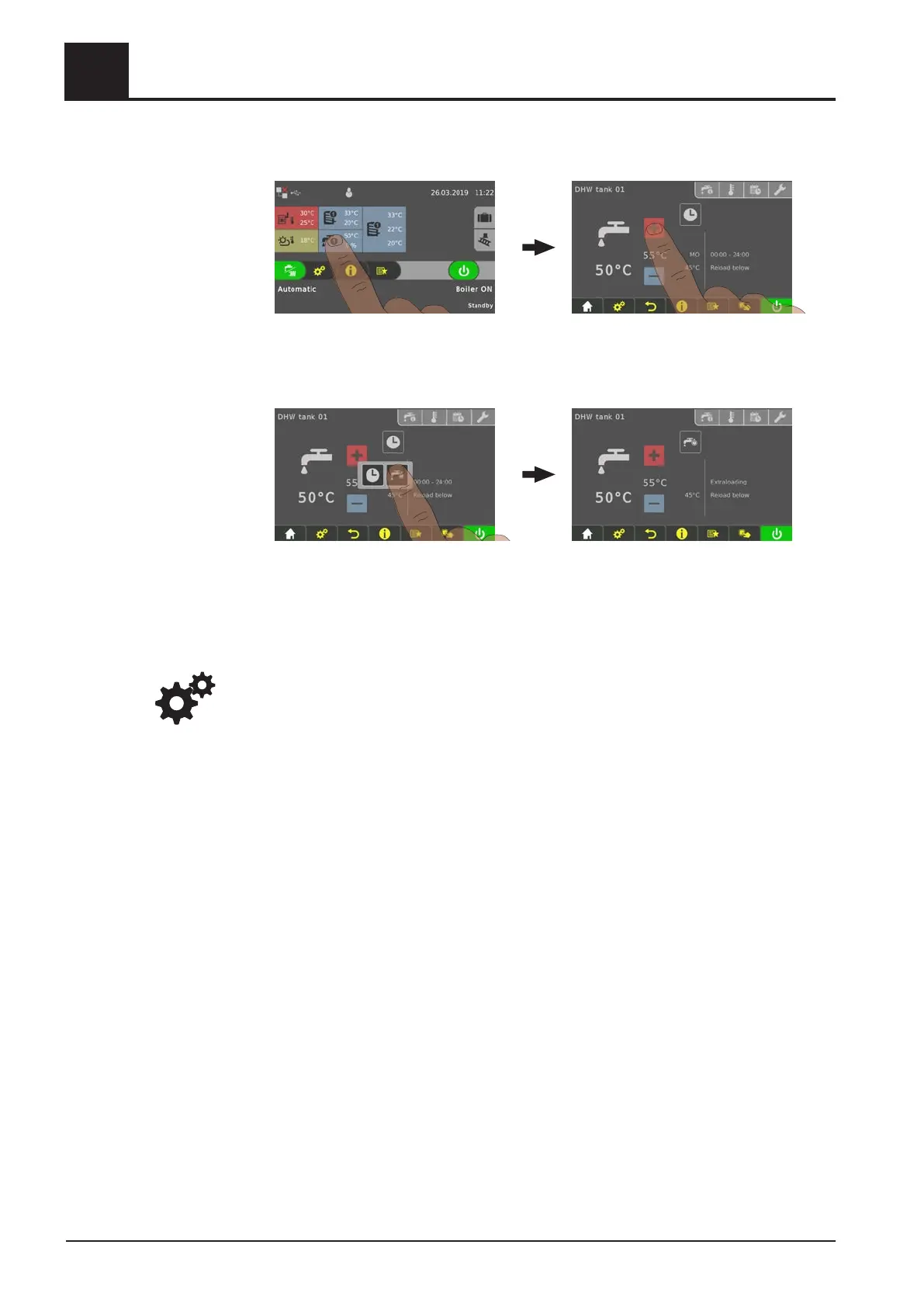
4.4.7 One-time extra loading of an individual DHW tank
❒ Tap the information display for the desired DHW tank
❒
Tap the mode icon for the DHW tank
❒ Tap the “extra loading” icon
➥ One-time loading of DHW tank starts. Once the selected DHW tank
temperature setpoint has been reached, loading stops and the icon switches to
“automatic”.
NOTICE! If this selection is not configured in the information display in the basic
display, open the components in the system menu.
4.4.8 One-time extra loading of all existing DHW tanks.
In the case of several DHW tanks, the “extra loading” function in the quick menu is
used to start a one-time extra loading of all existing DHW tanks.
⇨ See "Quick menu" [page 34]
4
Operating the System
Operate the boiler using the touch display
40 Froling GesmbH | A-4710 Grieskirchen, Industriestraße 12 | www.froeling.com




 To Next Page