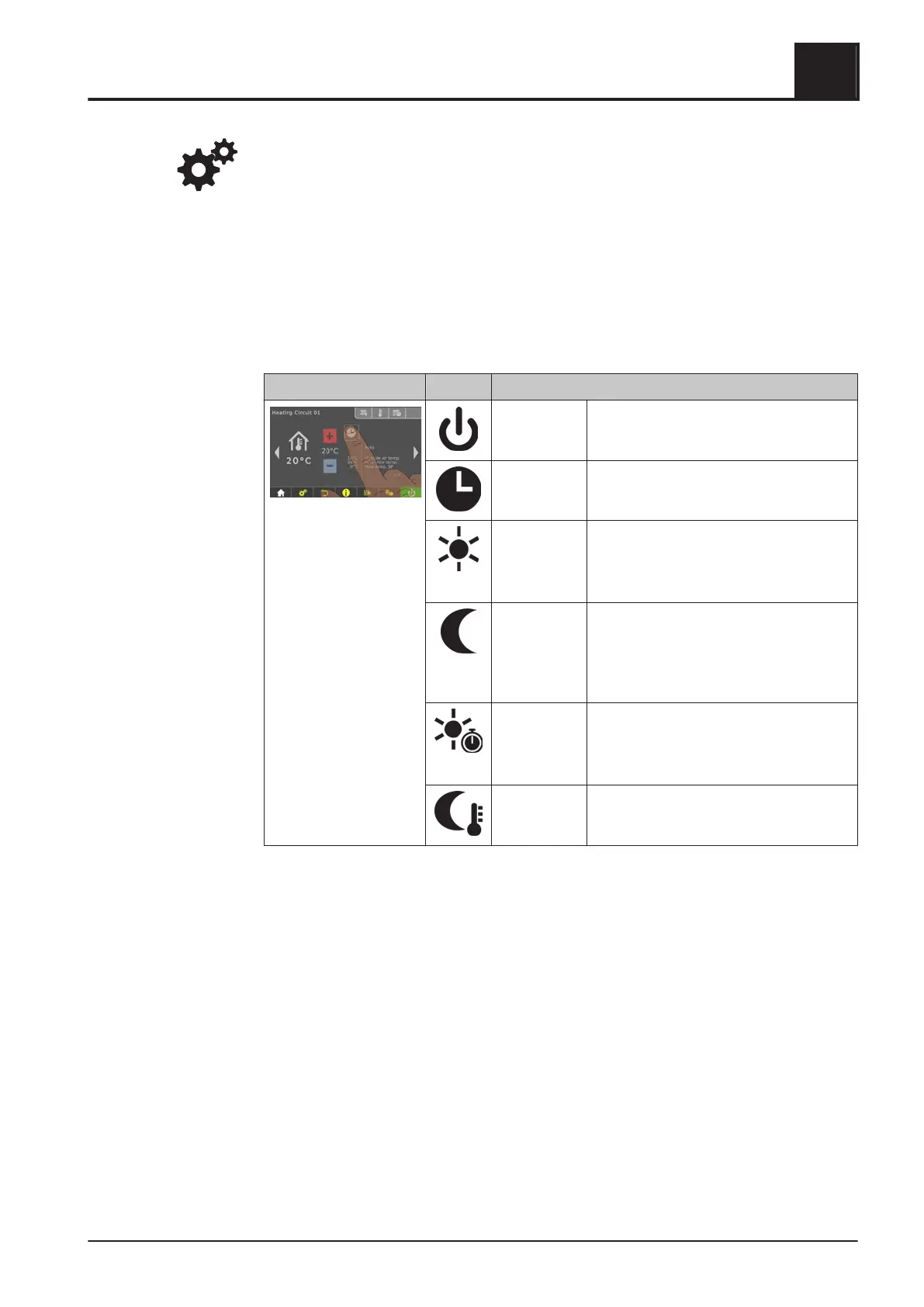
NOTICE! If this selection is not configured in the information display in the basic
display, open the components in the system menu.
Otherwise, the room temperature can be adjusted directly on the remote control/room
console.
4.4.12 Switch heating circuit mode
Tap on the mode icon in the menu of the respective heating circuit to change the
mode.
Procedure Icon Description
OFF The heating circuit is switched off. Frost
protection remains active!
Auto The heating circuit is controlled according
to the set time program.
Party The heating circuit is regulated before the
start of the next heating time.
To cancel this function prematurely,
activate another mode/function.
Setback
mode
The heating circuit is regulated to the set
setback temperature until the start of the
next heating time.
To cancel this function prematurely,
activate another mode/function.
Extra heating The heating circuit is regulated to the set
room temperature with no time limitation.
To cancel this function prematurely,
activate another mode/function.
Continuous
setback
mode
The heating circuit is regulated to the set
setback temperature until activation of
another mode/function.
Operating the System
4
Operate the boiler using the touch display
Operating Instructions T4e | B1560520_en 43





 To Next Page