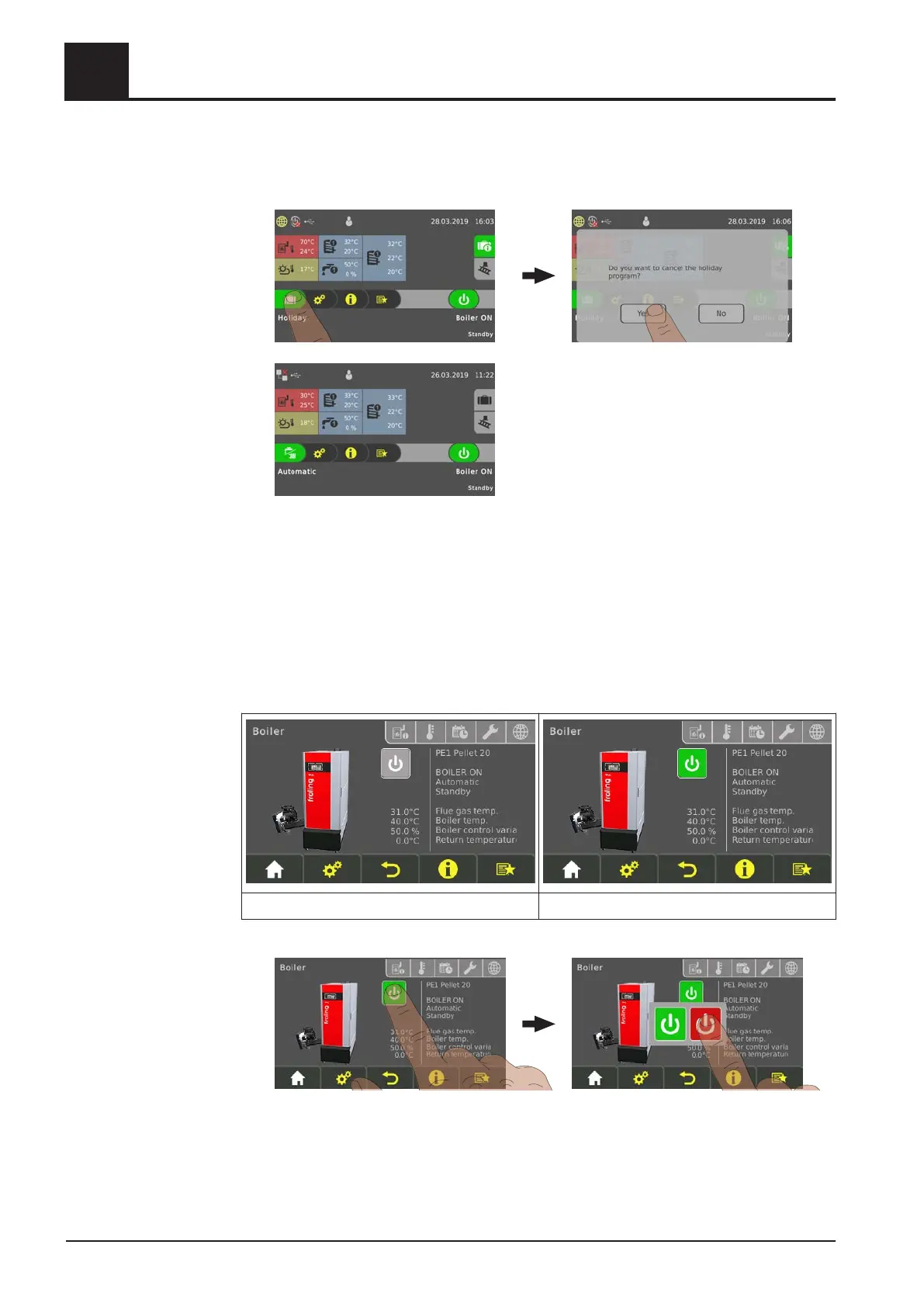
Tap the “suitcase” icon to prematurely end the holiday program. The boiler then
switches to the previously activated mode (“water tap” symbol = domestic hot water,
“water tap/radiator” symbol = automatic).
4.5 Switch the boiler ON/OFF on the room console
Prerequisite:
▪
Boiler access rights configured for the room console
If the boiler remote control is also activated (⇨ See "Display icons for froeling-connect/
remote control" [page 31]), the boiler can be switched on and off on the room console.
Boiler remote control deactivated Boiler remote control activated
❒ Switch the boiler ON/OFF by tapping on the current operating status
4
Operating the System
Switch the boiler ON/OFF on the room console
46 Froling GesmbH | A-4710 Grieskirchen, Industriestraße 12 | www.froeling.com




 To Next Page