1-11
Left Display Right Display Action
Select
Product
For additional programming refer back to Product Setup above. To exit
press the EXIT SCAN button twice to OFF.
To access menu strip, remove screws attaching bezel. Lower bezel and remove strip from back of controller. Once the
menu strip is updated, reverse the steps to reassemble. To unassign a product from a button set the cook time to 0:00 and
press EXIT/SCAN.
1.7 Multiple Setpoint (Segmented) Cooking Overview
When segmented cooking is selected, the product can cook at a variety of cooking temperatures with the temperature
changes occurring at user programmable points in the cook cycle.
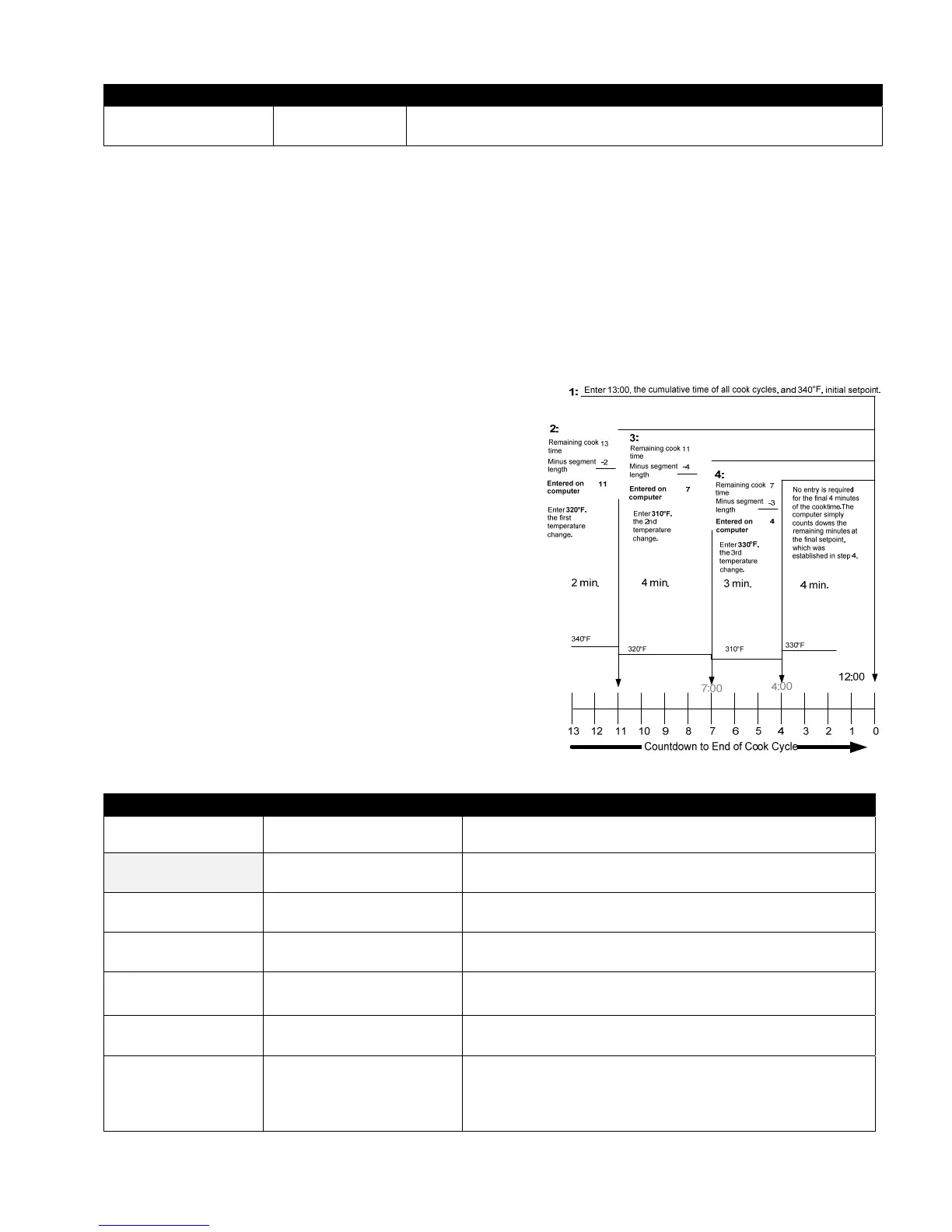
When programming for segmented cooking, it is easiest to think of the entire cook cycle occurring on a countdown timer.
The cook cycle begins with its full time allotment, say, 13 minutes and it is completed when the countdown timer reaches
zero. The desired temperature changes are entered based on when they are to occur relative to the remaining cooking time.
The time entries for temperature changes are for the time
remaining in the cook cycle, not the time elapsed. The graphic
below breaks down a 13-minute cook cycle. It’s best to create a
similar table of time/temperature changes before beginning the
programming process.
Step 1 sets total cook time and initial setpoint.
Step 2 sets the duration of the first cooking
segment, 2 minutes, and the setpoint of the
first temperature change.
Step 3 sets the duration of the second cooking
segment, 4 minutes, and the setpoint of the
second temperature change.
Step 4 sets the duration of the third cooking
segment, 3 minutes, and the setpoint of the
third temperature change.
The four remaining minutes in the cook time elapse
at the final temperature. No entry is required to use
the final minutes
1.8 Main Menu: Product Setup (Multiple Setpoint (Segmented) Cooking)
Left Display Right Display Action
OFF OFF
Press until the controller scrolls INFO MODE, changing to
MAIN and then PRODUCT SETUP.
PRODUCT
SETUP
Press .
Product
Setup
Enter Code
Enter 1650.
Select
Product
Press desired product button.
Long Name
Product name or button
number
Enter product name with letter keys. Advance cursor with
. Press to advance to next product set up feature.
Short Name
Abbreviated product name
or button number
Enter with letter keys abbreviated 4-character product name,
which alternates with cook time. Press .
COOKING MODE SINGLE SETPOINT
Press . If multiple setpoint or segmented cooking is desired
press Multiple Setpoint (Segmented) and follow the
instructions in the next section. (Default is SINGLE
SETPOINT)



 To Next Page