Flluid 1
11
USING YOUR FLLUID
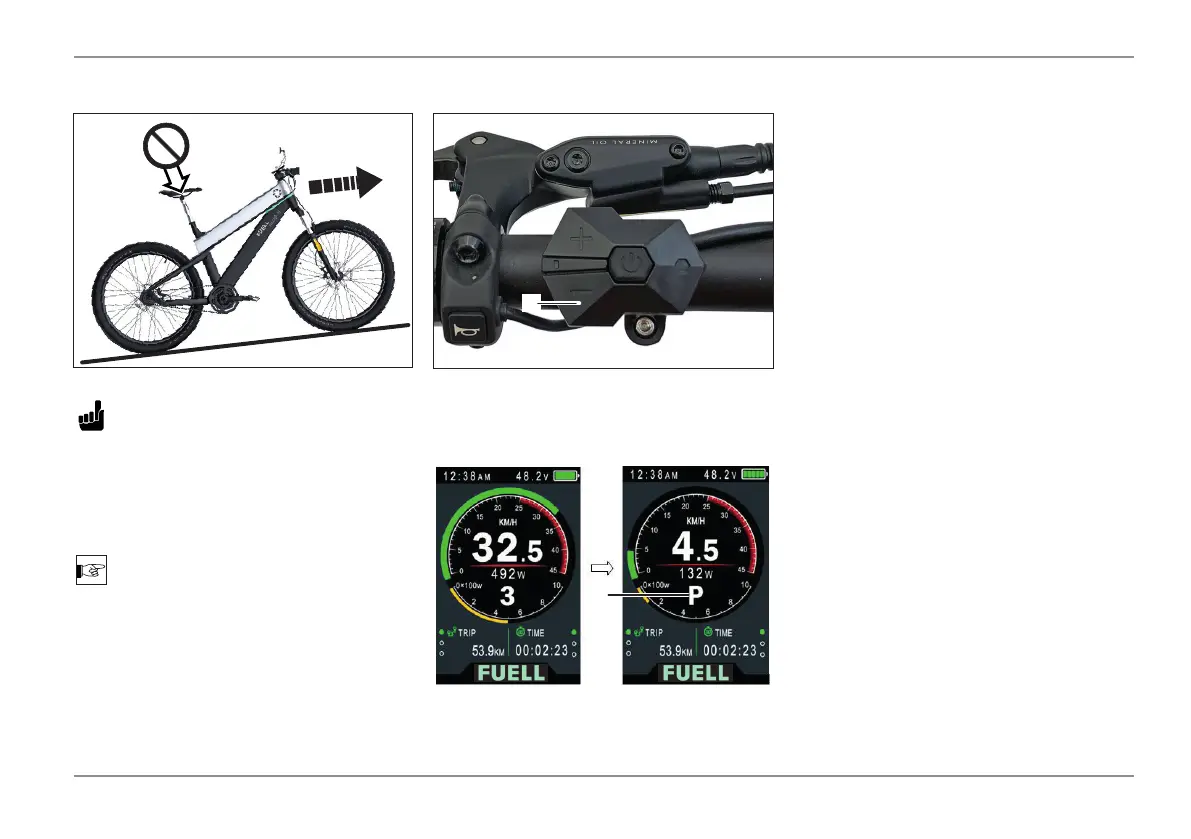
Push Assist 3.5 mph (6 kmh)
Press and hold the UP and DOWN but-
tons for one second to clear various tem-
porarily stored data:
AVERAGE SPEED/ MAX SPEED/ TRIP/
TIME.
Temporary data is stored in memory and
will not be lost when the display is pow-
ered off.
Data Reset
CAUTION
If riding conditions exceed the rider’s
ability, eg. For example, on steep slopes
ordifcultterrain,thepushassistcan
be used if the rider is not seated on the
e-bike.
NOTE
The push assist switches off if the speed
exceeds 3.5mph.
To engage the push assist press and hold
the DOWN / - button (1).
- Press DOWN / - (1) until the push as-
sist symbol P (2) appears on the dis-
play.
- To disengage the push assist release the
DOWN / - button (1).
1
2


 To Next Page