46
5 Printing
IMPORTANT
When performing the film printing from the scanner(SP), make sure that the Printing Status screen is opened after
the pre-operational check is completed. If the printing is started before the Printing Status screen does not appear,
the operation may be stopped. If this occurs, open the Printing Status screen, and then resume printing.
IMPORTANT
If a jamming occurs in the printer(LP) during the printing process, the any of the orders that are not printed yet in the
“Done” list may not be printed. Please perform printing process for these orders again.
5.1.1 DSC Printing from Imaging
Controller (Example)
[Imaging Controller Operation]
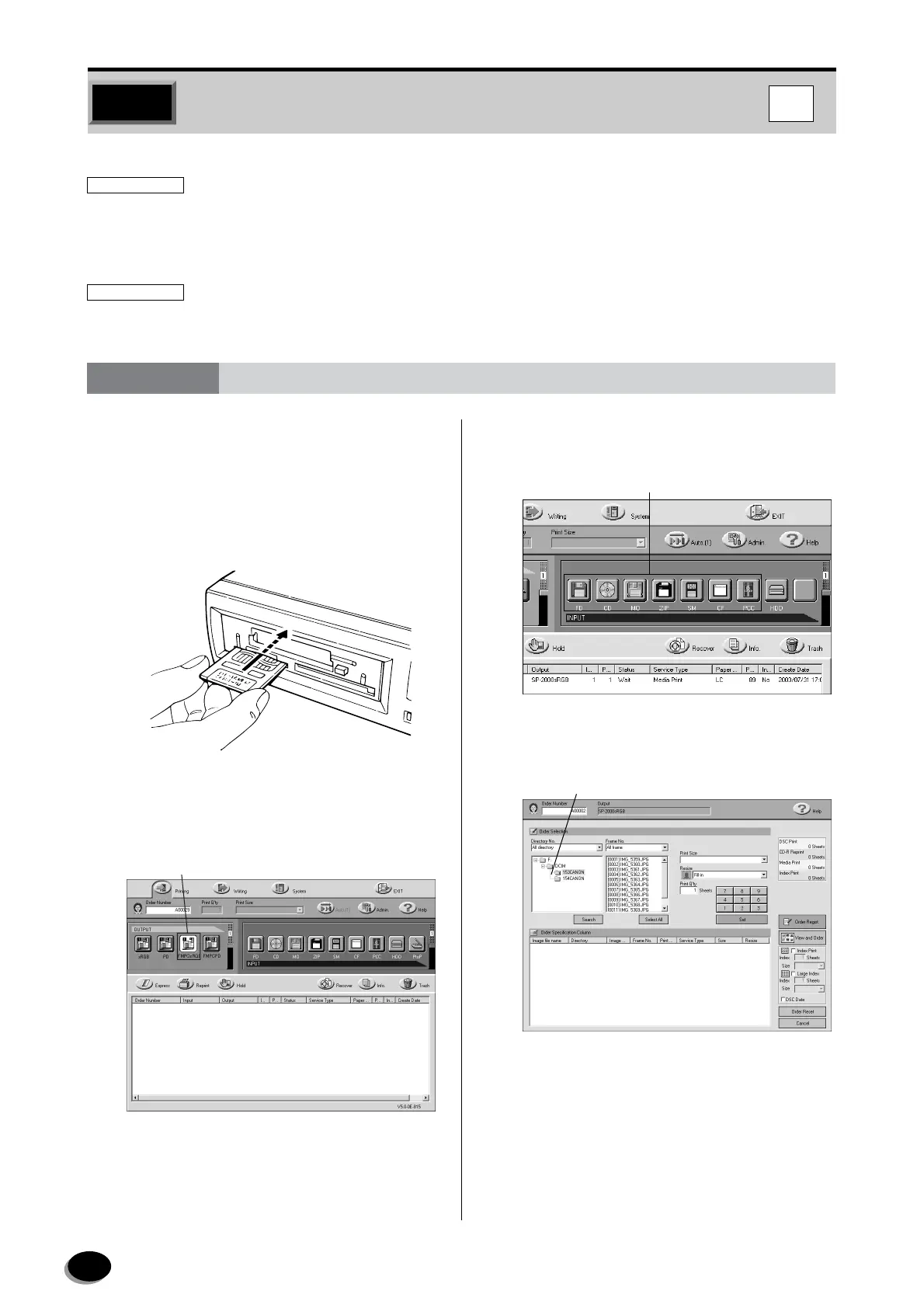
1
Set the media in the drive.
2
In the [OUTPUT] field, select the FMPC device
(ex : FMPCsRGB, FMPC).
3
In the [INPUT] field, click the icon of the media
you inserted.
4
On the DSC Print Service screen, select the
folder in which the images are stored.
5.1 Printing Flow
FD121
Select the FMPC device
(ex: FMPCsRGB, FMPC).
Click the icon of the media you inserted.
Select the folder.
IC
distributed by www.minilablaser.com



 To Next Page