72
7.4.1 To Return to Direct-connecting
Type (in FRONTIER 350/370)
To return to the direct-connecting type in
FRONTIER 350/370, use the following procedures.
Make sure that the FMPC is turned ON, and that at
least one IEEE1394 board operates normally.
(IEEE1394 board also functions as repeater.)
1
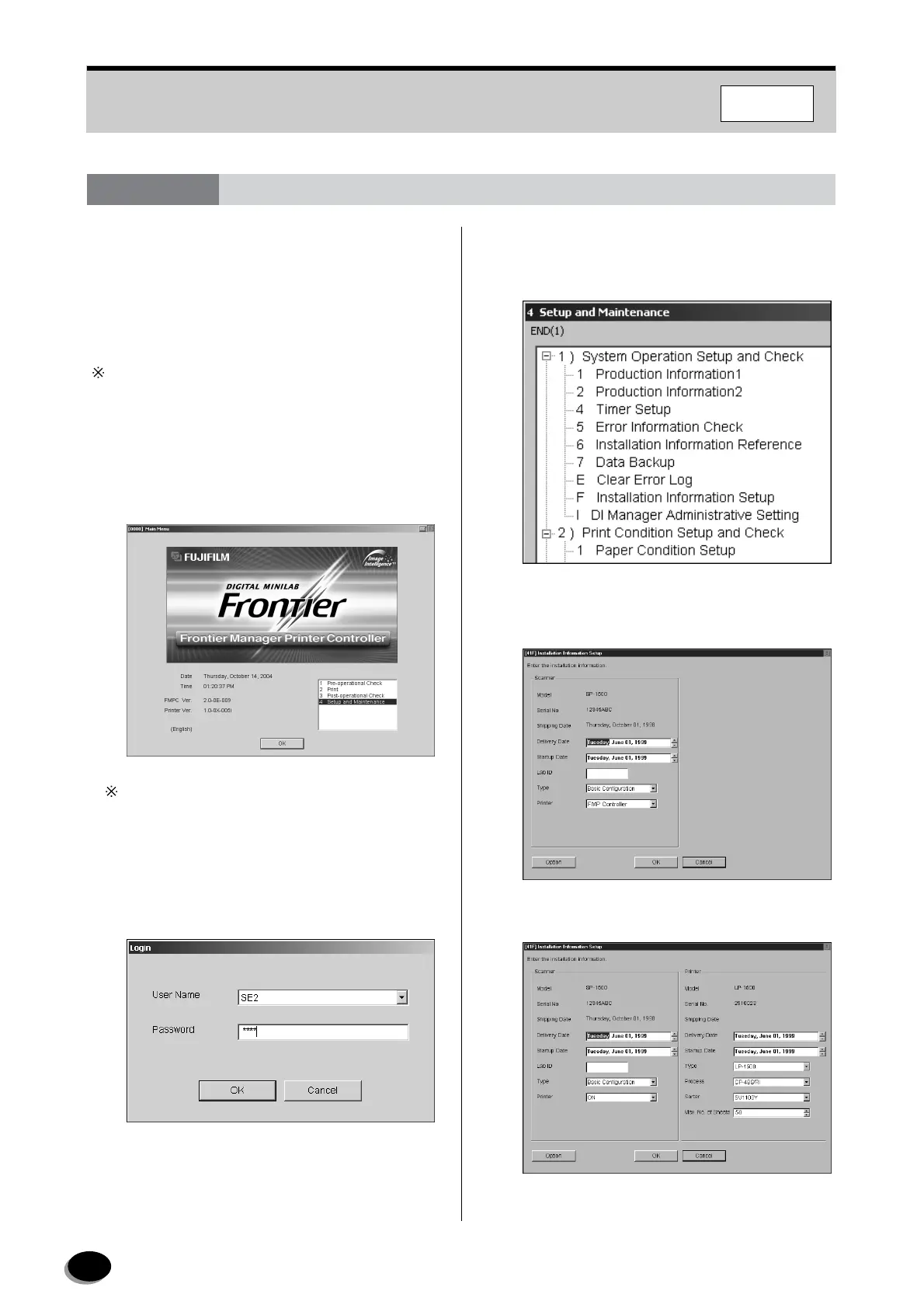
On the “Main Menu” screen in the scanner (SP),
select [4 Setup and Maintenance], then click the
[OK] button.
If the “initializing of printer failed” message appears,
click the [Retry] button to clear it, and then perform
the procedures.
2
In the “Login” dialog, select [SE2] as user name
and enter the password “7777”, and then click
the [OK] button.
3
Select [41 System Operation Setup and Check] -
[41F Installation Information Setup], then click
the [Start] button.
4
The “[41F] Installation Information Setup” screen
appears.
5
Set to [ON] for [Printer].
7.4 Measures against FMPC Failures
F350/370
distributed by www.minilablaser.com



 To Next Page