45
4 Paper Preparations
1
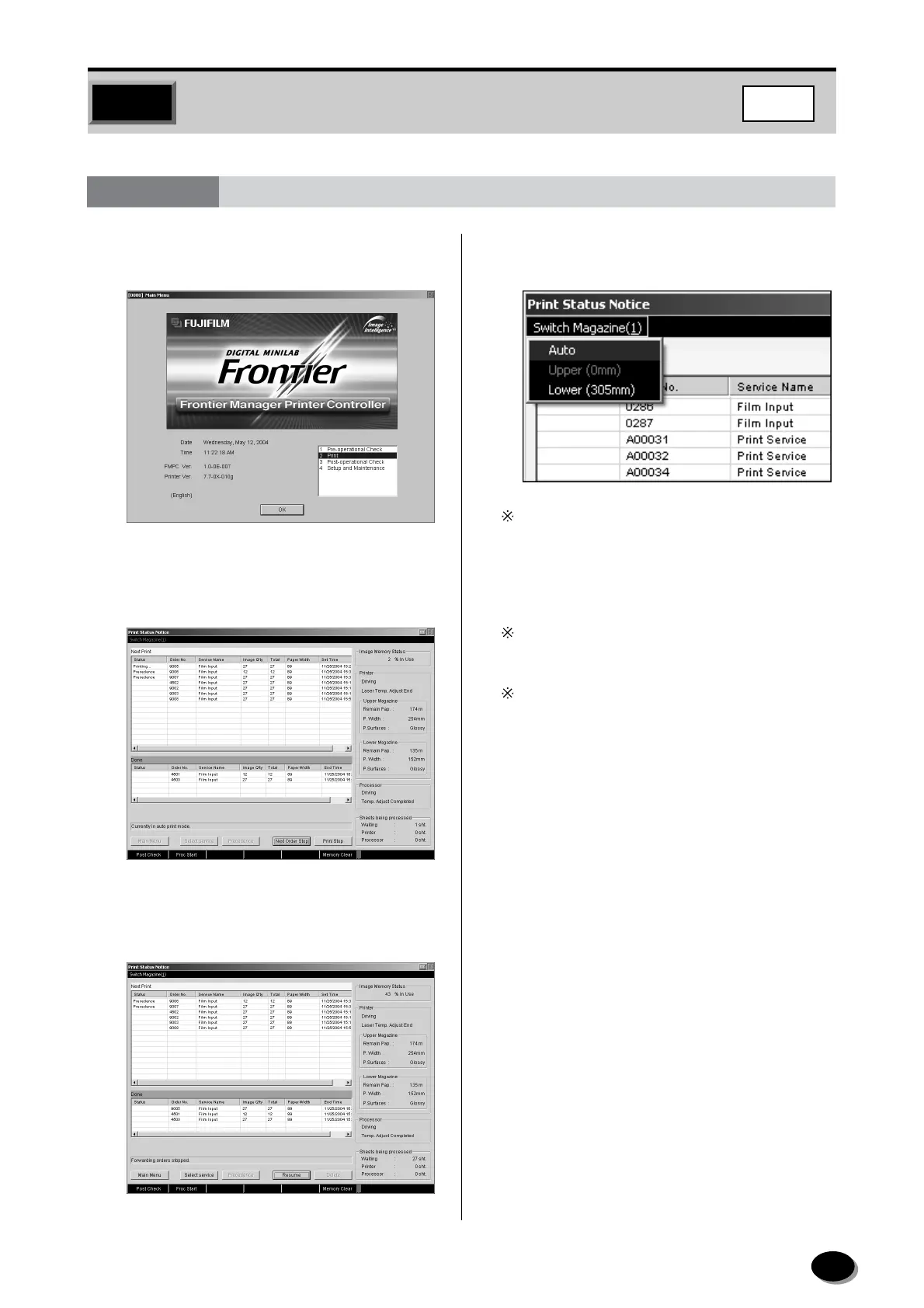
On the Main Menu screen, select “2 Print” and
click the [OK] button.
• The printing status screen appears.
2
Click the [Next Order Stop] button.
• The [Next Order Stop] is switched to the
[Resume] button, also “Seitch Magazine (1)” is
activated.
3
Click the “Switch Magazine (1)” and select
“Auto”, “Upper” or “Lower”.
Auto: The upper or lower paper magazine is
selected automatically in accordance with
the print size selected.
Upper: The upper paper magazine is selected.
Lower: The lower paper magazine is selected.
When the paper types of two magazines are
differrent, make sure to select “Upper” or “Lower”.
If paper has come to an end in the paper magazine
selected when the upper and lower magazines are
the same paper size in the “Auto” mode, the
message “Paper end process completed in upper
(lower) magazine. Paper is to be fed from lower
(upper) magazine.” appears. The magazine is
changed automatically when [OK] is clicked.
4.1
Switching the “Auto”, “Upper” or “Lower” Paper Magazines
FMPC
distributed by www.minilablaser.com



 To Next Page