PARAMETERS
5
5-3
n Parameter editing method
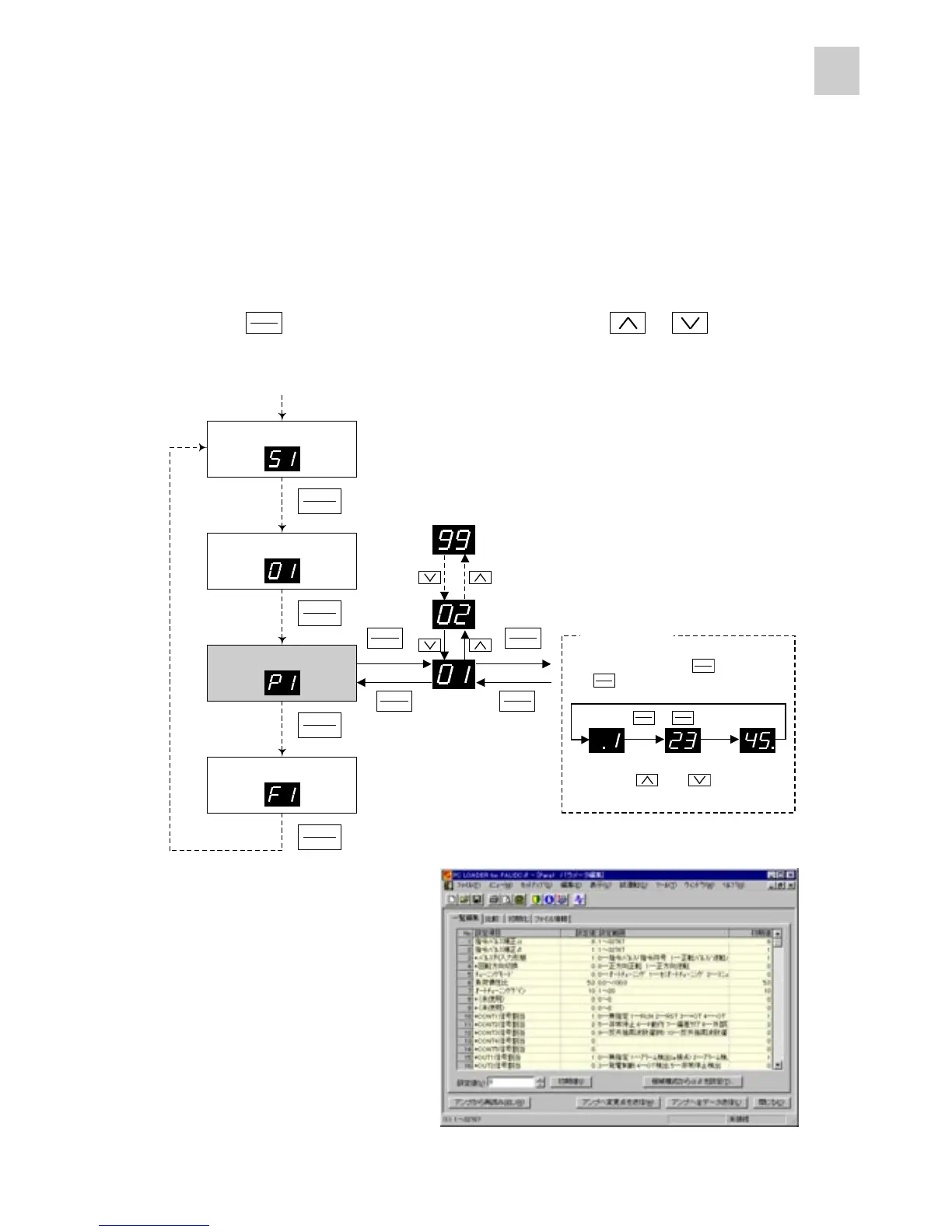
There are two parameter editing methods: through keypad panel operation and through PC loader
operation.
(1) Parameter editing through keypad panel operation
Press the key to select the parameter editing mode and press the or key to
select the desired parameter number.
(2) Parameter editing through PC loader
Use the optional PC loader to edit
parameters.
MODE
MODEMODE
MODE
ESC
ESCESC
ESC
Status display mode
Monitor mode
Parameter setting mode
Test operation mode
Power-on
(More than 1 sec.) (More than 1 sec.)
MODE
MODEMODE
MODE
ESC
ESCESC
ESC
MODE
MODEMODE
MODE
ESC
ESCESC
ESC
MODE
MODEMODE
MODE
ESC
ESCESC
ESC
MODE
MODEMODE
MODE
ESC
ESCESC
ESC
MODE
MODEMODE
MODE
ESC
ESCESC
ESC
MODE
MODEMODE
MODE
ESC
ESCESC
ESC
SHIFT
SHIFTSHIFT
SHIFT
ENT
ENTENT
ENT
SHIFT
SHIFTSHIFT
SHIFT
ENT
ENTENT
ENT
Data editing
SHIFT
SHIFTSHIFT
SHIFT
ENT
ENTENT
ENT
MODE
MODEMODE
MODE
ESC
ESCESC
ESC
+
SHIFT
SHIFTSHIFT
SHIFT
ENT
ENTENT
ENT
MODE
MODEMODE
MODE
ESC
ESCESC
ESC
While holding down the key, press
the key to shift the digit to the right.
Using the and keys, edit
data.



 To Next Page