Operation
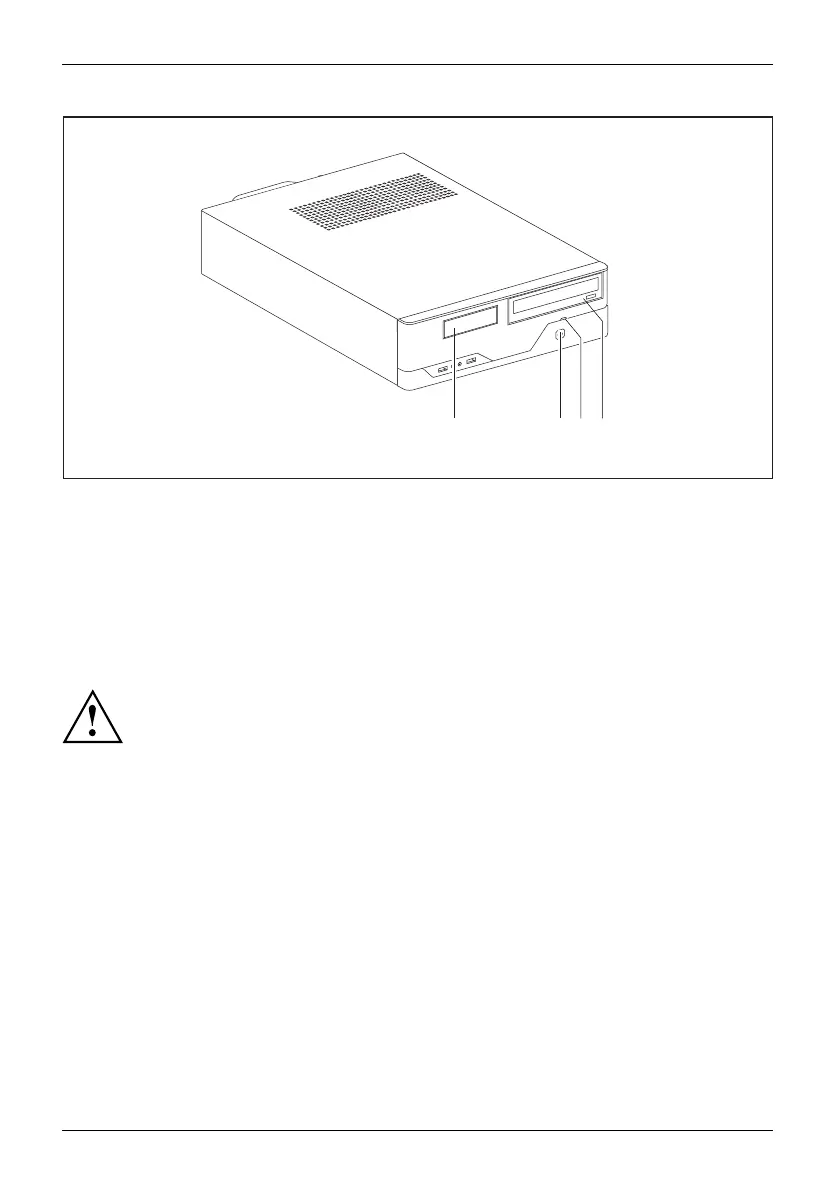
123
4
1 = Indicator for diskette drive or multi-card
reader (de pending on the configuration
level of the device)
2 = Power-on indicator
3 = Hard disk indicator
4 = Drive indicator, e.g. DVD
Hard disk indicator
The indicator lights up when the hard disk drive of the device is accessed.
Power-on indicator
Power-onindicatorPower-onindicatorPower-onindicatorPower-onindicatorPower-onindicator
In energy-saving mode the device must not b e switched off with the main power switch
(if present) or disconnected from the mains, as this may result in data loss.
• The indica
tor is lit green: The device is on.
• The indicator flash es g reen: The device is in power-saving mode. After being
switched on with the ON/OFF sw itch, the device powers up or returns to the
state it was in before it entered power-saving mode.
• The indic
ator is not lit: The device is switched off.
Diskett
e drive ind icator or multi-card reader indicator (dep e nd ing on the
configu
ration level of the device)
DiskettedriveMulti- cardreaderind icator
The ind
icator lights up when the diskette drive or the multi-card reader of the device is
access
ed. Never remove a diskette or a multi-card while the indicator is lit.
Drive
indicator, e.g. DVD
DVDindicatorDVDindicatorCD-ROMindicatorCD-ROMdrive
The in
dicator lights up when the CD-ROM or DVD drive of the device is accessed.
Neve
r remove a DVD while the indicator is lit.
22 Fujitsu Technology Solutions








 To Next Page