System expansio ns
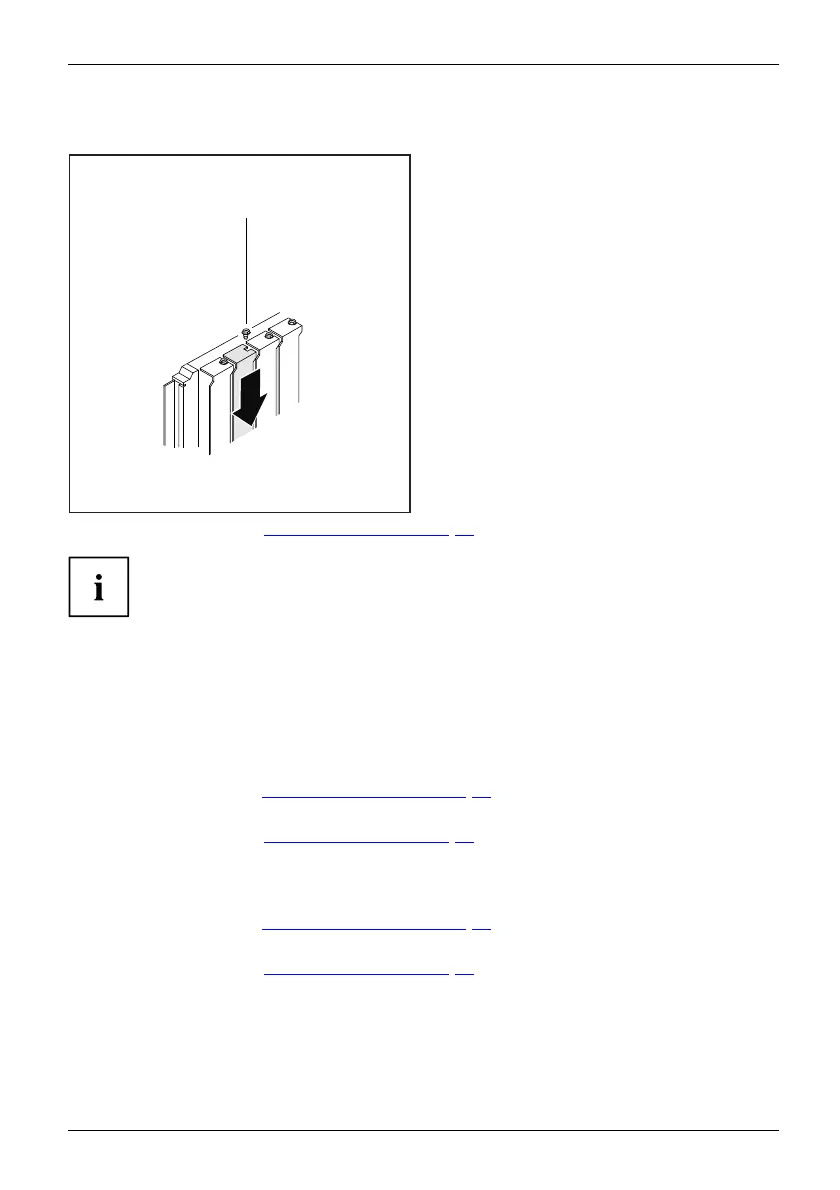
Reinstalling a slot cover
2
1
► Push the slot cover into the slot (1).
► Tighten the screw (2).
► Close the casing (see "
Close the casing", Page 35).
If you have installed or remo ved a board, please check the relevant PCI
slot settings in the BIOS Setup. If necessary, change th e settings. Further
information is provided in the PCI board documentation.
Mainboard expansions
Details o n how to upgrade the m ain memory or the pro cessor of your device
can be found in the manual for the mainboard.
UpgradesLithiu mba tteryProcessorMainmemoryMainboa rd
Upgrading main memory
► Open the casing (see "Opening the casing", Page 33).
Mainmemory,
► Upgrade th e memory according to the description in the manual for the mainboard.
► Close the casing (see "
Close the casing", Page 35).
Processor, replacing
► Open the casing (see "Opening the casing", Page 33).
Proces sor,rep lacing
► Upgrade the processor according to the description in the m anual for the mainboard.
► Close the casing (see "
Close the casing", Page 35).
Fujitsu Technology Solutions 51








 To Next Page