System expansions
Installing and removing heat si
nks
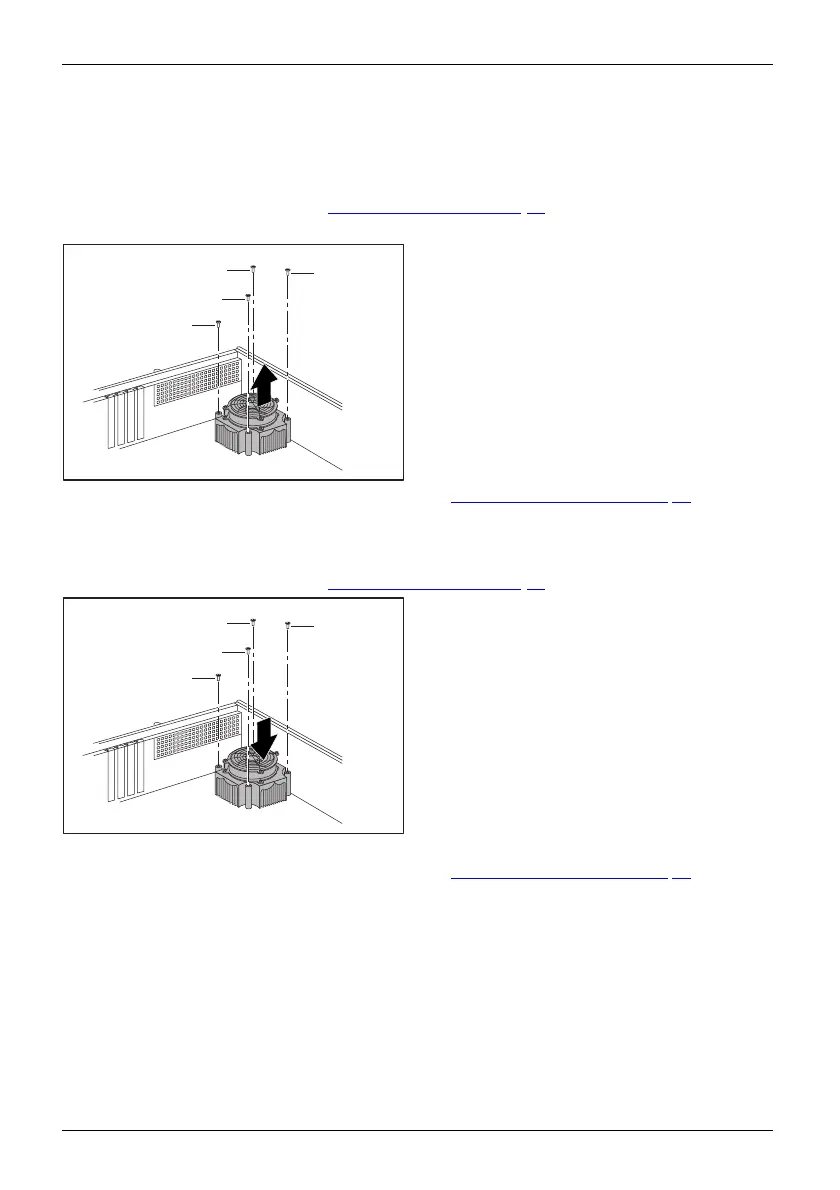
Removing the heat sink
► Remove th e cover (see chapter "Removing a cover", Page 33).
► Disconnect the fan c ables from the mainboard.
1
1
1
1
2
► Undo the screws (1).
► Remove the heat sink from the casing (2).
► Install the cover on th e casing aga in (see chapter "
Reattaching the cover", Page 36).
Installing the heat sink
► Remove the cover
(see chapter "
Removing a cover", Page 33).
2
2
2
2
1
► Insert the hea t sink into the casing (1).
To d o this, correctly align the screw
holes on the heat sink with the screw
holes on the mainboard.
► Fasten the scr
ews ( 2).
► Connect the fan cables to the mainboard.
► Install t
he cover on the casing again (see chapter "
Reattaching the cover", Page 36).
48 Fujitsu Technology Solutions








 To Next Page