System expansions
Removing an accessible 3
1
/
2
inch drive (floppy disk drive or multicard
reader) or a non-accessible 3
1
/
2
inch drive (hard d isk)
► Remove th e cover (see chapter "Removing a cover", Page 33).
► Remove the fro nt panel (see chapter "
Removing the front pan el", Page 34).
► Remove the drive cage (see chapter "
Removing the drive carrier", Page 37).
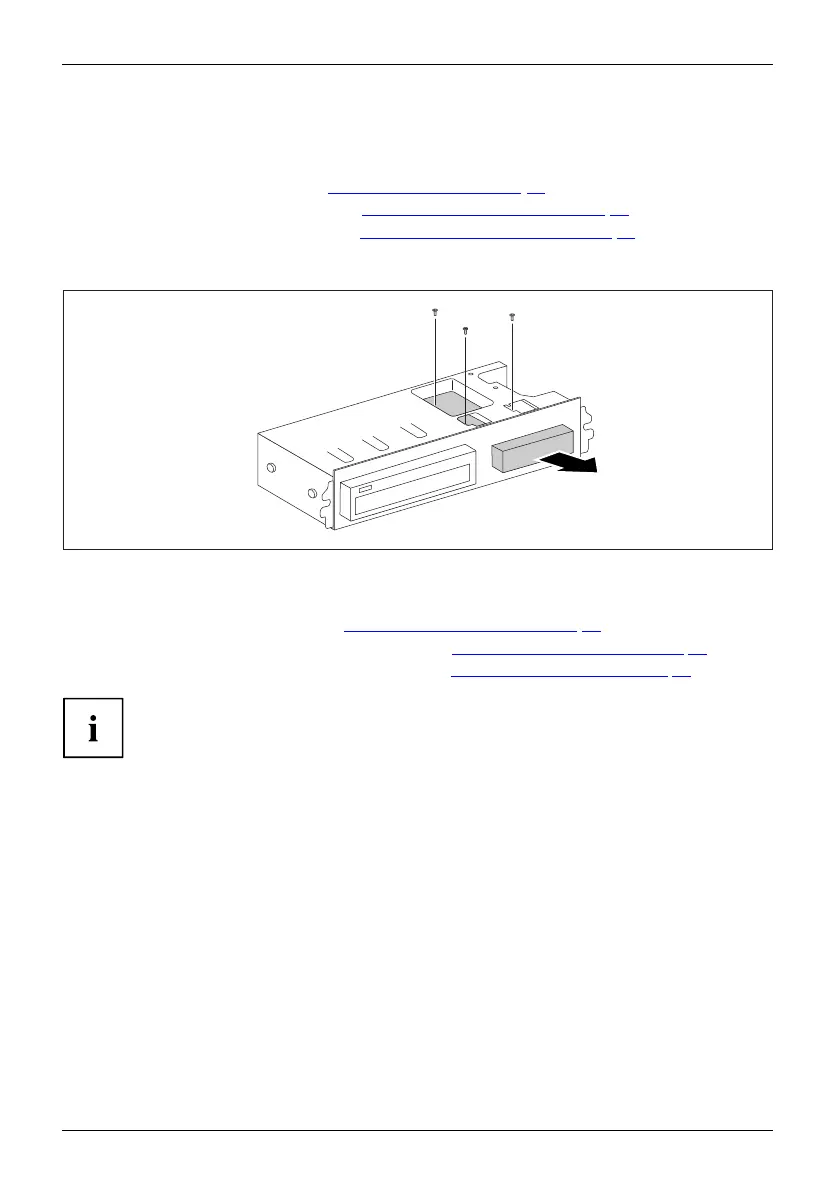
► Disconnect all cables connecte d to the drive (data cable, power supply cable).
► Turn the drive cage over.
2
1
1
1
► Remove the screws (1).
► Pull the drive out of the drive cage in the direction of the arrow (2).
► Install the drive cage (see chapte r "
Install ing th e drive cage", Page 38).
► Secure the front panel on the casing (see c hapter "
Securing the front p anel", Page 35).
► Install the cover on th e casing aga in (see chapter "
Reattaching the cover", Page 36).
It may be necessary to modify the entry for the drive in the BIOS Setup.
42 Fujitsu Technology Solutions








 To Next Page