System expansio ns
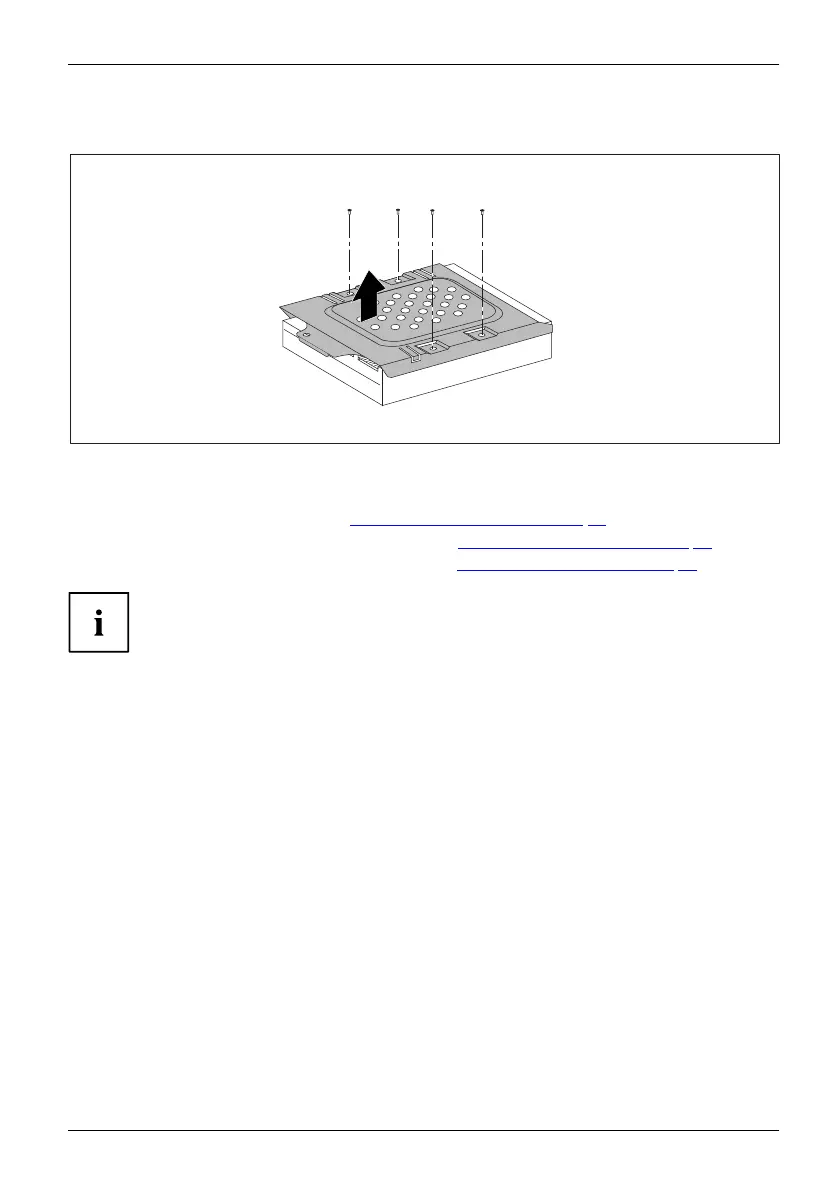
Releasing the hard disk drive cage from the hard disk drive
1
1
1 1
2
► Undo the s crews (1).
► Remove the hard disk drive cage from the h ard disk drive (2).
► Install the drive cage (see chapter "
Installing the drive ca ge", Page 38).
► Secure the front pane l on the casing (see chapter "
Securing the front p anel", Page 35).
► Install the cover on the casing again (see chapter "
Reattaching the cover", Page 36).
It may be necessary to modify the entry for the drive in the BIOS Setup.
If you are not planning to install a new hard disk drive, secure the screws in the threaded
bores on the underside of the hard disk drive cage so that they are not lost.
Fujitsu Technology Solutions 45








 To Next Page