Working with the notebook
Using fingers
You can execute commands and start applications by using finger tip on
the touchscreen of your device.
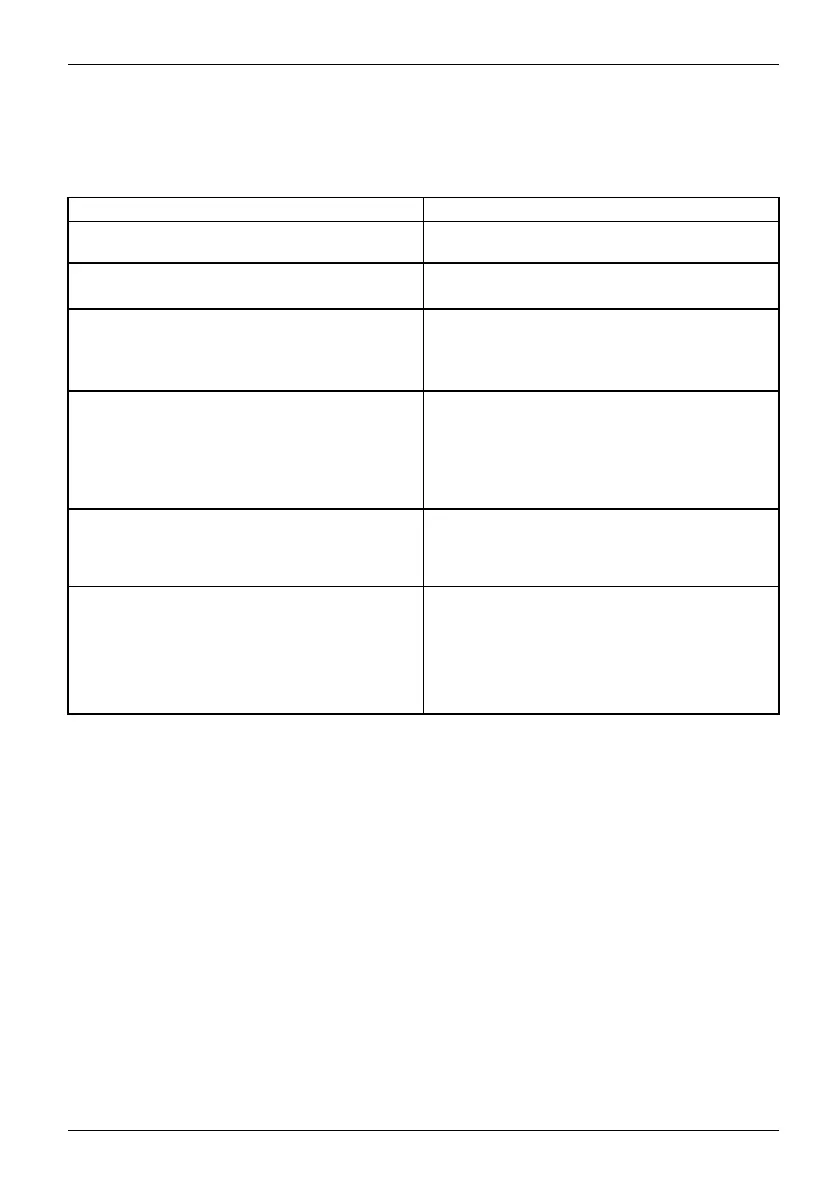
Action Description
Tap
► Tap on a s ymbol, menu, a button or folder to
select this option or to activate it.
Tap , hold, release ► Tap and hold an icon and release it again.
Theselectedactionispe
rformed.
Dragging ► Touch and hold a symbol a
nd drag it to
another place.
For instance, you can drag apps or widgets onto
the start-up screen in this way.
Double tap
► To increase the size of a view, quickly
tap twice on a web page, map or another
screen.
Ifyoudouble-taponapictureinabrowser,it
will be enlarged, another double-tap m akes it
smaller again.
Zoom in/Zoom out
► With some apps, you can enlarge the
display size by moving two fing ers apart on
the to uchscreen , and reduce it by moving
your fingers together.
Input fields With some apps, data must be entered, for
instance an Internet a ddress or your name or
password.
► Taponaninputfield.
An on-screen keyboard opens, with which you
can enter your data.
Fujitsu 33






 To Next Page