RX2520 M5 Operating Manual 79
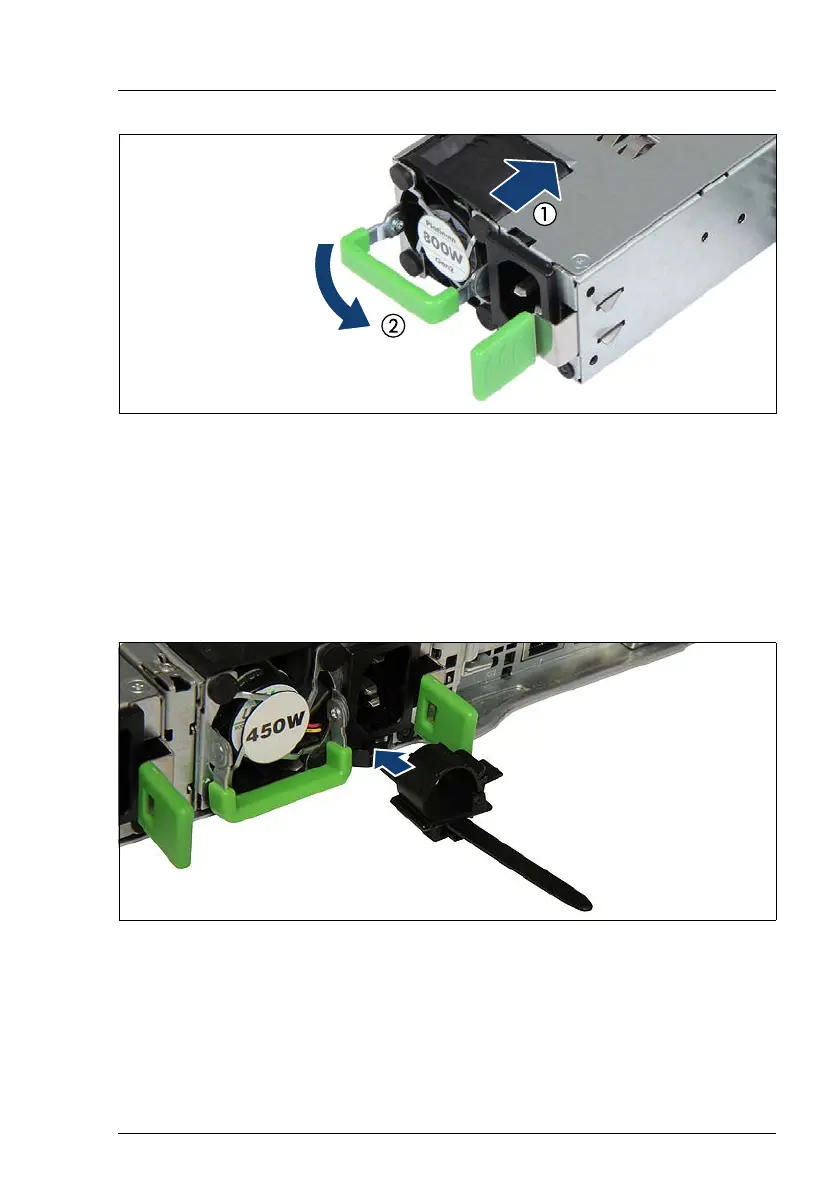
Figure 29: Installing a PSU
Ê Push the PSU into its bay (1) as far as it will go until the release latch snaps
in place.
Ê Fold down the handle on the PSU (2).
I Ensure that the PSU engages correctly in the bay and is locked in
position. This is the only way to prevent the PSU from sliding out of its
bay and being damaged during transportation.
Figure 30: Installing the cable clamp
Ê Only for AC-PSU: Push the cable clamp into the corresponding hole until it
clicks in.
Ê Connect the power cord to the PSU, see section "Connecting the power
cord" on page 62.
Ê If applicable, configure the redundant power supply.



 To Next Page
 Loading...