1.2 Names and Functions of Parts
ScanSnap fi-5110EOX Operator's Guide 3
Before You Start Using Your Scanner
1
1.2 Names and Functions of Parts
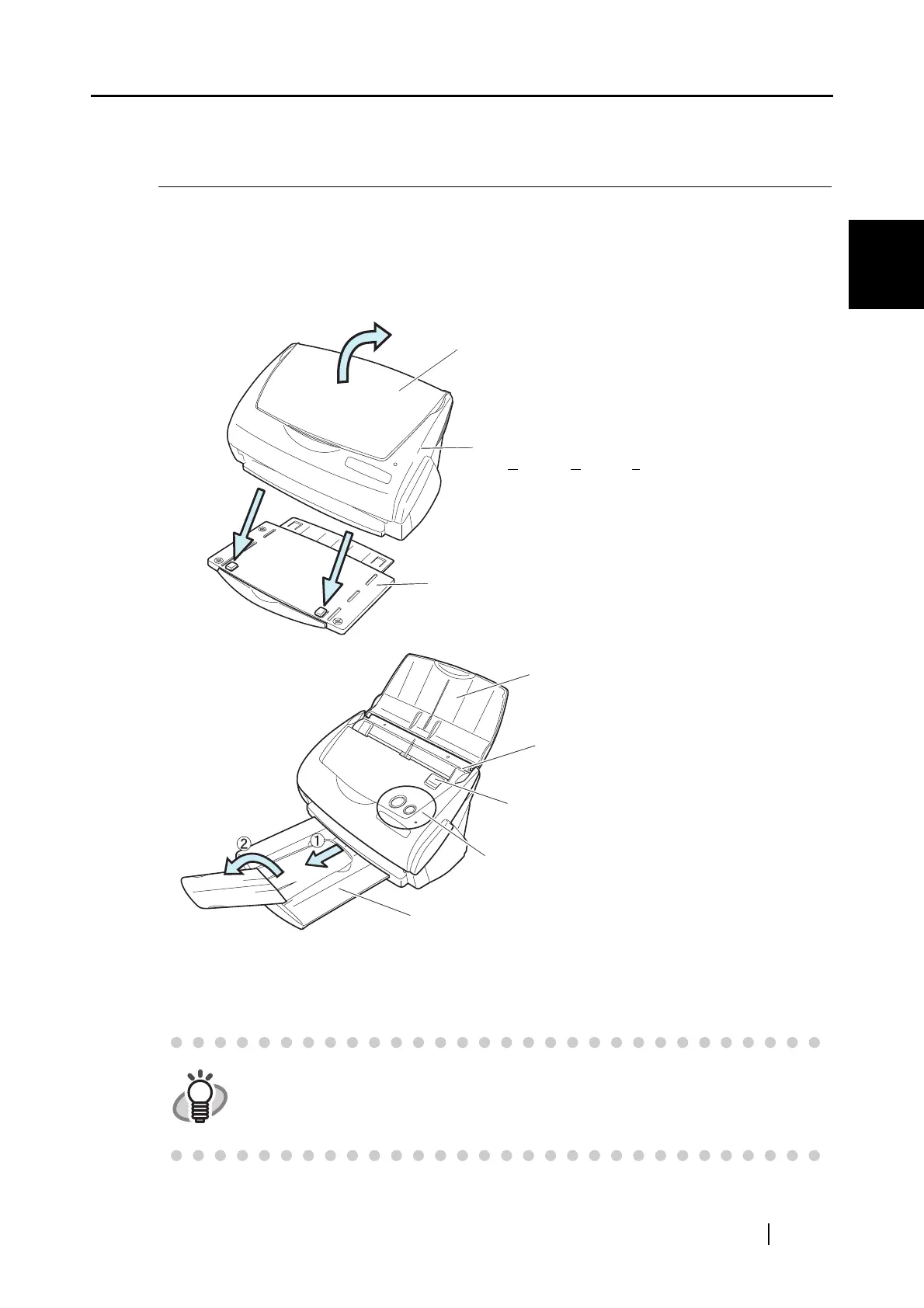
This section describes the names of parts and their functions.
■ Front Side
HINT
You can also use the scanner without the Stacker.
Paper chute cover
Open the cover to use the scanner.
⇒Opening the cover turns on the scanner.
ADF cover
(ADF:A
utomatic Document Feeder)
Stacker
Attach the scanner as shown. Adjust the two front pro-
jection portions to the hollows on the bottom of the
scanner.
Paper chute cover
After opening it, load the documents to be scanned
on this unit.
Side guide
Ajust the side guides to the width of documents so
that the scanned imageswill not get skewed.
Cover open lever
To open the ADF cover, pull this lever towards you.
Operation button
⇒Refer to the next page.
Stacker
Before using the stacker, pull it out as shown above.



 To Next Page
 Loading...











