3.5 Various settings according to your needs
ScanSnap fi-5110EOX Operator's Guide 53
Basic Scanner Operations
3
■ Scanning only one side of a document
As the default setting, pushing [SCAN] button on ScanSnap product starts scanning docu-
ments in "Duplex" mode. If you wish to start "Simplex" scanning by pressing the [SCAN] button,
please change the settings following the procedure below.
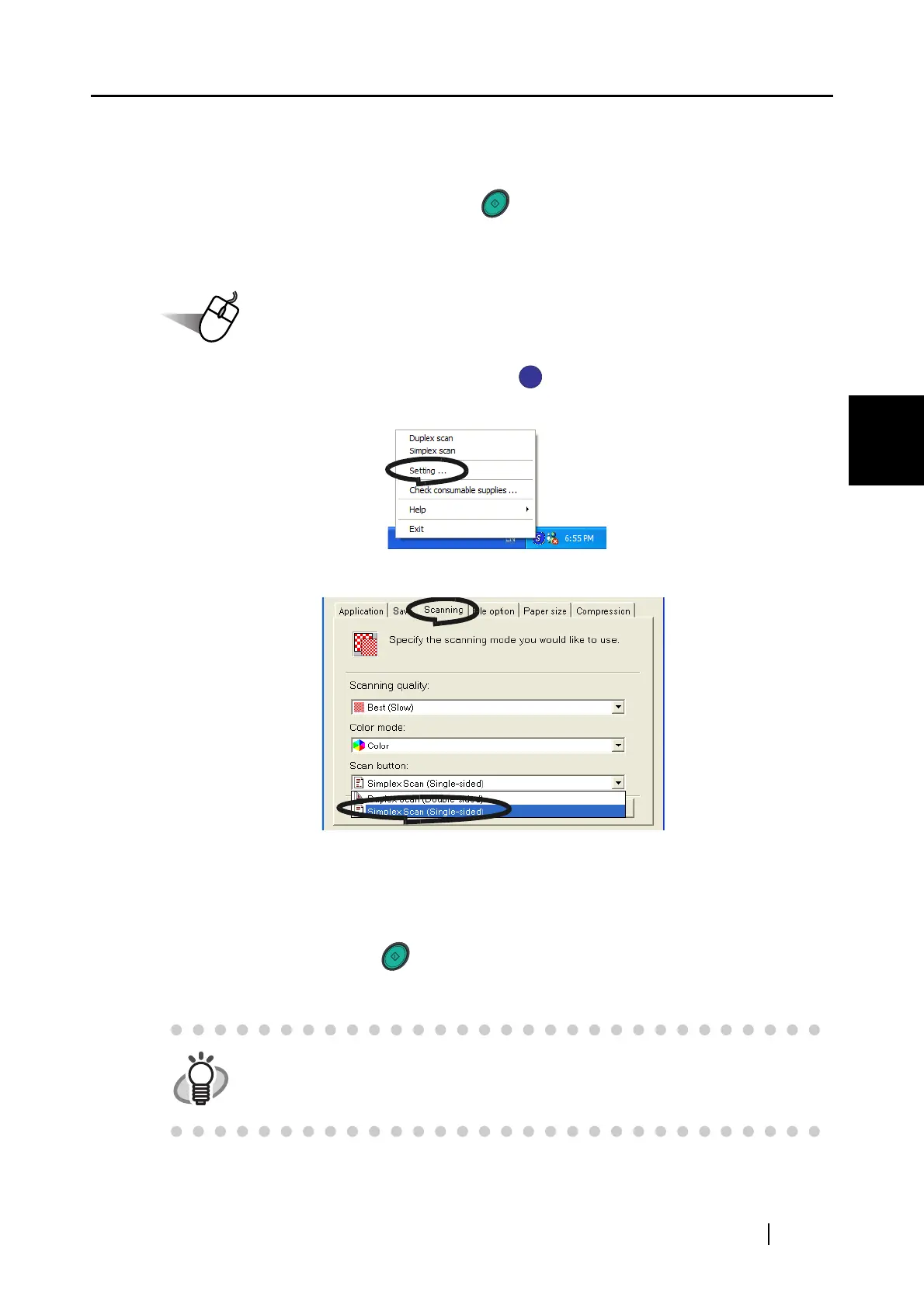
1. Right click the "ScanSnap Manager" icon on the task tray and select "Setting"
from the menu.
2. Click [Scanning] tab and select [Simplex scan] at [SCAN button:].
3. Click [OK] button to close the window.
4. Load the document onto the scanner.
5. Press the [SCAN] button .
⇒ The document is scanned in the "Simplex" mode.
To return the setting to the "Duplex" mode, select [Duplex scan] in step 2
above. The selected setting is applied to further scans unless it will be changed
again.
SCAN
SCAN


 To Next Page
 Loading...












