3.5 Various settings according to your needs
ScanSnap fi-5110EOX Operator's Guide 71
Basic Scanner Operations
3
■ Converting scanned images to an editable text with OCR
If you scan a text document, you will get an image of the document, containing also all the signs,
letters and numbers. The system cannnot recognize the image data as Text. This means, that you
you are not able to edit the content of your document without using OCR (Optical Character Rec-
ognition).
You can convert such image data into editable text data by using OCR processing ("Paper Capture"
function) of Adobe Acrobat 6.0.
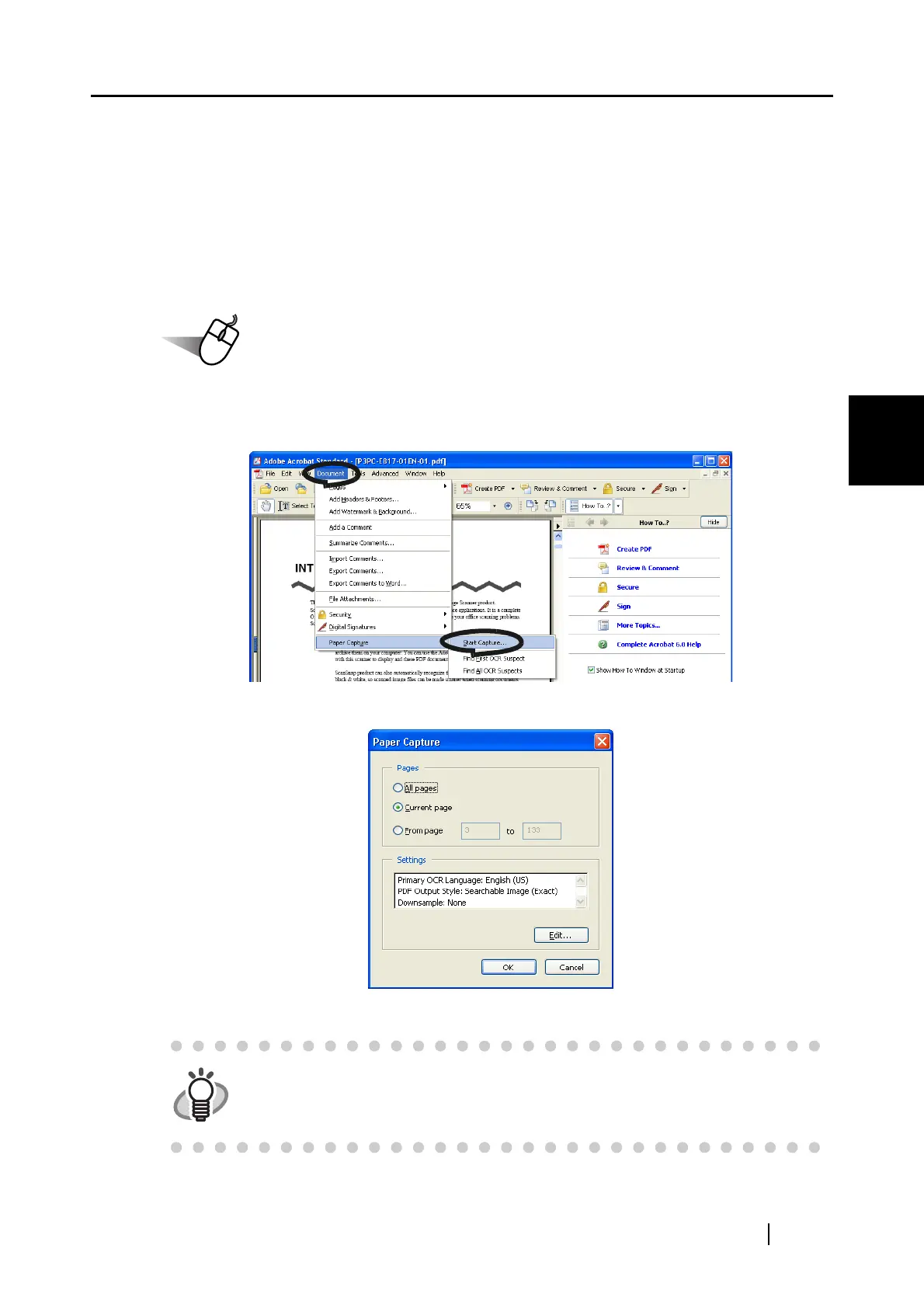
1. With Adobe Acrobat, open the PDF file you wish to convert.
2. Select [Document] - [Paper Capture] - [Start Capture] from the menu bar.
3. In the following window, configure the necessary settings, then click the [OK] button.
⇒ The characters on the image are converted into text data by the "Paper Capture" funciton.
HINT
For details of this function, refer to "Adobe Acrobat 6.0 Help".



 To Next Page
 Loading...











