FPT Gateway Installation Installation Overview
14 FocalPoint™ Gateway Installation & Operation Manual - P/N: 52649:Rev: B3 2/11/10
• “Cable Connections” on page 18.
• “Power Connection” on page 21.
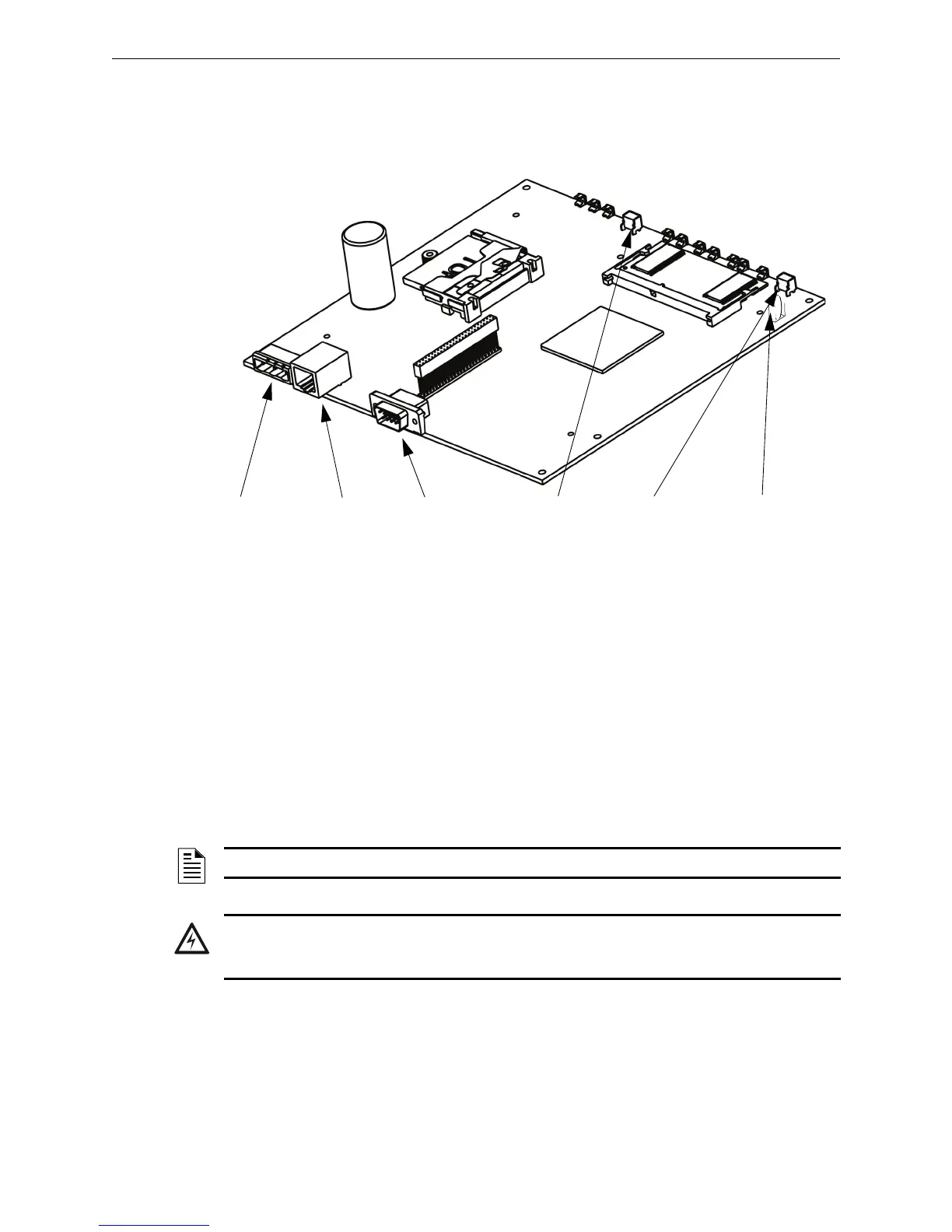
2.2.1 Gateway Board Layout
Figure 2.1 FPT Gateway PC Board Layout
Reset Button
The Reset button is used to cycle power to the PC board. It does not affect the settings made to the
software.
Mode Button
The Mode button is used to return the gateway to all factory settings (i.e. IP address setting). Press
and hold the button for at least 15 seconds to return the gateway to the factory shipped state.
Lithium Battery
The Panasonic BR2032 lithium battery (P/N: 31007) has a factory installed fish-paper-type
insulator between the battery and the battery mounting bracket. Remove the insulator after the PC
board is installed.
Reset ButtonRJ45 Ethernet
Connector
+24VDC Power
Connector
EIA-232 Port +3VDC Lithium
Battery
Mode Button
NOTE: The replacement of the PC board’s lithium battery is to be performed by a trained technician.
WARNING: Electrostatic Discharge
Always observe ESD protection procedures when handling printed circuit boards and electronic
parts.



 To Next Page