Menu Descriptions FocalPoint Gateway Config Tool Reference Information
41FocalPoint™ Gateway Installation & Operation Manual - P/N: 52649:Rev: B3 2/11/10
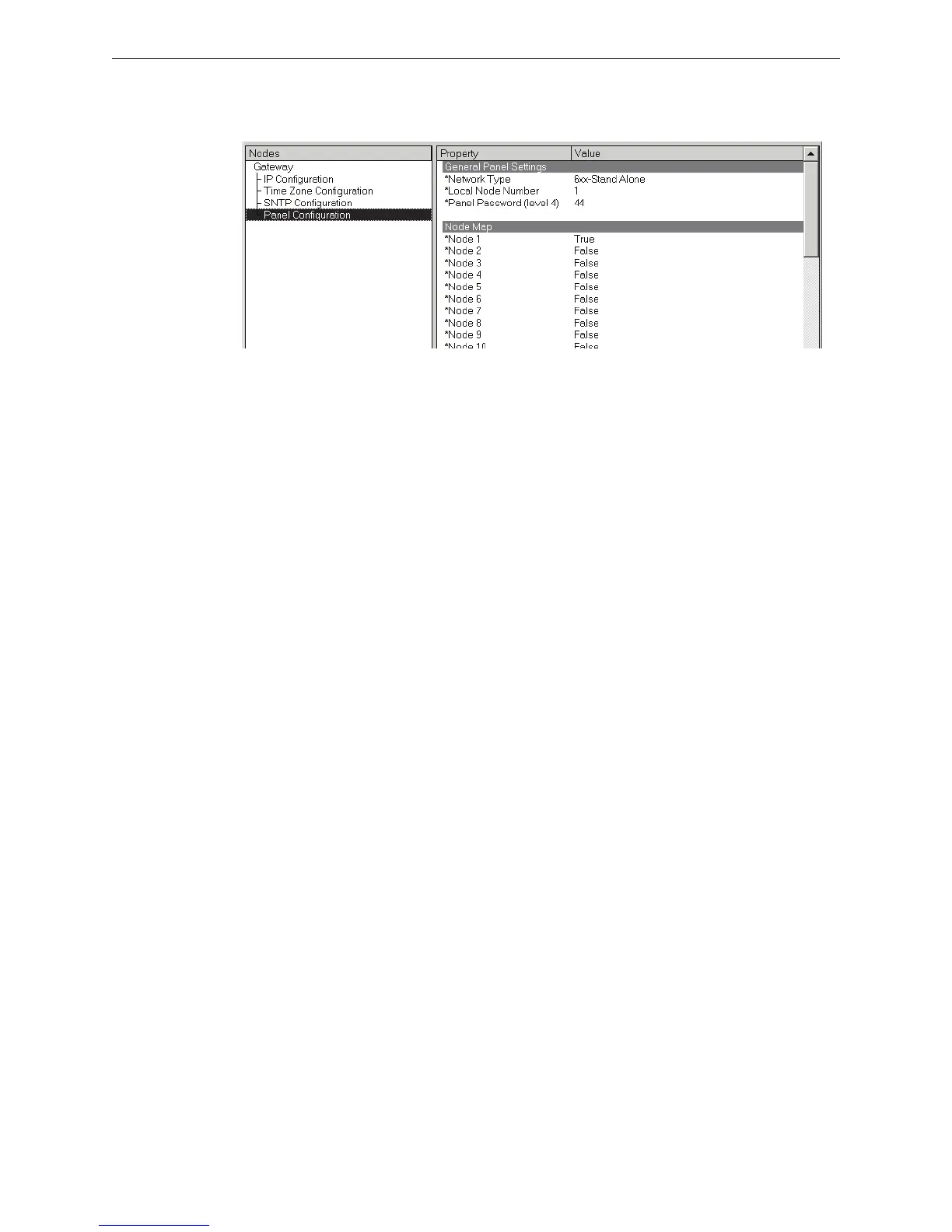
5.2.5 Panel Properties Fields
Refer to “Panel Configuration Settings” on page 26 for procedural information.
Figure 5.5 Panel Configuration Property/Value Field Descriptions
General Panel Settings
• Network Type - Is used to select a Gamewell/FCI panel type.
• Local Node Number - Is used to change the FocalPoint network address of the panel.
• Panel Password (level 4) -Is used to change a Gamewell/FCI panel’s IP address.
Node Map
Refer to “Node Mapping” on page 34 for more information about mapping nodes.
5.3 Menu Descriptions
5.3.1 File
• Login... - Is used to gain editing control over the gateway. The factory default password is
44444444 (eight fours). Refer to “Login Password Settings” on page 29.
• Exit - Closes the FocalPoint Gateway Config Tool window.
5.3.2 View
• Refresh Gateway List - Used to generate a new list of gateways that will be available and
displayed when the FocalPoint Gateway Config Tool’s Address field down arrow is clicked.
5.3.3 Configure
• Set Gateway Password - Refer to “Login Password Settings” on page 29.
5.3.4 Help
• About - Display version information.



 To Next Page