FPT Gateway Installation Cable Connections
20 FocalPoint™ Gateway Installation & Operation Manual - P/N: 52649:Rev: B3 2/11/10
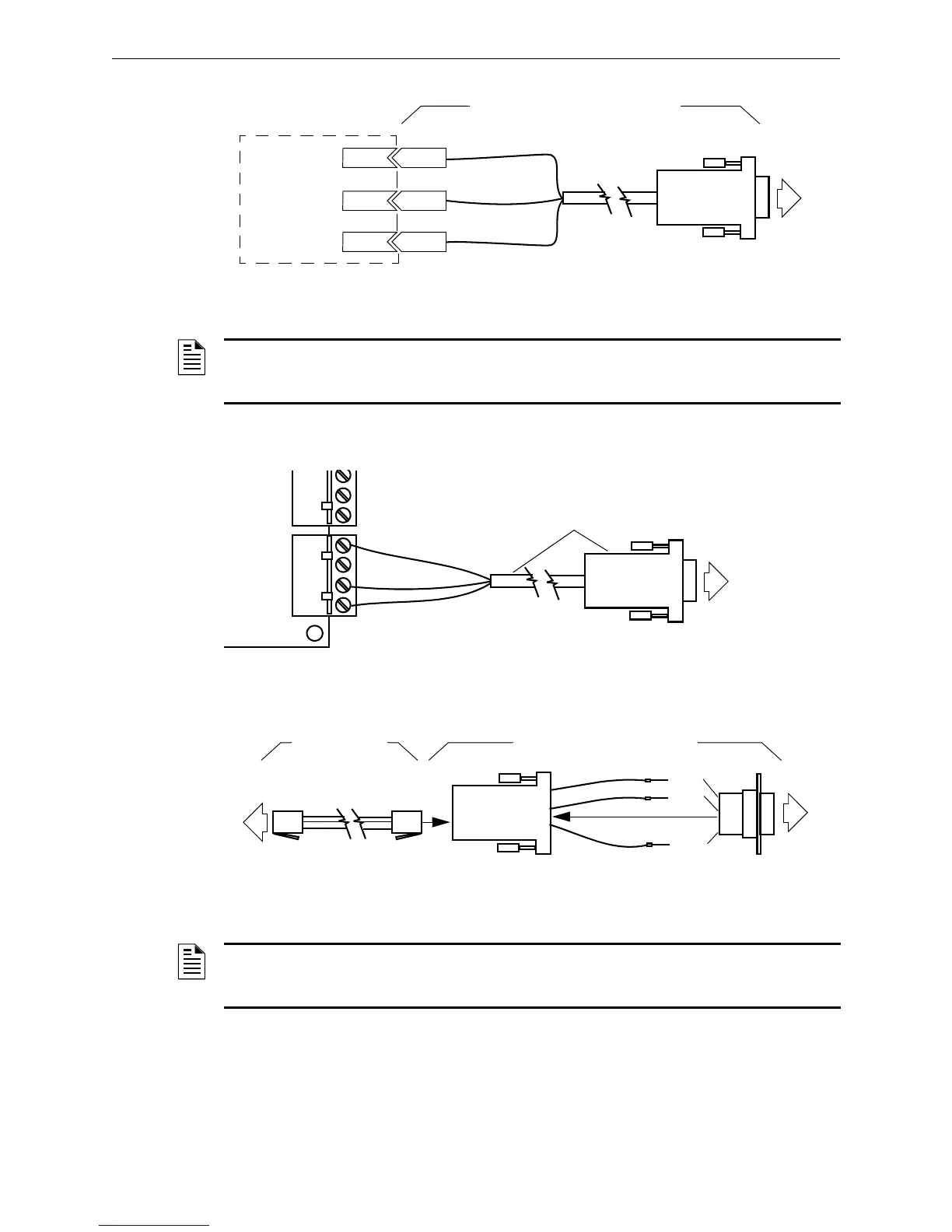
Figure 2.8 Direct Serial Data Connection Using the Gateway Supplied Cable
2.5.3 FCI Panel Serial Data Connections
Figure 2.9 E3 Serial Cable Connection
Figure 2.10 7100/7200 Serial Cable Assembly/Connection
GRN
BLK
RED
DB9 Connector
To
GW
To RS232
Connector on
600 Series
Panel
(excludes 602)
Serial Cable Supplied with Gateway
(DB9 to Leads Cable P/N: 75267)
GroundGround
TXRX
RXTX
NOTE: For information about which 600 Series panel’s connectors is used for direct serial data
connections between the gateway and the 600 Series panel consult your respective
Gamewell/FCI panel’s documentation or contact Technical Support.
GRN
BLK
RED
1 2 3 4
TB6
DB9 Connector
E3 Panel’s ILI-MBE3 Board
To
GW
DB9 to Leads Cable
P/N: 75267
DB9 Adapter Casing
Serial Cable
P/N: 6100-0076
BLK
YLW
RED
Pin 2
Pin 3
Pin 5
DB9 Adapter Plug
DB9 Adapter P/N: 6100-0077
To
7100/7200
RJ-11
Connector
Insert
To
GW
NOTE: Some early vintage 7200 panels have a DB9 connector instead of an RJ-11 connector
and such a connection requires a DB9 adapter both ends of the serial cable. Current versions of
firmware are supported but some early versions of firmware may not be supported.



 To Next Page