FPT Gateway Configuration FPT Gateway Configuration Procedure
26 FocalPoint™ Gateway Installation & Operation Manual - P/N: 52649:Rev: B3 2/11/10
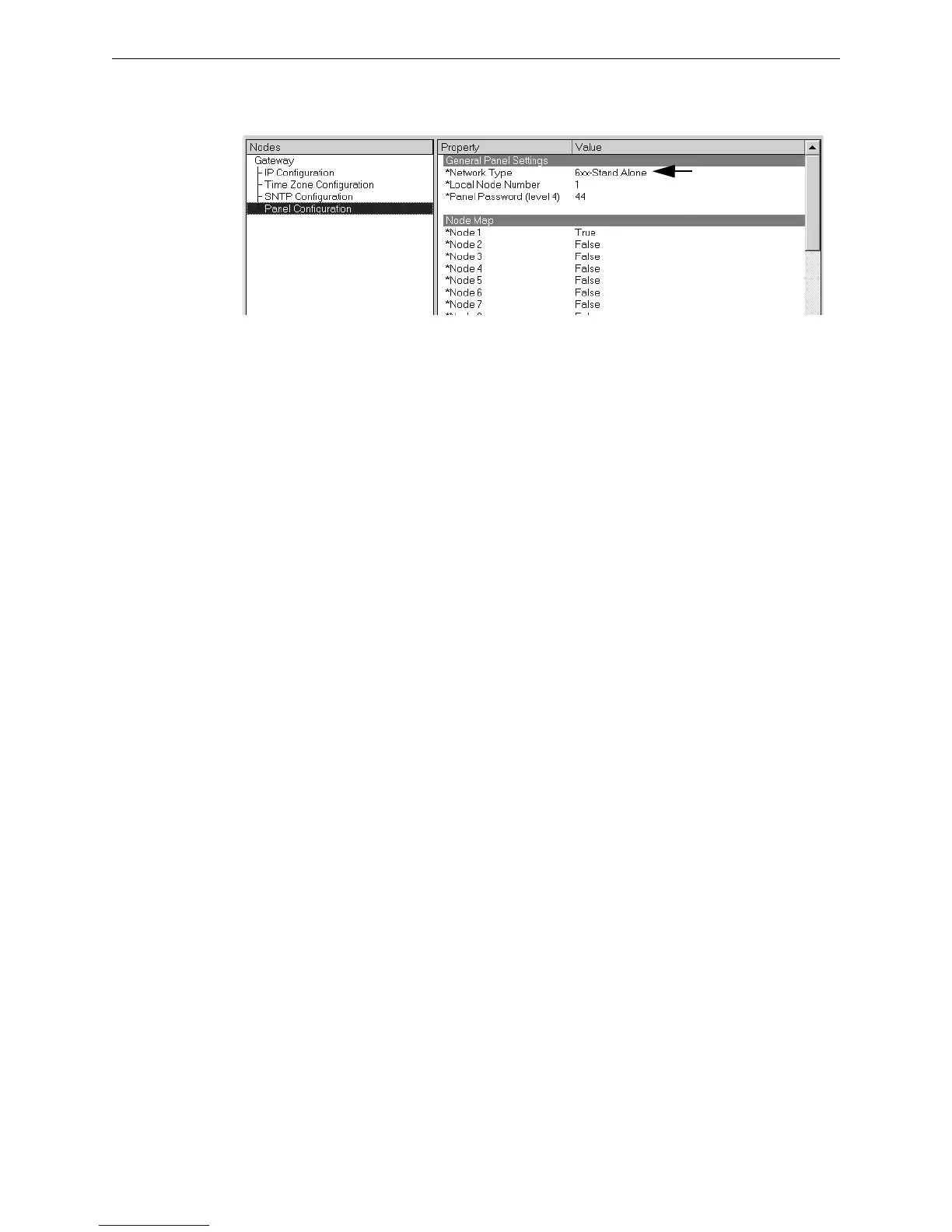
3.2.2 Panel Configuration Settings
Step 1. Select Panel Configuration in the Nodes list. The Property/Value fields display.
Step 2. Select a panel in the Network Type field’s list of choices.
Step 3. If the FocalPoint Gateway is connected to an E3 panel then make the Node Map changes
that match your selection made in Network Type field by clicking on the value and
selecting True or False from the list. Refer to “Node Mapping” on page 34 for more
information about mapping nodes.
Step 4. Close the FCI Gateway Configuration Tool window with the window’s X.
Step 5. Now you need to perform “Time Settings” on page 27



 To Next Page