3. Displaying Issues & Solutions.
3.1 How to do when it's indicating '' No Signal--Saving Power''
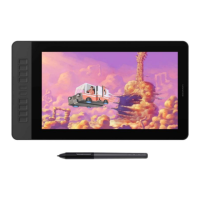
Firstly, please kindly note that ‘’No Signal’’ issue is related to the HDMI connection. Please make
sure the HDMI cable is well connected between PD1561 & computer.
Secondly, if you use windows computer, please press ‘’Windows+p’’ on keyboard, and make sure
to choose Duplicate or Extended mode. Don’t choose ‘’Projector Only’’ or ‘’Computer Only’’.
Otherwise, it will cause no signal problems. Give me test result please.
Thirdly, Is there an HDMI interface on the computer? Or are you using a HDMI adaptor?
If you are using a HDMI adaptor, please make sure it’s not usb to HDMI adapter. USB is mainly for
data transmission. It’s not good for video/signal transmission. We recommend you to use
dvi/vga/DisplayPort/type-c to HDMI adapter depending on whichever is on your device.
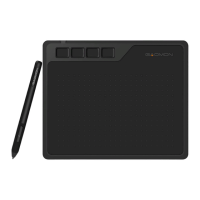
Fourthly, please find/borrow another computer which comes with HDMI port to test. Please make
sure to plug the HDMI cable into graphic card, but not in mother board.
If the No Signal issue remains after trying above solutions, please take a video and send to
GAOMON SERVICE. We will apply warranty and make everything right for you. Don’t worry!
3.2 How to do when it's all black without displaying anything, and no
indicator light.
1) Please kindly note that, if it doesn’t display anything and no indicator light, it should be related
to the power cord connection. Please kindly check whether you have well connected the power
cord.
2) Please change a different electricity socket.
3) If the issue remains, please take a video, and send to GAOMON SERVICE. We will apply warranty
and make everything right for you. Don’t worry!


 To Next Page