Your route on the map
As you travel, the device guides you to your destination using voice prompts and information on the map.
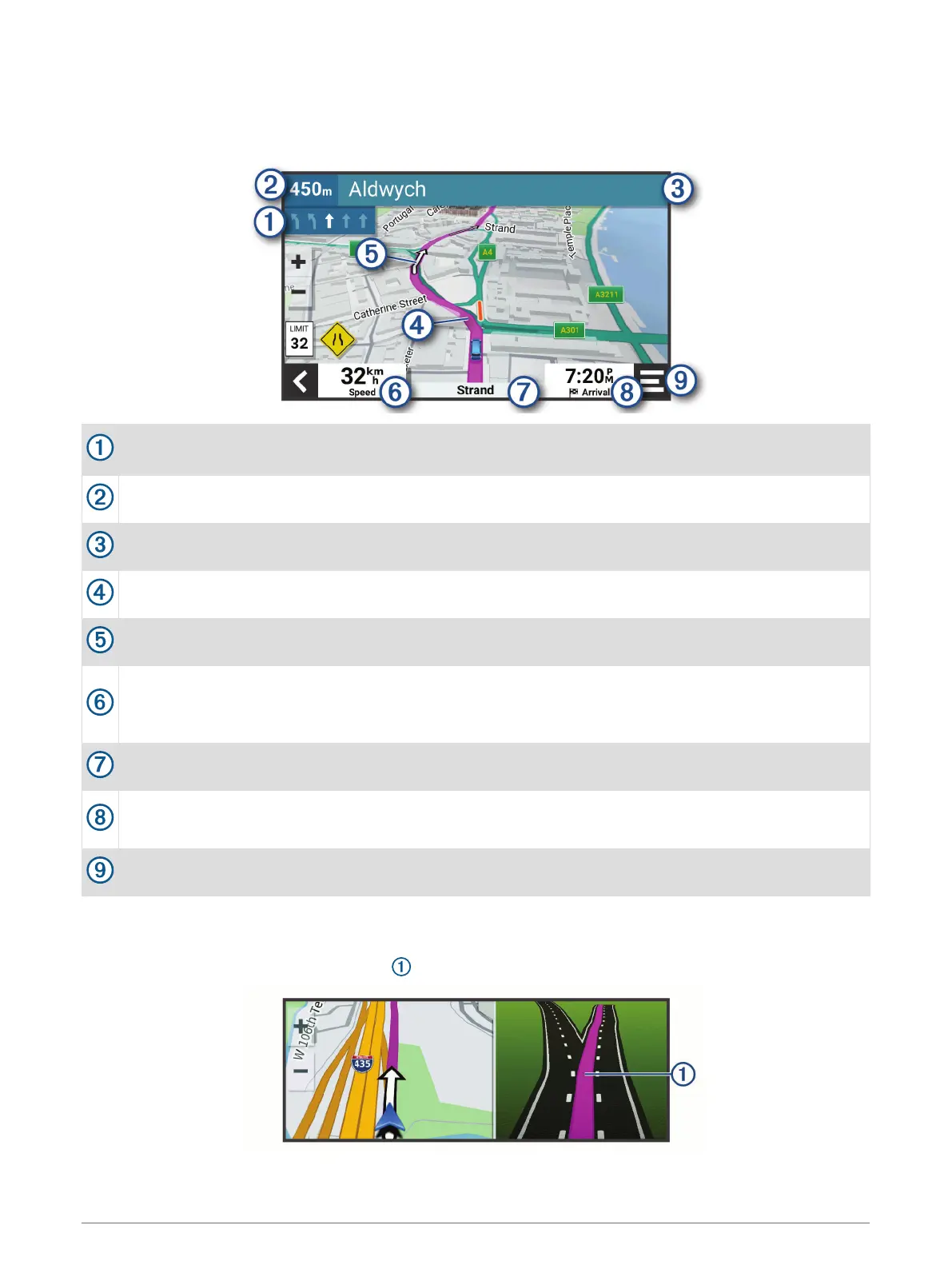
Instructions for your next turn or exit, or other actions appear across the top of the map.
Next action in the route. Indicates the next turn, exit, or other action and the lane in which you should
travel, if available.
Distance to the next action.
Name of the street or exit associated with the next action.
Route highlighted on the map.
Next action in the route. Arrows on the map indicate the location of upcoming actions.
Vehicle speed.
TIP: you can touch this field to open the trip information page (Viewing the trip information page,
page 22).
Name of the road on which you are travelling.
Estimated arrival time.
TIP: you can touch this field to change the information it shows (Changing the map data field, page 23).
Map tools. Provides tools to show you more information about your route and surroundings.
Active lane guidance
As you approach some turns, exits, or interchanges in your route, a detailed simulation of the road appears
beside the map, if available. A coloured line indicates the proper lane for the turn.
Navigating to your destination 15







 To Next Page