6 GPSMAP
®
2008/2108 Owner’s Manual
ge T T i n g sT a r T e d
NOTE: Ifusinganew,blankSDcardtotransfer
waypoints from MapSource, insert it in your
GPSMAP 2008/2108 unit before copying the
lesfromyourPC.Thispreparesthecard.
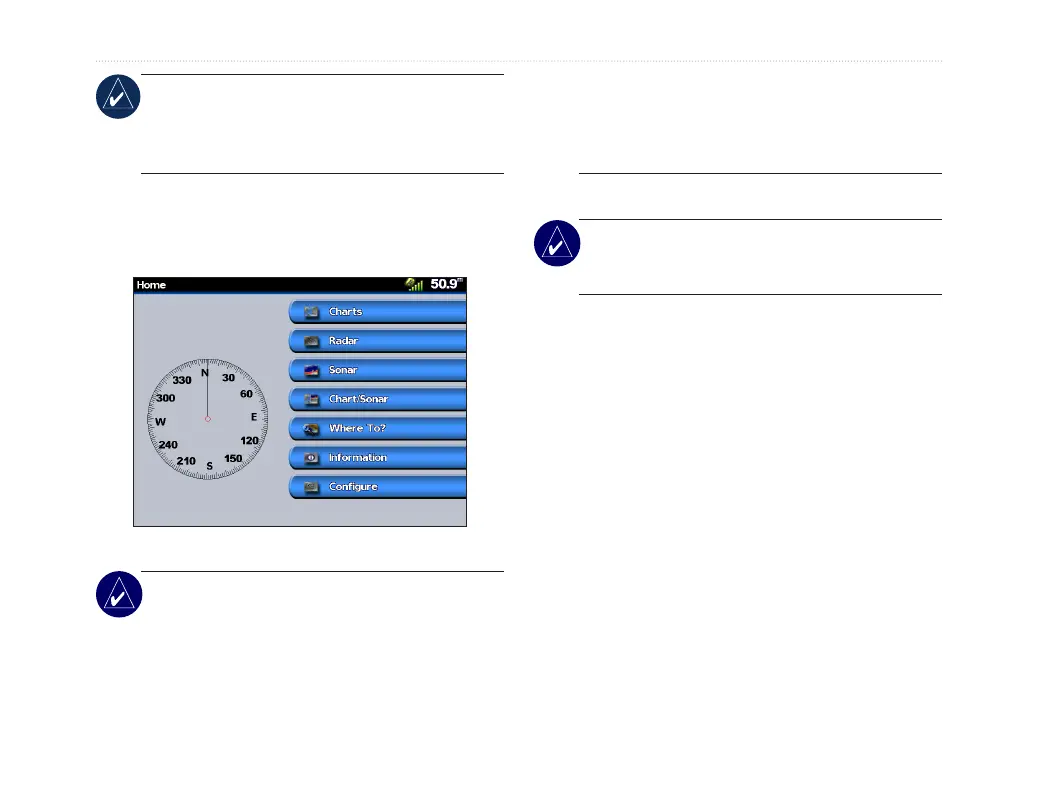
Understanding the Home Screen
Use he Home screen to access all other screens.
• Charts—access Navigation (page 7).
NOTE: On the GPSMAP 2008/2108 unit,
you must insert a preprogrammed BlueChart
®
SDcardtoaccessthenavigationandshing
charts. GPSMAP 2008/2108 supports Garmin
BlueChart
®
g2 map. BlueChart
®
g2 is used
for illustration in this owner’s manual.
BlueChart
®
g2 is only available in some
exclusive regions currently, please check
with your local Garmin distributors for more
details.
• Sonar—access sonar information (page 31).
NOTE: This option is available only if you have
a unit with a built-in sounder or a Garmin sonar
module connected.
• Chart/Sonar—set up the screen to view a chart
and sonar in a split screen (page 13).
• Where To?—access navigation features (page
14).
• Information—view information including
tides, currents, celestial data, user data, and
information about other boats (page 21).
• Congure—access unit and system settings
(page 25).
GPSMAP 2008/2108 provides compass indicator on
the main page to visually help users know the heading
of the boat. The compass is shown up to the scale of
2 degrees.The feature works only when GPS signal is
located.













 To Next Page