GPSMAP
®
2008/2108 Owner’s Manual 13
Us i n g Ch a r T s
Using the Chart/Sonar Screen
Use the Chart/Sonar screen to view the Navigation
Chart.
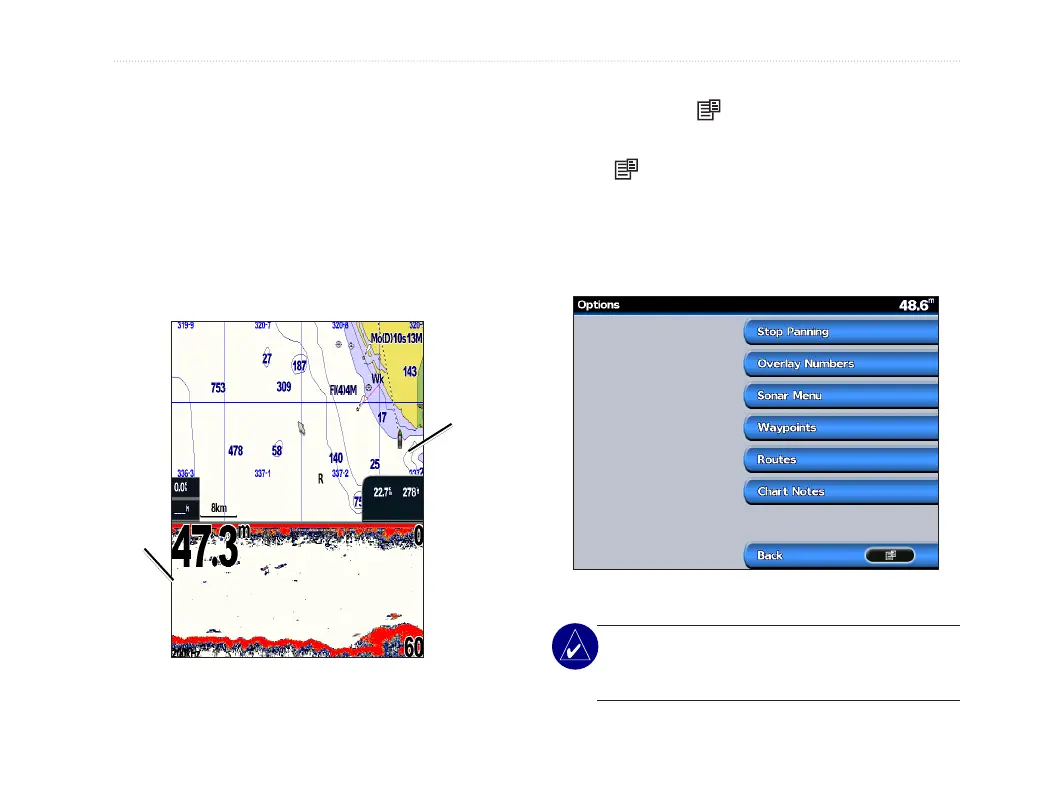
To view a split chart/sonar screen:
1. From the Home screen, select Chart/Sonar/
Navigation Chart.
2. Select Navigation Chart to view both
Navigation and Sonar Charts.
Navigation
chart screen
Navigation/Sonar Combination
Sonar
screen
To access additional settings or options for the chart/
sonar screen, press .
To set up Sonar setting:
1. Press
2. Select Sonar Menu
3. Choose required settings for Range/Gain/
Frequency
Chart/Sonar options
NOTE: The Chart/Sonar screen, like the Sonar
screen, is only available when using a sonar
capable unit with a transducer attached.













 To Next Page