22 GPSMAP
®
2008/2108 Owner’s Manual
Vi e W i ng in f o r m a T i o n
NOTE: Thersttimeyouusethenumbers
screen, you are asked to complete steps 3 and 4
for the initial setup.
Viewing Tide Station Information
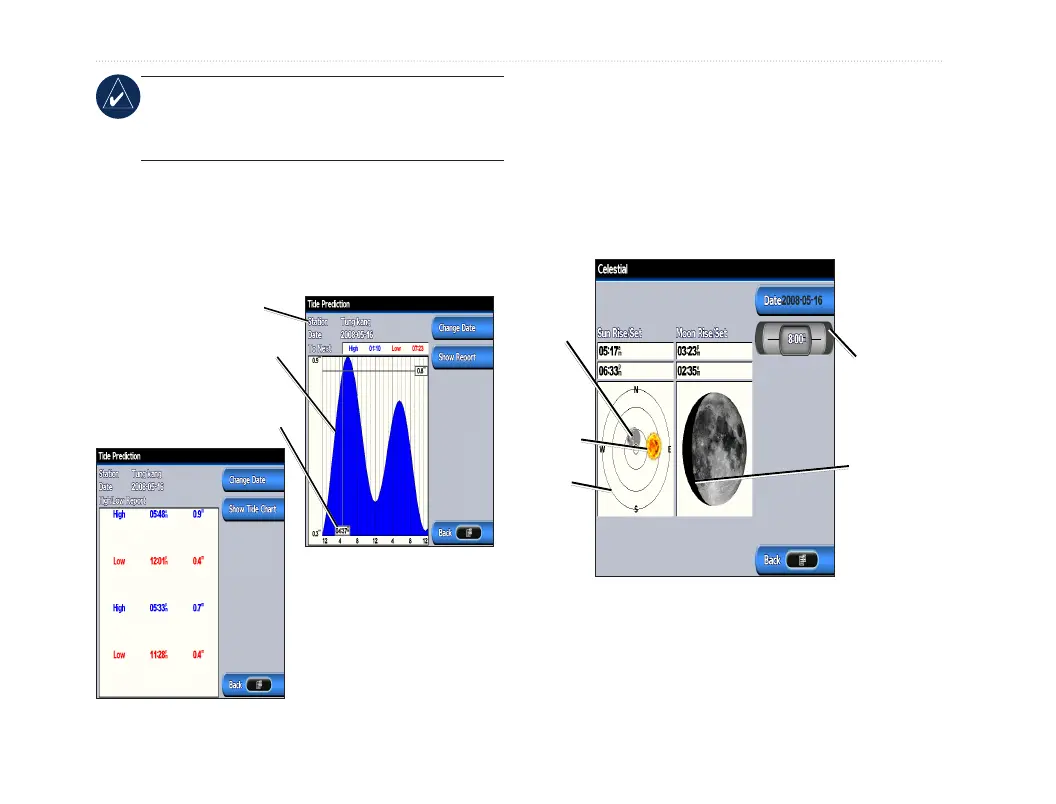
To view tide information, select Tides from the
Information screen, then select a tide station from the
list.
Tide Prediction Report
Tide Prediction Chart
Tide station
High tide curve
Current tide
height
• ToviewtheTidePrediction
Report, select Show Report.
• ToreturntotheTidePrediction
Chart, select Show Tide
Chart.
Viewing Celestial Information
Use the Celestial screen to view celestial data for sun
and moon rise/set, moon phase, and approximate sky
view location of the sun and moon.
To view celestial information, on the Information
screen, select Celestial.
Moon phase
Sky view
window
Sun
position
Moon
position
Press left or right
on the ROCKER
to adjust the time.













 To Next Page