GPSMAP
®
2008/2108 Owner’s Manual 31
Us i n g so n a r
Us i n G so n a r
When connected to a transducer, your unit becomes a
powerfulshnder/asher.YoucanconnectaGarmin
GSD21orGSD22soundermoduletoyourunitto
use the sonar features.
NOTE: WhenusingGSD21,youcanwire
through NMEA Port 1 or CANet port whereas
GSD22canonlywiretoCANet(GPSMAP
2008).WithGPSMAP2108,GSD21uses
NMEAPort1whileGSD22canonlyhookto
network port.
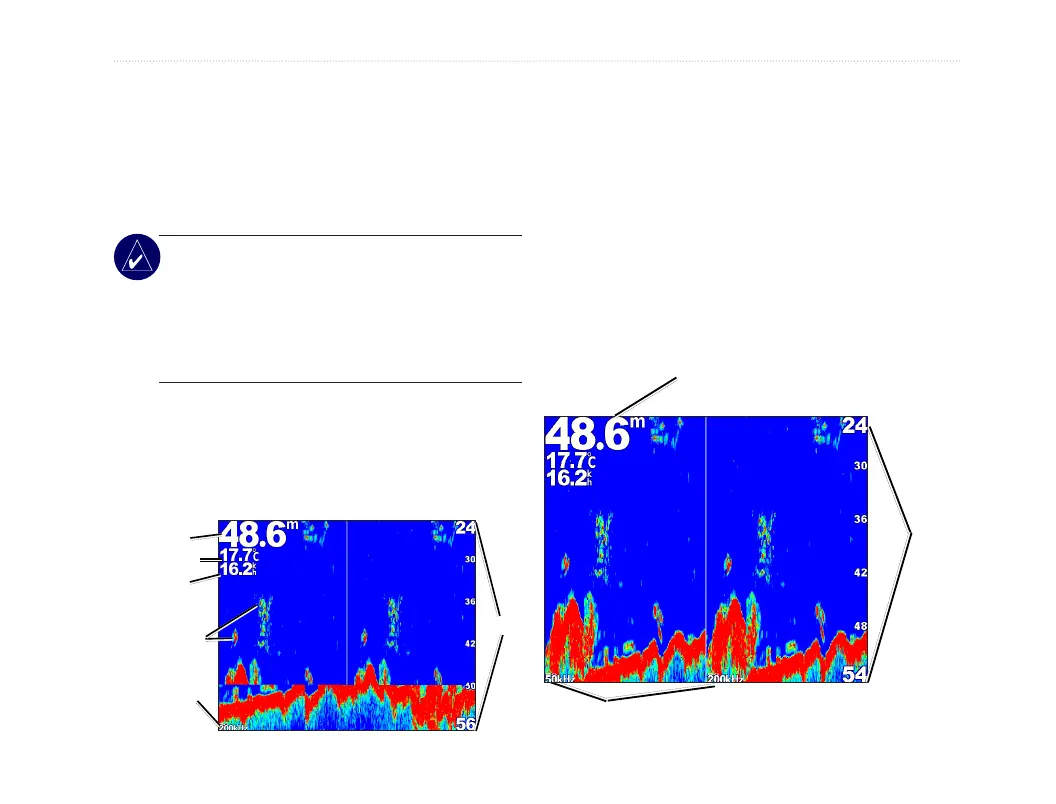
Understanding the Full Screen
Select the Full Screen option to view a full-screen
graph of the transducer’s sonar readings.
From the Home screen, select Sonar > Full Screen.
Transducer
frequency or
beam width
Temperature
Speed
Depth
Range
Suspended
targets
Understanding the Split Freq
Screen
Use the Split Freq screen (dual frequency transducer
only) to view both the 50kHz and 200kHz frequencies
on the same screen. A 50kHz frequency graph appears
on the left; a 200kHz frequency graph appears on the
right.
To open the Split Freq screen, from the Home screen,
select Sonar > Split Freq.
Frequencies
Depth, temperature, and speed
Range













 To Next Page