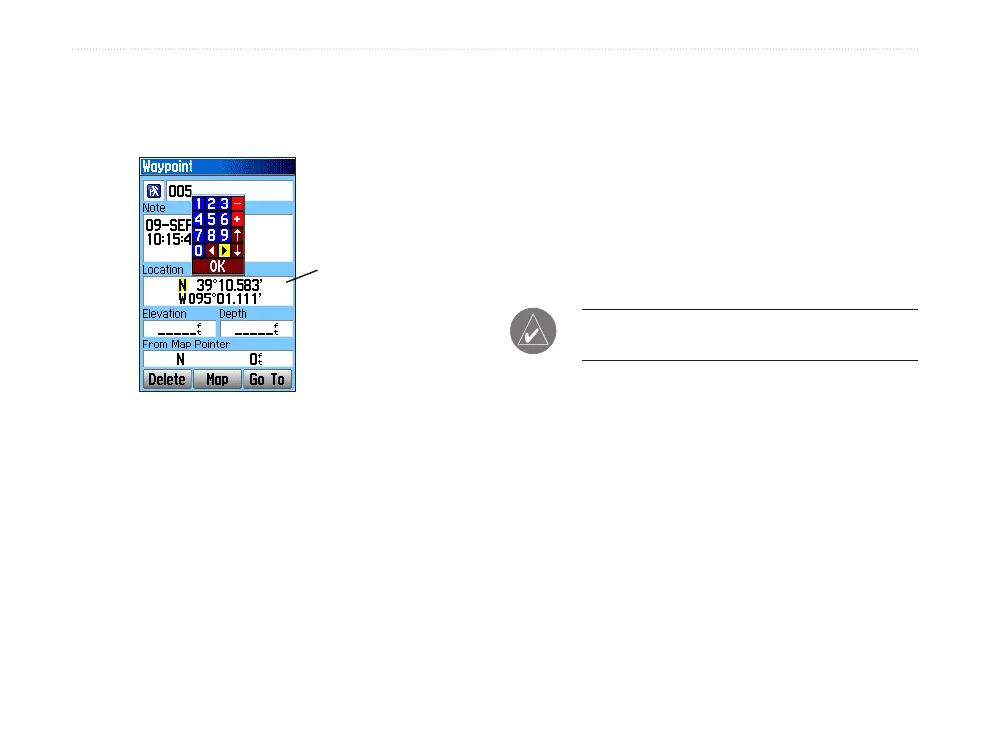
3. Use the ROCKER to enter location
coordinates. Highlight OK, and press ENTER
when nished.
Manually
enter waypoint
coordinates.
4. Press QUIT to exit.
Editing Waypoints
You can edit waypoints as you create them or at a
later date. You can change the symbol, name, note,
location, elevation, and depth.
To edit a waypoint:
1. Press FIND to open the Find Menu.
2. Highlight the Waypoints icon, and press
ENTER to open the Waypoints Page.
3. Select the waypoint you want to edit, and
press ENTER. The Waypoint Page opens.
4. Highlight each eld and press ENTER to make
changes. Use the waypoint symbol chart and
the alphanumeric keypad to enter new data.
5. Press QUIT when nished.
Deleting Waypoints
You can delete waypoints from the Waypoint Page.
NOTE: When you delete a waypoint, you cannot
recover it from the unit.
To delete a waypoint:
1. Press FIND to open the Find Menu.
2. Highlight the Waypoints icon, and press
ENTER to open the Waypoints Page.
3. Select the waypoint you want to delete, and
press ENTER. The Waypoint Page opens.
4. Highlight the Delete button, and press ENTER.
A conrmation message appears.
5. Highlight Yes, and press ENTER to delete the
waypoint.
12 GPSMAP 60Cx Owner’s Manual
bAsIc oPerAtIon > edItIng wAyPoInts















 To Next Page