190-02692-00 Rev. A
Garmin G1000 Pilot’s Guide for the Piper PA-32 Saratoga
181
FLIGHT MANAGEMENT
SYSTEM
OVERVIEW
FLIGHT
INSTRUMENTS
EIS
AUDIO PANEL
& CNS
FLIGHT
MANAGEMENT
HAZARD
AVOIDANCE
AFCS
ADDITIONAL
FEATURES
APPENDICES INDEX
VRPS
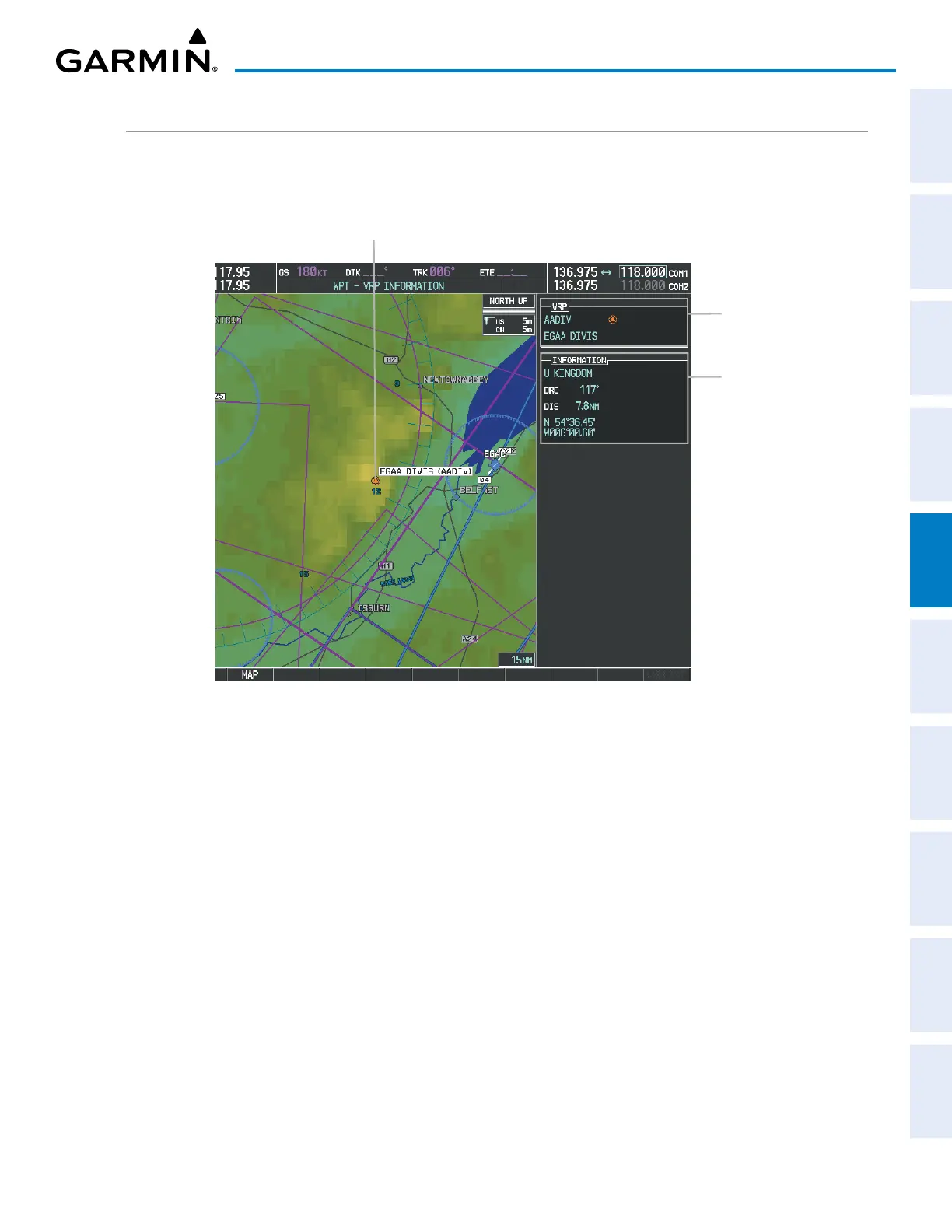
The WPT – VRP INFORMATION Page is used to view information about visual reporting points (VRPs).
In addition to displaying a map of the currently selected VRP and surrounding area, the page displays VRP
information in two boxes labeled VRP and INFORMATION.
Figure 5-38 WPT – VRP INFORMATION Page
Selected VRP
VRP Identifier/Symbol
– VRP Name
VRP Information
– Country
– Bearing/Distance to VRP
from aircraft position
– Lat/Long
Selecting a VRP:
1) With the WPT – VRP INFORMATION Page displayed, enter the identifier or the name of the VRP in the VRP Box.
2) Press the ENT Key.
3) Push the FMS Knob to remove the flashing cursor.
Or:
1) With the NRST – NEAREST VRP Page displayed, push the FMS Knob.
2) Press the ENT Key or turn either FMS Knob to select an identifier in the NEAREST VRP Box.
3) Push the FMS Knob to remove the flashing cursor.
The NRST – NEAREST VRP Page can be used to quickly find a VRP close to the aircraft. In addition to
displaying a map of the surrounding area, the NRST – NEAREST VRP Page displays information for up to 25
nearest VRPs in two boxes labeled NEAREST VRP and INFORMATION. The list only includes VRPs that are
within 200 nm.


 To Next Page