AT Pro International™
31
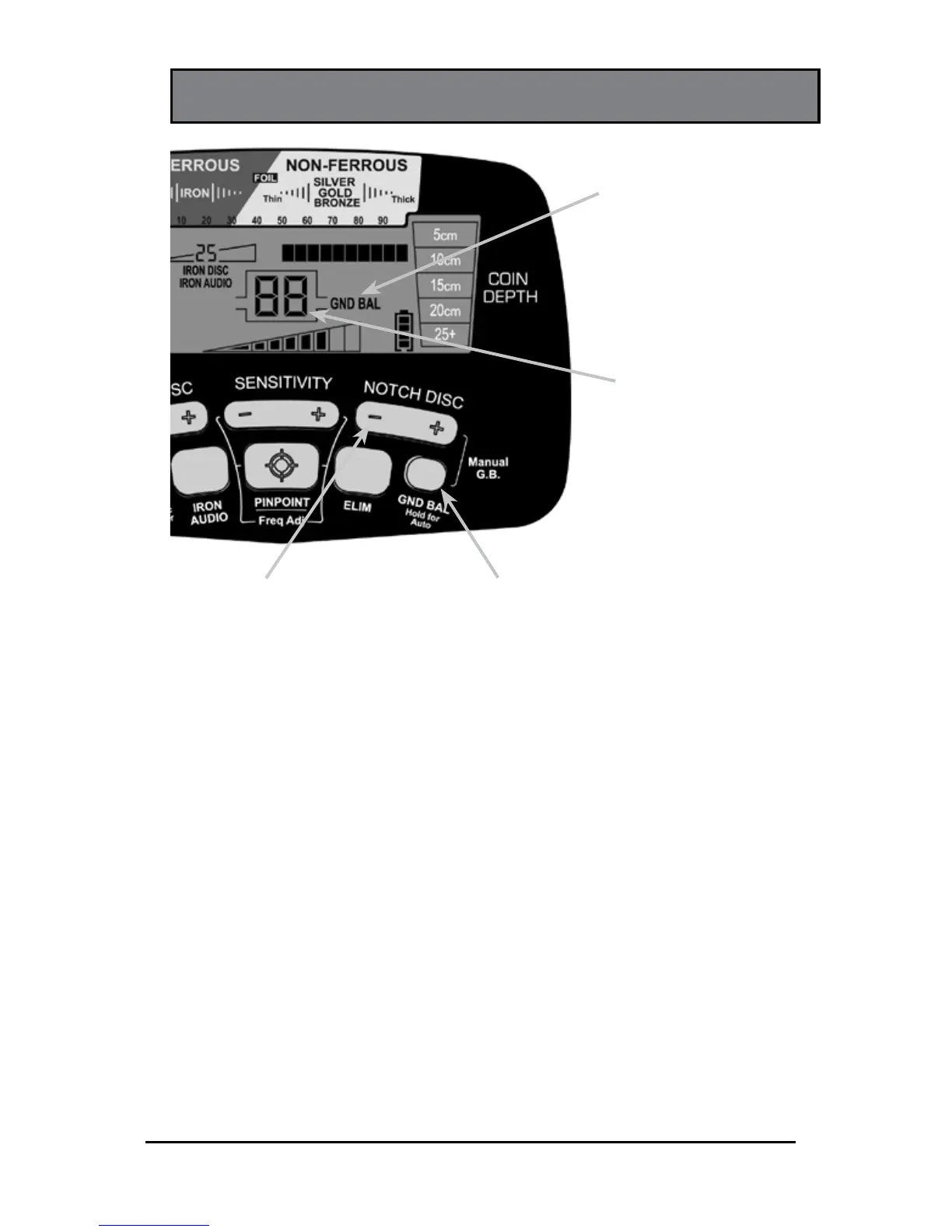
GROUND BALANCE
GND BAL
Pushbutton
NOTCH DISC
Pushbutton
(use with GND BAL)
GND BAL Pushbutton—Hold for Automatic Ground Balance
or use in conjunction with the NOTCH DISC pushbuttons for
Manual Ground Balance.
Detector performance can be negatively affected by ground
mineralization. The AT Pro can be ground balanced either
automatically or manually to cancel unwanted ground signals
and obtain maximum stability and target detection.
Automatic Ground Balance: Press and hold the GND BAL
pushbutton while continually "bouncing" or "pumping" the
searchcoil from 2 to 20 centimeters above the ground. When
there is a minimal audio response from the ground, release
the pushbutton and begin hunting. The ground balance value
will have been indicated in the center of the LCD. Low ground
GND BAL
Indicator
(only displays on
LCD when in use)
GND BAL Setting
(only displays
while in Ground
Balance mode)












 To Next Page