EasyManua.ls Logo

Garrett AT Pro - Care and Maintenance; Battery Replacement Procedure

Garrett AT Pro
61 pages
Print Icon
To Next Page IconTo Next Page
To Previous Page IconTo Previous Page
Loading...
48
Garrett Metal Detectors
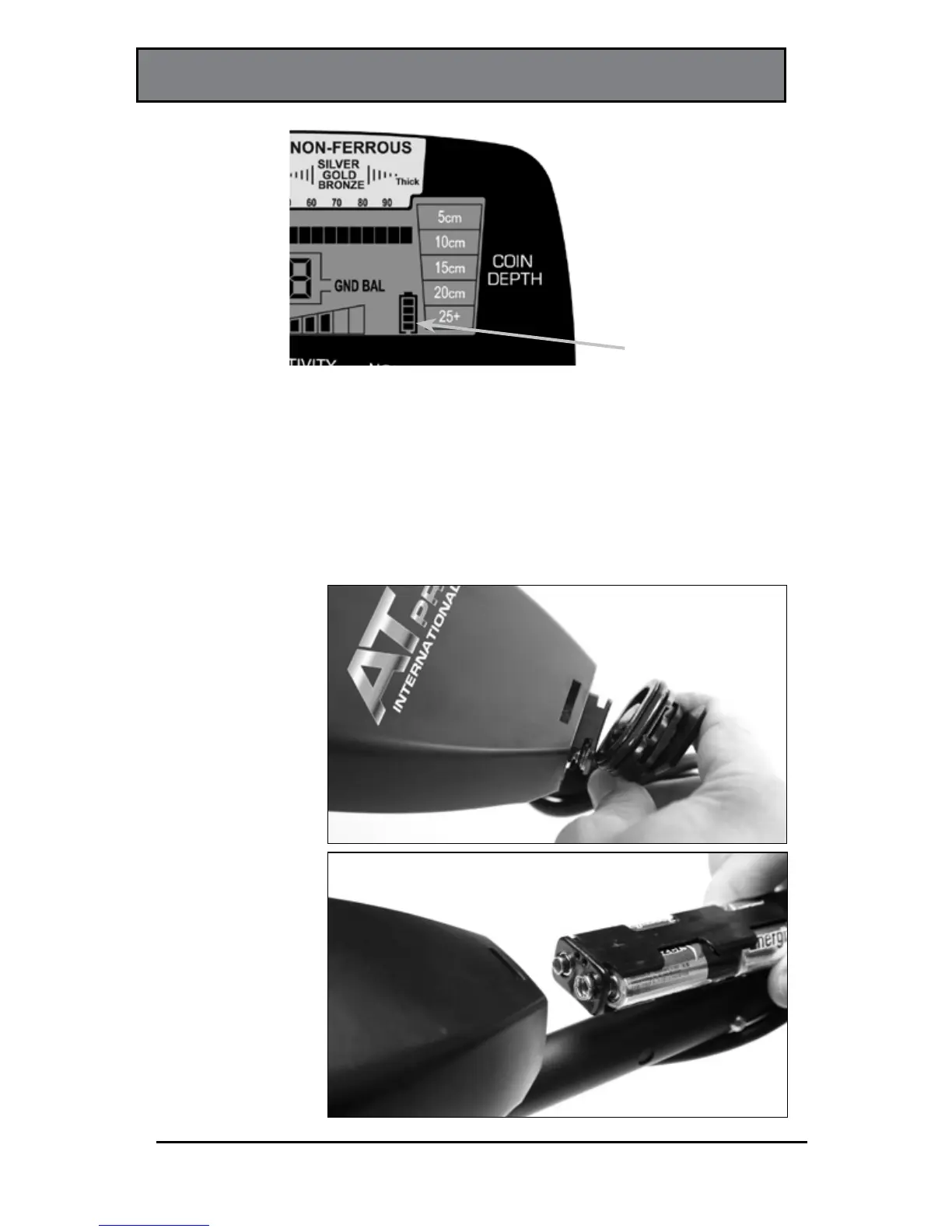
Battery Level
Indicator
CARE AND MAINTENANCE
Battery Replacement—The AT Pro is operating with fresh
or fully charged batteries when 4 illuminated bars on the
Battery Level Indicator (see above) are displayed. The
detector will maintain full performance until the batteries
need to be replaced. Replace batteries when there is only
Remove the battery
cover by rotating
the cover one-
quarter turn in a
counterclockwise
direction. Grasp
the cap by top and
bottom and pull it
straight back. Slide
the battery tray
out to replace the
batteries.
INSERT BATTERY HOLDER
IN THIS POLARITY

Related product manuals