GA600AC Sliding Gate Opener User Manual
Then the gate will move in
the set direction.
Default Setting Instruction
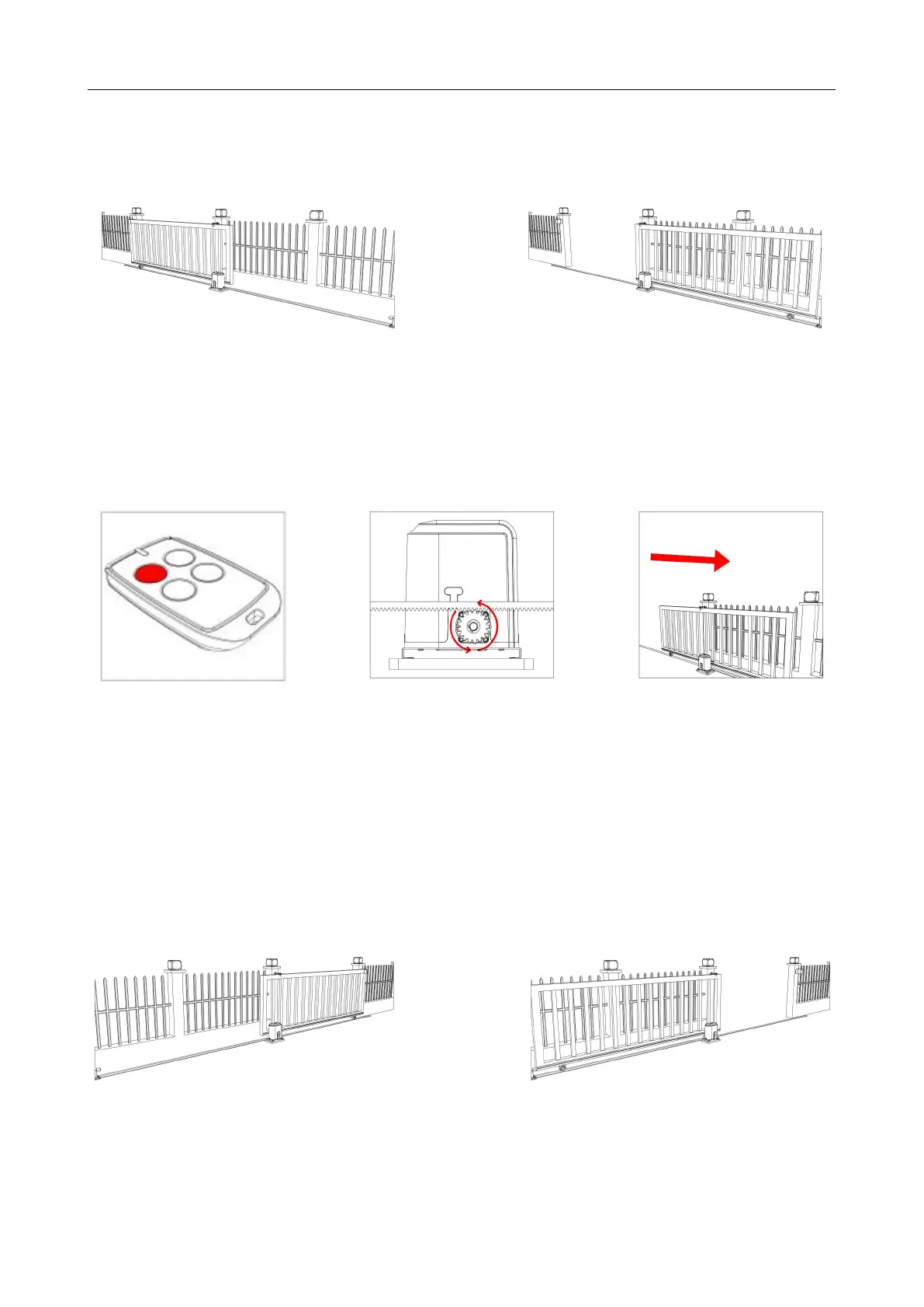
The gate opener will open the gate to the right-hand side as its default setting. By default, the
opener mounts on the right-hand side. (Figure 1)
Figure 1
Gate in closed position Gate in open position
Before installation: Test the gate opener by plugging it into a power source and pressing the
remote. Press the opening button, the output gear rotates, then press the stop button, the output
gear stops rotating. Finally, press the closing button, the output gear rotates to the opposite
direction. This will give you an understanding of the way in which the opener will move the gate.
Note: Ensure that the gate opener is unplugged before proceeding with installation. Please
keep fingers away from the motor output gear whilst it is turning.
If your gate needs to open from the other direction (to the left, refer to Figure 3), your opener needs
to be mounted on the left-hand side as shown, the relative wires need to be swapped over, please
check under “Terminal Instructions” for swapping. (Factory default setting is for right-hand opening:
opener mounted on the right-hand side).
Figure 3
Any works done to the gate opener must be completed whilst the power is off, and the
opener is unplugged.
Press the first/top button
on the remote.
Rotating output gear will
drive the gate frame.



 To Next Page