1-3 side view of Puma II
1 2 3 4 5 6 7 8
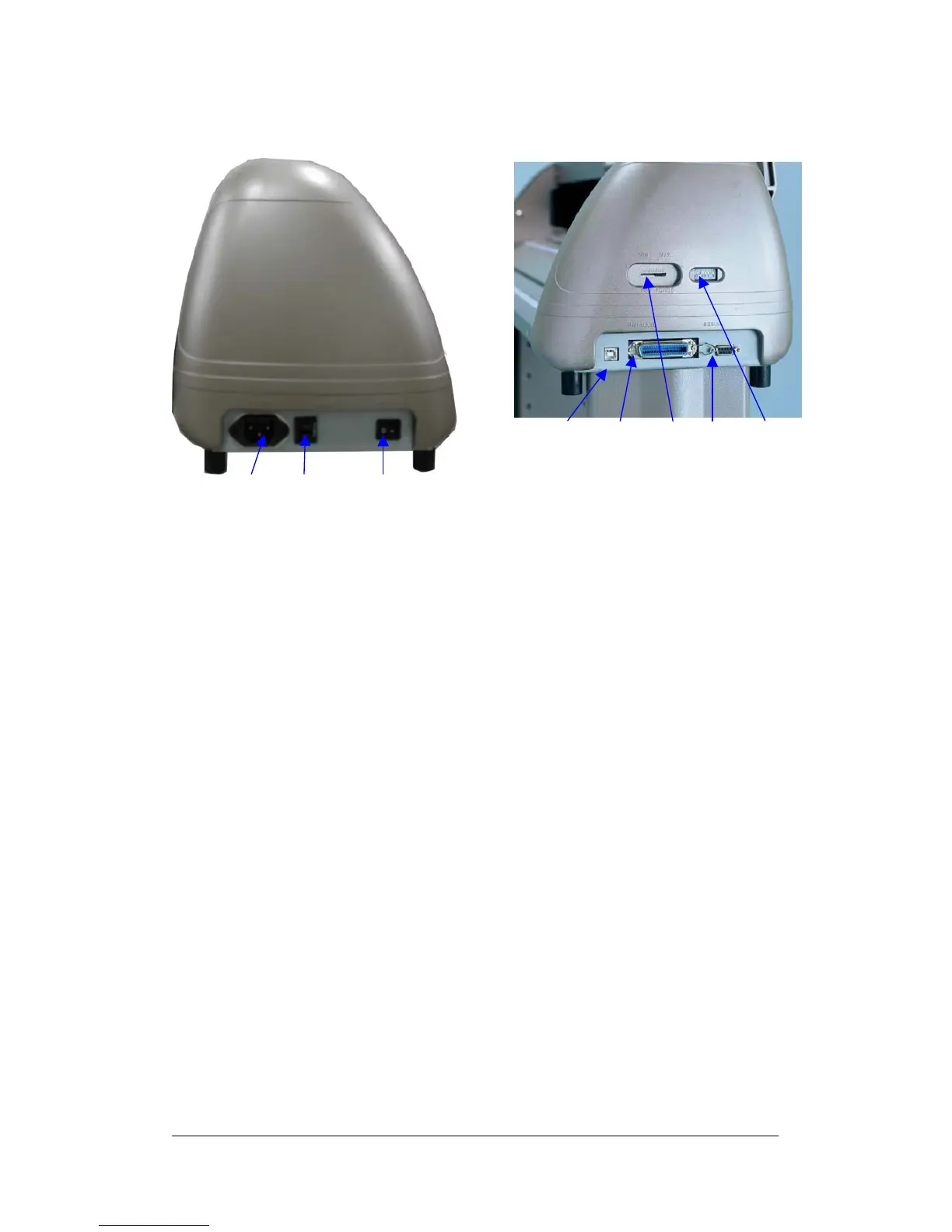
Fig 1-3 Left hand side view of Puma II Fig 1-4 Right hand side view of Puma II
Left Hand Side (Figure 1-3)
1. AC Power Connector – Used to insert the AC power cord.
2. Fuse – Up to 3 Amp.
3. Power Switch – On when switches to [I]; Off when switches to [O]
Right Hand Side (Figure 1-4)
4. USB interface Connector - Used to connect the cutting plotter to a
computer through a USB cable.
5. Parallel Interface Connector (Centronics) – Used to connect the cutting
plotter to a computer through a parallel interface cable.
6. Pen Force Control Slider – Set the blade force here.
7. Serial Interface Connector (RS-232C) – Used to connect the cutting
plotter to a computer through a serial interface cable.
8. Dip Switch - Used for various parameter setting.
Puma II users manual 1-3



 To Next Page