Puma II User’s Guide 2-2
2.2 Stands and Media Support System Installation
There are seven steps to assemble stand and media support system. Please
follow the procedure:
Step 1 Check screws and wrench in the accessory box of stand carton:
Items Puma II 60/30 Puma II 132S
M6 screws 28 24
M5 L- shape hexagon screw driver 1 1
M6 L- shape hexagon screw driver 1 1
M6 wrench (spanner) 1 1
Step 2
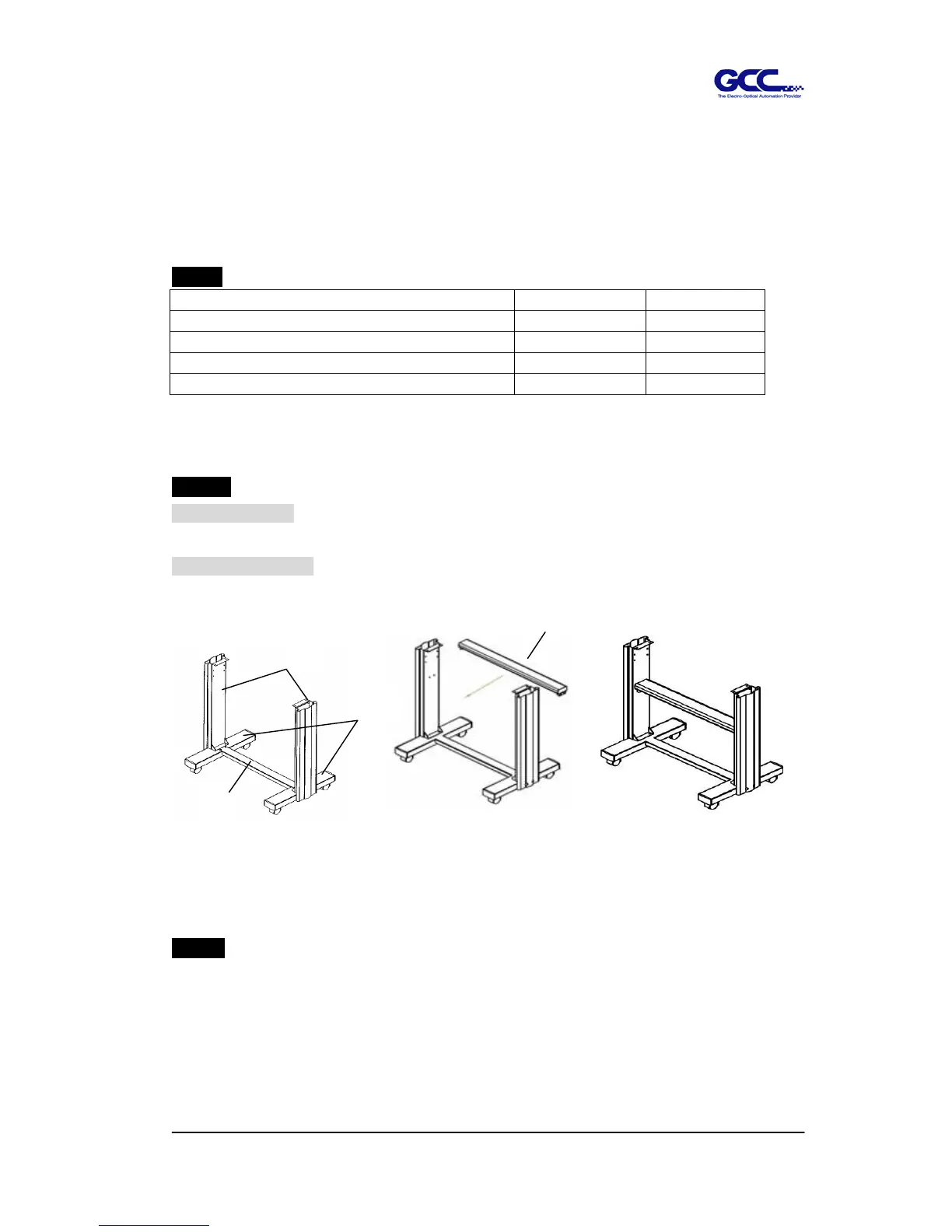
Puma II 60 stand: There are three components to assemble it. Please refer to Figure
2-1.
Puma II 132S stand: There are four components to assemble it. Please refer to Figure
2-1-1 and 2-1-2
Step 3
Then connect part 3 and H-shape stand. First, position the extension of part 3 into the
squares holes on H-stand. Second, insert the screws into the holes besides the squares
then tighten them, see Figure 2-2.
2
3
1
4
Figure 2-1
(Puma II 60)
Figure 2-1-1
(Puma II 132S)
Figure 2-1-2
(Puma II 132S)



 To Next Page