Puma II User’s Guide 2-16
2.7 Dip Switch Setting
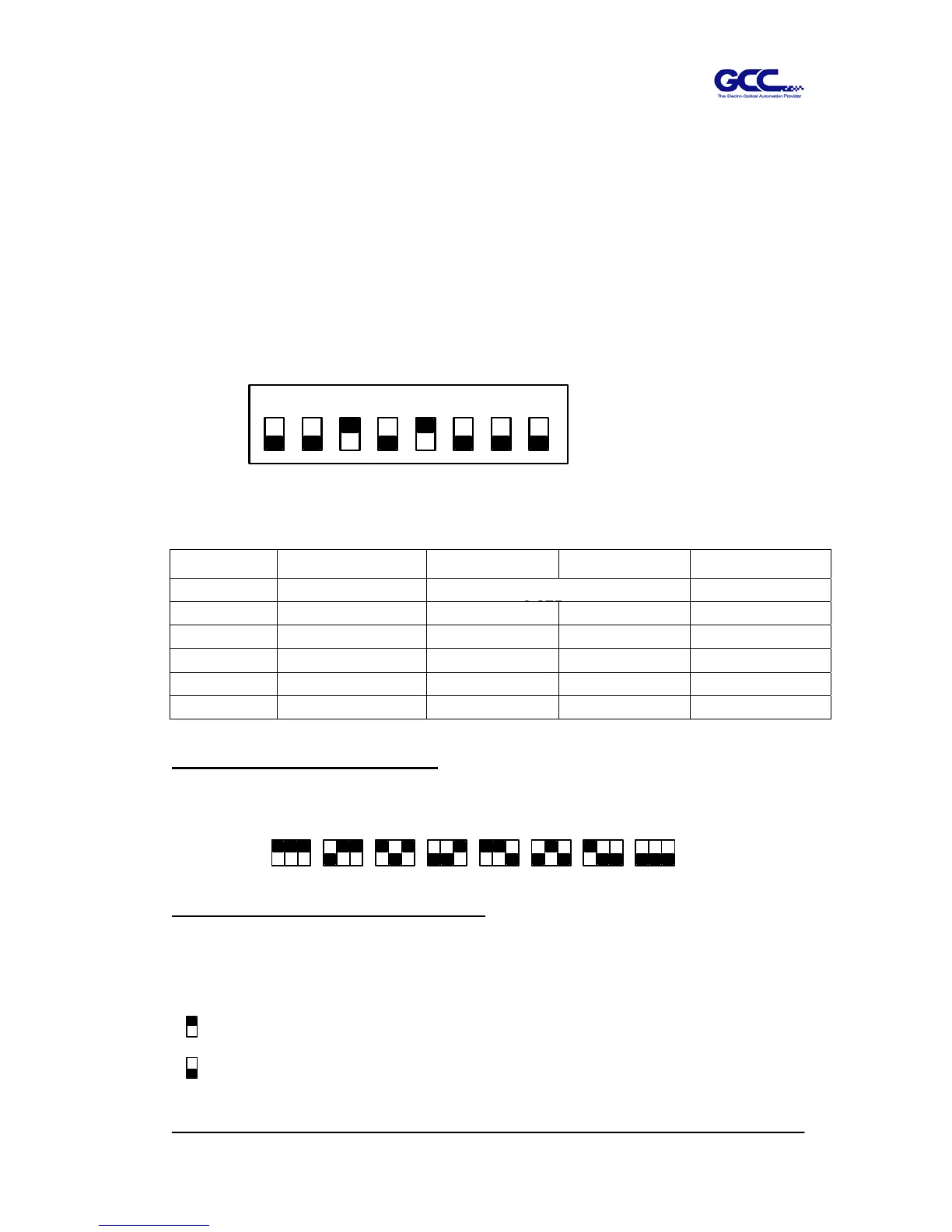
To get a perfect cutting job, you have to choose the proper Dip Switch setting. The table
below shows function of each Dip Switch. The cutting plotter will read values of Dip
Switches every time when press ON/OFF LINE key.
**Dip Switch setting change during on-line condition will not work.
You can change the setting by pressing PAUSE key or when the plotter is in off-line
condition. The default setting value is as Figure 2-25.
Dip Switch Function Switch Down Switch Up Default Value
SW 1-3
Offset Value (Please refer to SW 1-3)
0.275 mm
SW-4
Media Weight Light Heavy Light Media
SW-5
Quality Draft Fine Fine
SW-6
Smooth Enable Disable Enable
SW-7
Auto Unroll Enable Disable Enable
SW-8
Media Type Edge Single Edge
SW 1-3 : OFFSET SETTING
The first three Dip Swtches represent 8 different blade offset values as below:
SW-4 : MEDIA WEIGHT (SPEED)
The fourth Dip Switch from the left sets the maximum cutting speed. Heavy media has a
smaller upper limit. The value of the cutting speed can be changed from the driver
0.000 1.0000.7500.5000.3000.2750.250
0.175
12345678
ON
OFF
When switch to "Heavy media", the maximum cutting speed is set at 300mm/
sec, minimum cutting speed is set at 30mm/sec
When switch to "Light media", the maximum cutting speed is set at 600mm/
sec, minimum cutting speed is set at 330mm/sec.
Figure 2-25



 To Next Page