EasyManua.ls Logo

GDC SA-2100A - Un-Install the GPI;O Card

Default Icon
40 pages
Print Icon
To Next Page IconTo Next Page
To Previous Page IconTo Previous Page
Loading...
3. REMOVING THE EXISTING COMPONENTS OF THE SX-2001/ SA-2100
HFR UPGRADE MANUAL
FOR SX-2001/SA-2100(A/T) TO SX-000(A/T)R
DIGITAL CINEMA SERVER WITH
INTEGRATED MEDIA BLOCK
12
May 18, 2016
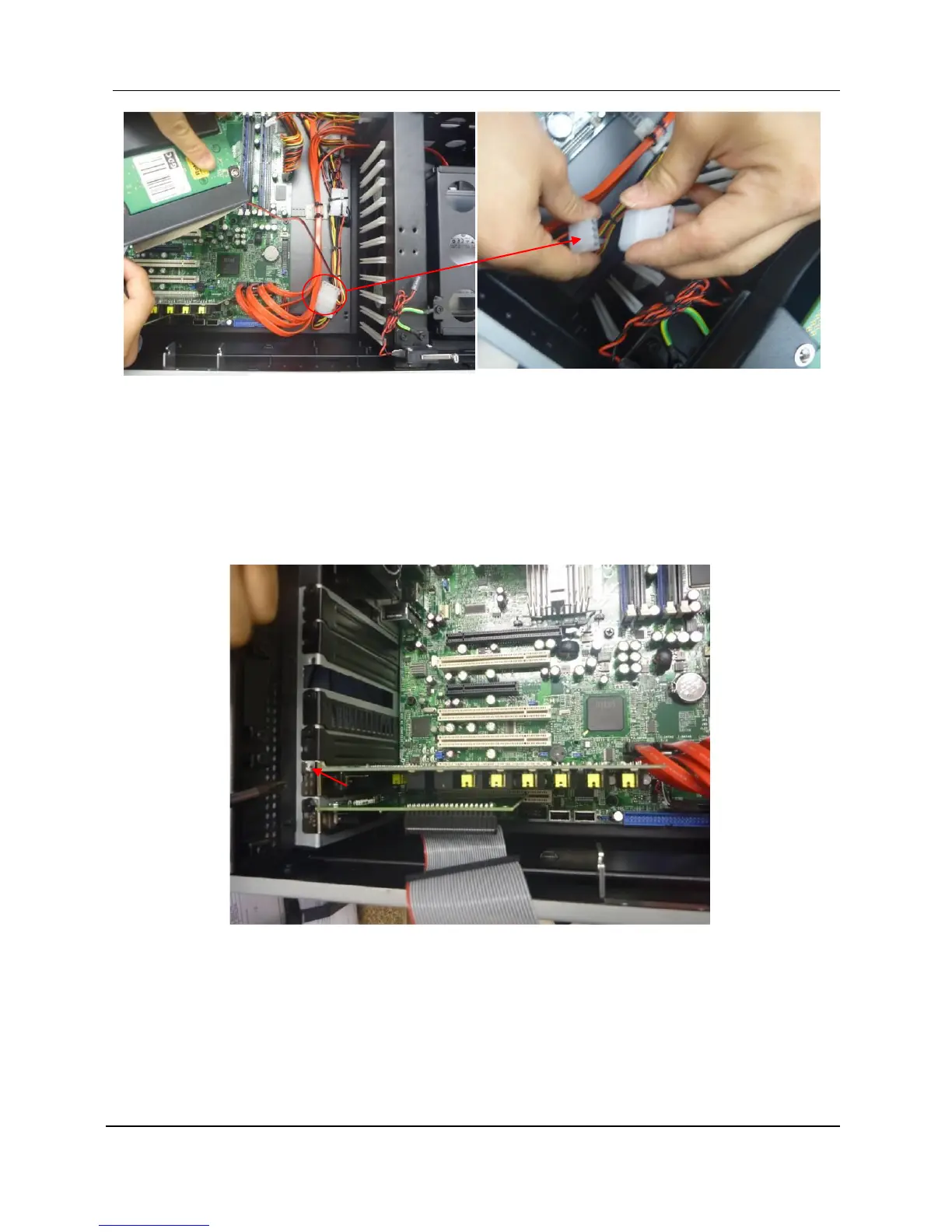
2. Take out the DCI card from the PCI slot and set aside.
3. Kindly remove the power pin head (red circle indicated in Figure 6) which is connected to
the fan on the DCI card to the pin head of the power supply.
3.5 Un-install the GPI/O Card
1. Unsecure the screw as indicated, and then gently remove the GPI/O card.

Figure 6 Take out the DCI card and remove the power pin head
Figure 7 Remove the GPI/O card

Table of Contents

Related product manuals