5. Select [Start] [Power] [On] to power on the projector.
6. After the projector has powered on successfully, the following steps must be taken at
the projector front panel:
a. Press and hold the Menu button until the front panel LCD prompts for a
password
b. Enter the Service user password using the channel buttons.
c. Select [Menu][Configuration][Installation][NewRouterSetup] and select
[Execute].
7. Clear the Service Door/Marriage Tamper on the server.
In order to use the IMB for content playback, the INPUT source of the projector macros must
be set to IMB.
9.3 Christie Series 2 Projector
When the IMB is installed into a Christie Series 2 projector, the following steps must be taken in
order for GDC server to playback with the Christie Series 2 projector:
Note: Ensure the projector is powered ON before proceeding.
1. Clear the projector’s marriage tamper:
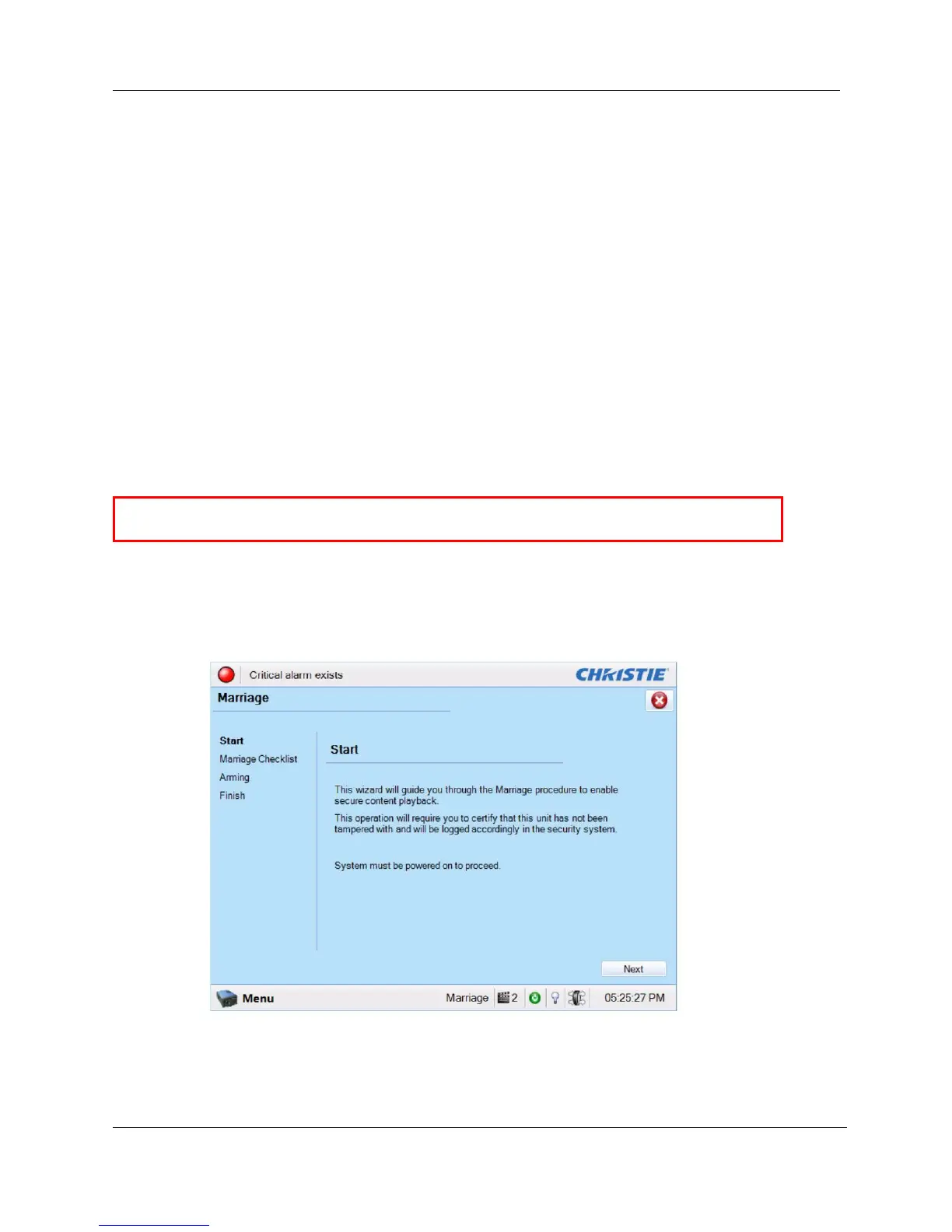
a. Log in to the "Marriage" account on the projector TPC. Select MenuService
SetupMarriage to start the Marriage wizard (see Figure 31). Click the [Next]
button to proceed to the Marriage Checklist window.
Figure 31 Projector marriage wizard on Christie projector TPC



 To Next Page