9. SERIES 2 PROJECTOR SETUP
To work with the GDC IMB, the projector must be set up according to the
requirements of the projector manufacturer.
9.1 Barco Series 2 Projector
No system configuration is required for Barco Series 2 projector to work with the GDC
IMB. The Service Door/Marriage Tamper on the server must be cleared before the
IMB can be used for playback.
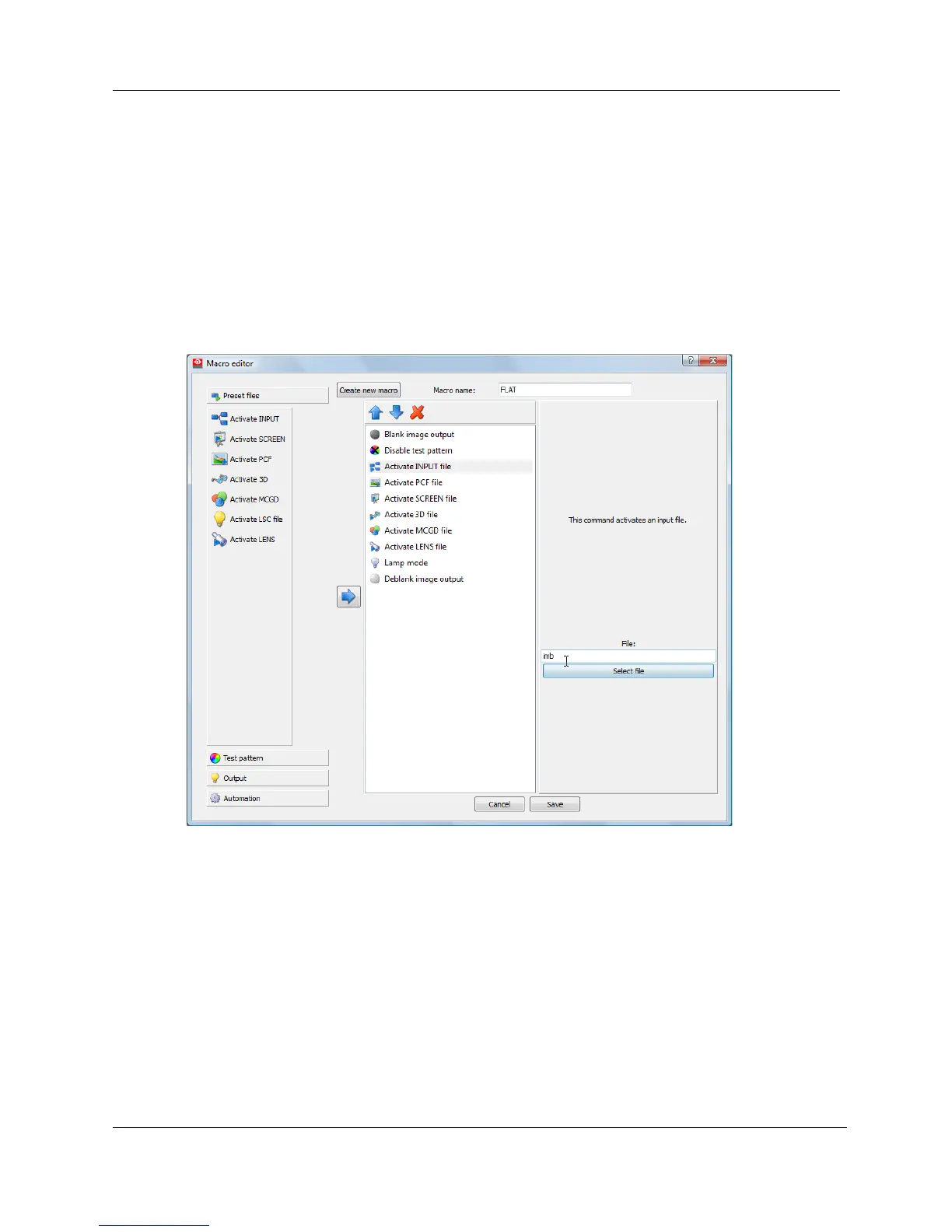
In order to use the IMB for content playback, the INPUT source of the projector
macros must be set to IMB (See Figure 28).
Figure 28 INPUT source settings on Barco Series 2 projector
9.2 NEC Series 2 Projector
In order to configure an NEC Series 2 projector to work with IMB, the following steps
must be taken:
1. Switch on the projector so that it is in STANDBY mode.
2. Use the Digital Cinema Communicator for S2 Windows software
provided by NEC to connect to the projector.
3. Select [Start] [Mode][Service] and enter the Service password to
activate service mode operation. (See Figure 29)



 To Next Page