– 39 –
Technical Data Sheet (JVM1950, DVM1950, JNM1951, PVM1970, PNM1971)
The Smart Board contains the power relay,
vent blower triac, surface light relays, and
other components to perform the proper
switching circuits. Several disconnect plugs
are also located on the Smart Board:
• CN101 – Ribbon Connector
• CN102 – Vent and Cooktop Lamp
Tact Switch Connector
• CN201 – Primary SMPS and Zero
Standby Switch Connector
• CN202 – Main Relay, Cooktop
Light, Turntable Relay and
Inrush Relay Connector
• CN203 – Vent Relay Connector
• CN301 – Gas Sensing Connector
• CN402 – Door and Hood Sensing
Connector
• CN901 – Battery Connector
Many diagnostic circuit tests can be made
at the disconnect plugs. (Refer to trouble-
shooting fl owchart and simplifi ed schematic
in mini-manual.)
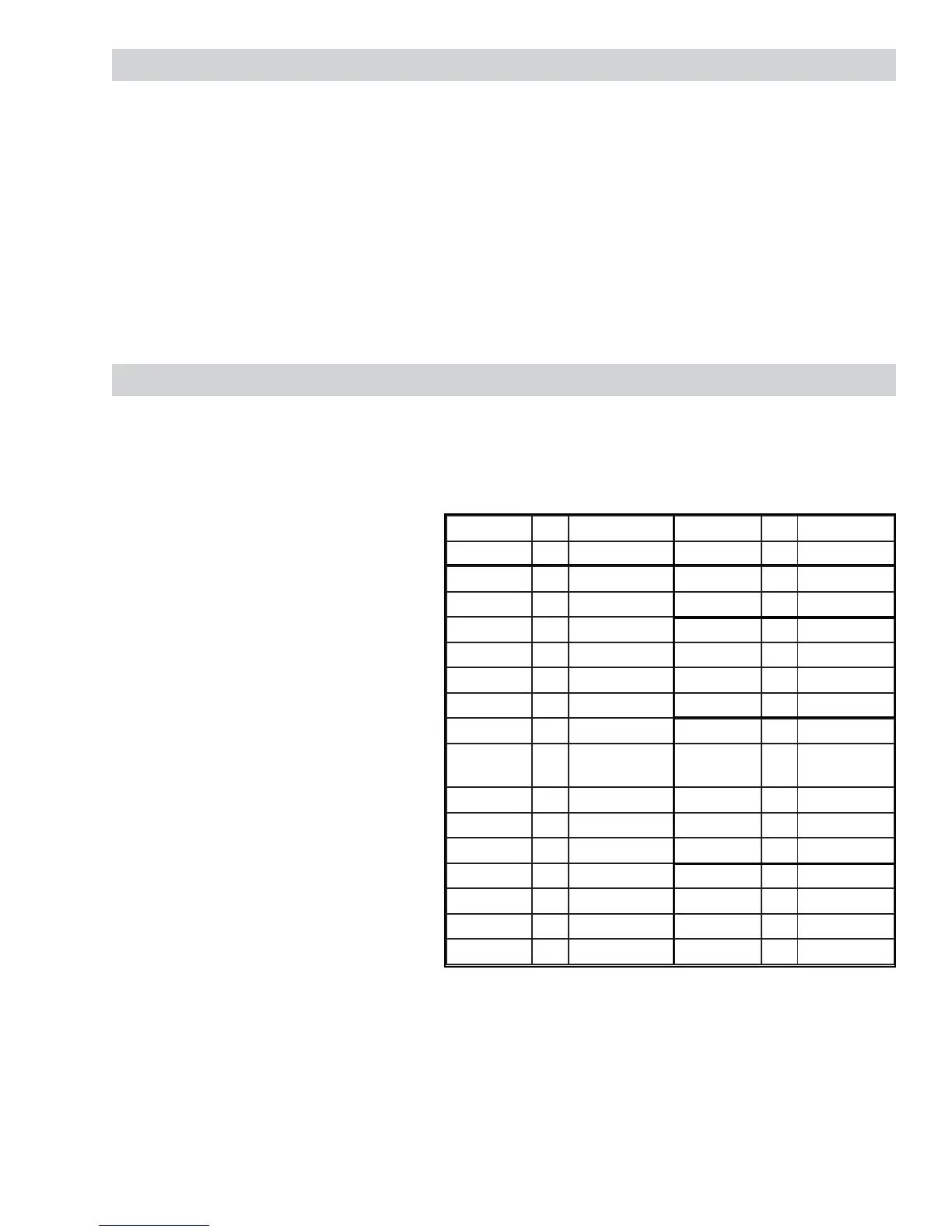
Connector Pin Voltage Connector Pin Voltage
CN101 1 0 - 5.25 V CN102 1 4.75 - 5.2 V
2 0 - 5.25 V 2 4.75 - 5.25 V
3 0 - 5.25 V 3 GND
4 0 - 5.25 V CN301 1 4.75 - 5.25 V
5 0 - 5.25 V 2 0 - 5.25 V
6 0 - 5.25 V 3 GND
7 0 - 5.25 V 4 4.75 - 5.25 V
8 0 - 5.25 V CN402 1 9.6 - 14.4 V
9 0 - 5.25 V 2 Not
Connected
10 0 - 5.25 V 3 0 - 14.4 V
11 0 - 5.25 V 4 0 - 5.25 V
12 0 - 5.25 V 5 GND
13 0 - 5.25 V CN901 1 0 - 3.1 V
14 0 - 5.25 V 2 GND
15 0 - 5.25 V 3 GND
16 0 - 5.25 V
Control Performance Test (JVM1950, DVM1950, JNM1951, PVM1970, PNM1971)
1. Set Clock – Touch Settings pad 2 times, enter time of day, press Settings pad to select AM/PM, then
touch Settings pad again to set.
2. Alternately, touch each function pad and enter time, power level, or selection for the selected function.
3. Touch Cancel/Off after each function test to clear that function.
4. Repeat procedure for each function to test each pad.
5. Control and display should respond to each entry.
6. Display should revert to Time Of Day after each Cancel/Off.
7. Refer results to troubleshooting fl owchart.


 To Next Page