– 41 –
Sensor
Sensor Cooking
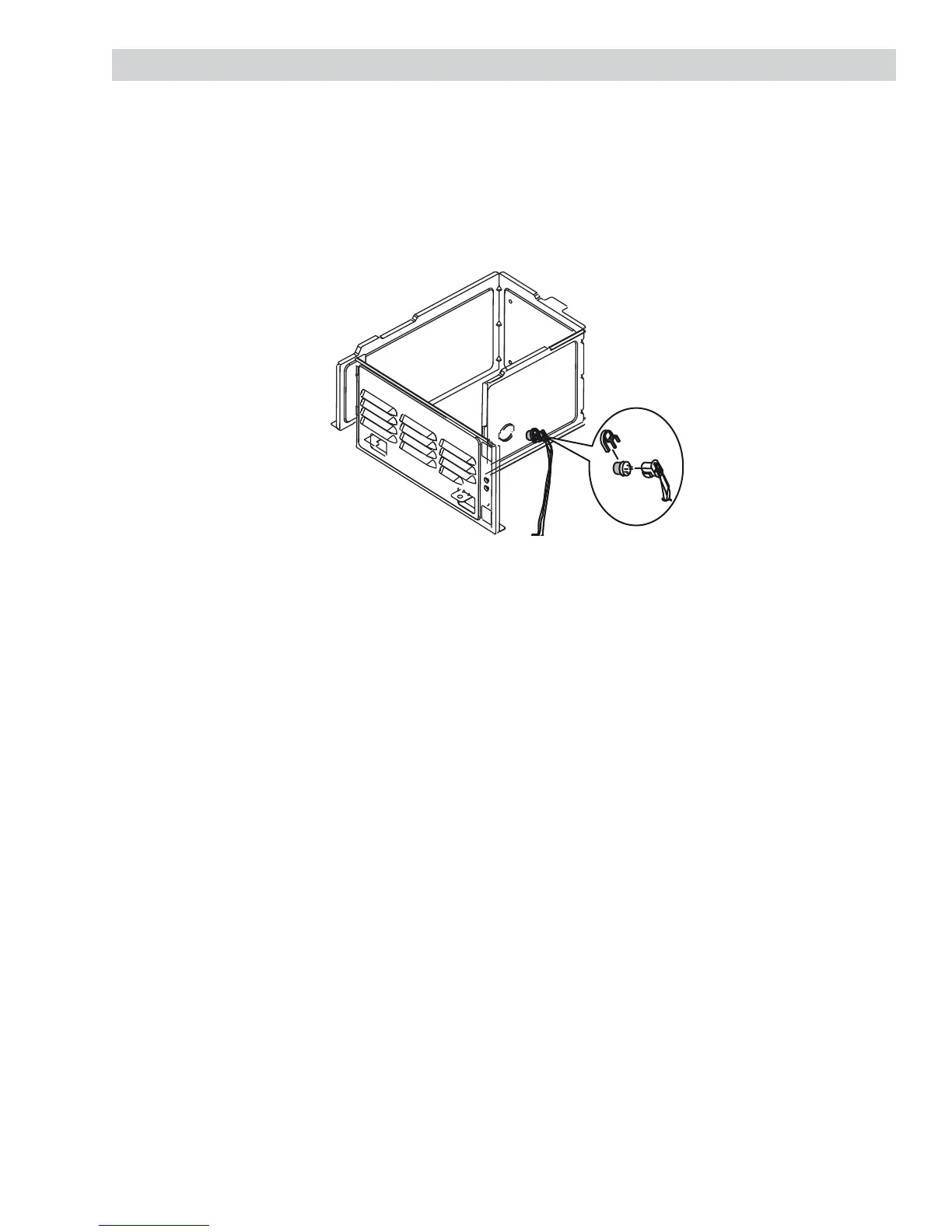
The Sensor Cooking function uses a special gas sensor that detects both humidity (steam) and hydrocarbons
(food odors) during the cooking process. Before conducting either of the sensor tests below, ensure the unit is
plugged into a wall outlet for at least 5 minutes. Do not power the unit during the 5 minutes. If unit is already
plugged in, proceed. The gas sensor is a plug-in device located in the vent area at the top, left-hand corner of
the cavity behind the grille.
Sensor Cooking Test
1. Place ground meat in oven.
2. Touch MyPlate.gov and select Ground Meat by selecting number pad 3.
3. Press Start.
4. Control beeps and shuts off.
5. Touch Cancel/Off
.
A) Test OK – Normal
B) Test Fails – Check Sensor (See Sensor Test below).
Sensor Test (Quick Test)
1. With two fi ngers, touch and hold the following pads simultaneously: 7 and 8.
2. Observe diagnostic number on the display (numbers approximate).
• 15 - 185 (normal)
• 213 or higher (sensor failed to open, sensor unplugged, wiring or smart board).
• Less than 6 (shorted sensor or smart board).
Only heater terminals (H: black and red leads) can be checked with an ohmmeter (30 Ω).
Caution: Do not attempt to check sensor terminals (white and orange leads) as this
could damage the sensor.


 To Next Page