7-76 F650 Digital Bay Controller GEK-106310AB
7.3 IEC 61850 CONFIGURATOR 7 IEC 61850 PROTOCOL
7
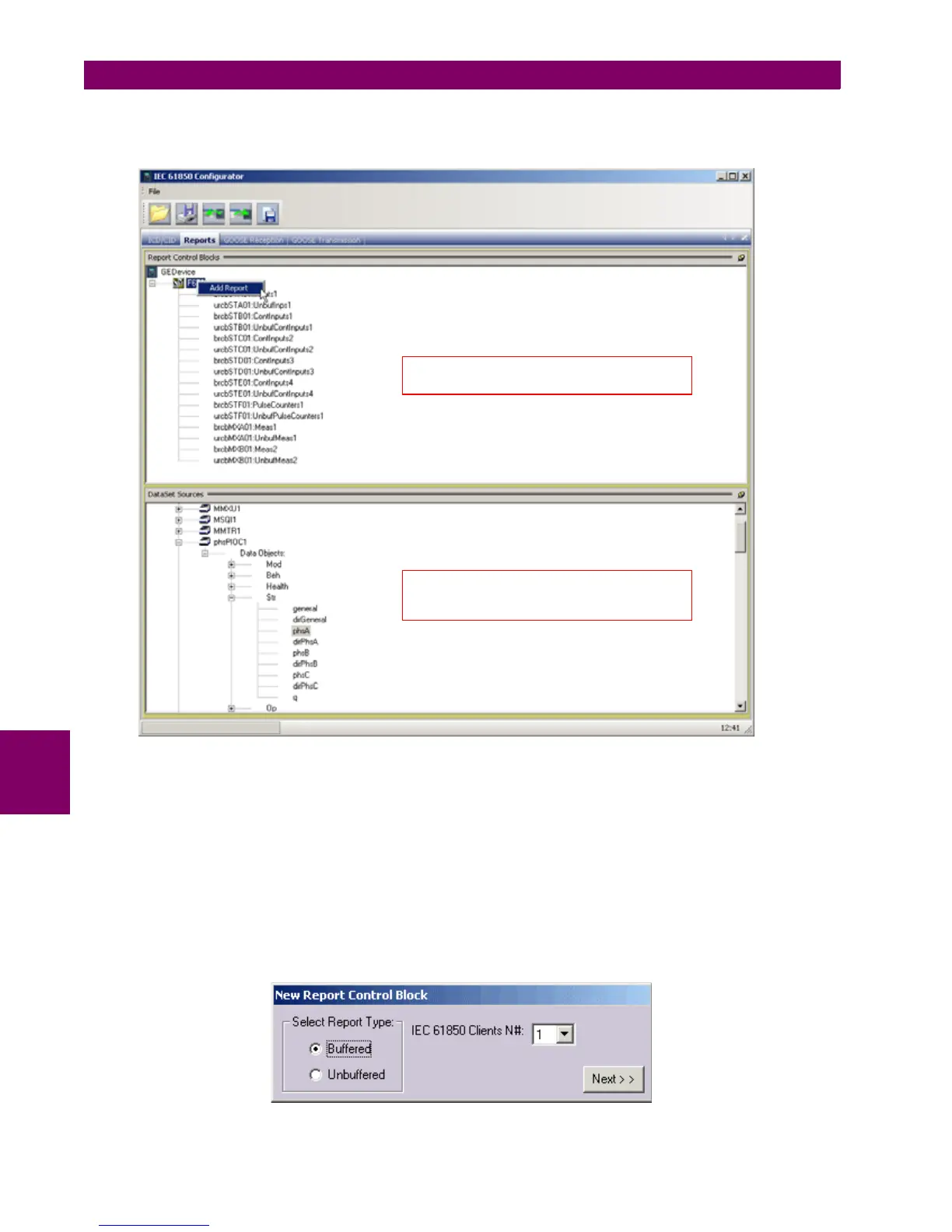
"Reports" tab in "IEC 61580 Configurator" permits configuration of Data Sets and Control Blocks for Buffered and
Unbuffered Reports. In order to create new Report please select with the mouse the name of Logical Device Instance and
right-click on it. Then select "Add Report".
Figure 7–22: ADD REPORT IN REPORTS TAB
When selected the Add Report option with the mouse right button, a new dialog window will appear where the user should
specify the type of Report, either Buffered or Unbuffered.
In case of Buffered Report the number of IEC 61850 clients has to be configured. According to this value the appropriate
number of Buffered Control Blocks will be created. In case of Unbuffered Report the option of selecting the number of IEC
61850 clients is disabled as only one Unbuffered Report Control Block will be created.
After selecting type of report and optionally the number of IEC 61850 clients please click on the "Next" button.
ICD Explorer panel, drag-and-
drop feature
makes creation of Data Sets easy
List of Report Control Blocks


 To Next Page