GEK-106310AB F650 Digital Bay Controller 7-77
7 IEC 61850 PROTOCOL 7.3 IEC 61850 CONFIGURATOR
7
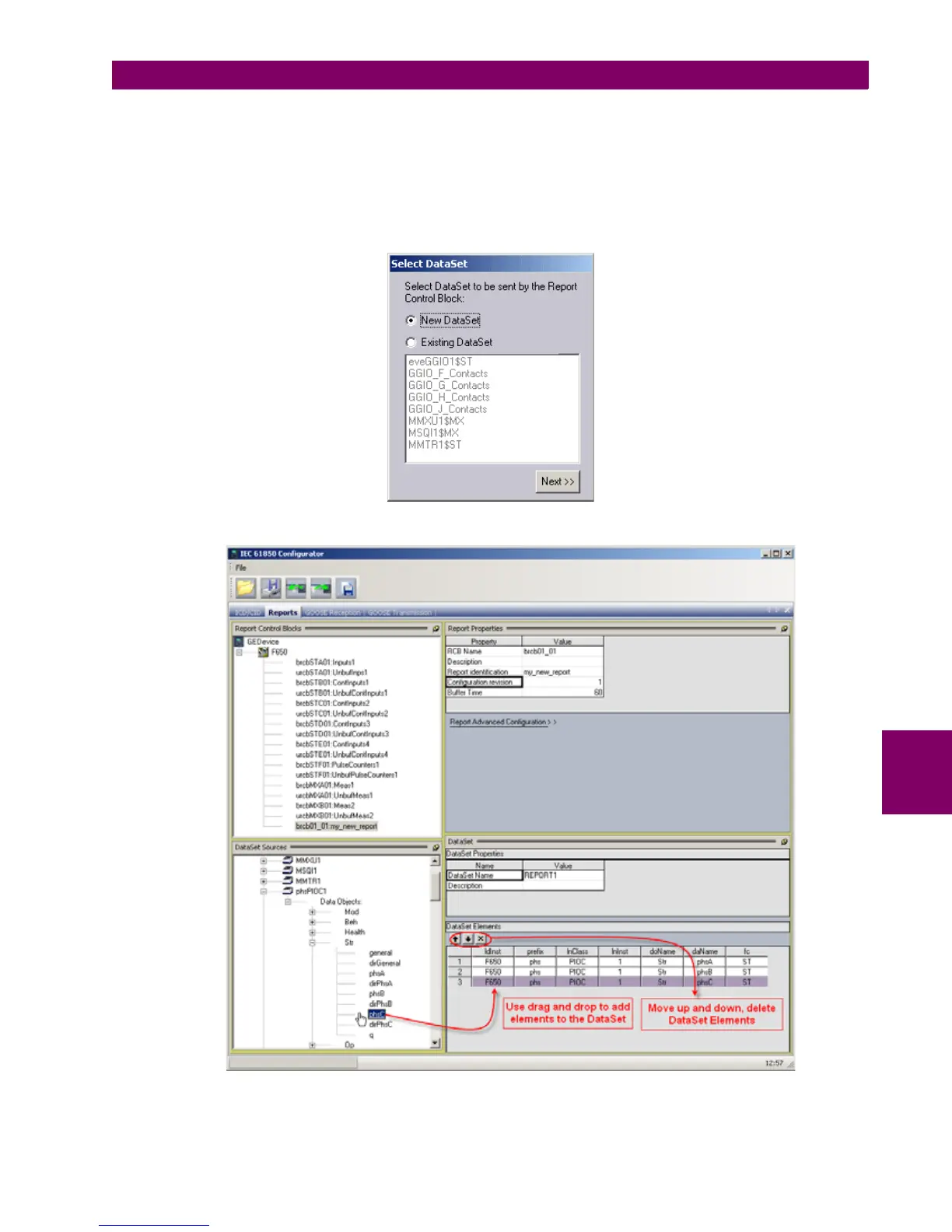
After pressing "Next>>" a new dialog window will appear where the user should select the Data Set attached to the report
being created. There is a possibility to attach the report to already existing Data Sets.
This option is useful when there is a necessity to increment number of control blocks of existing Buffered Report or when
the user wants the same Report that was previously configured as Buffered to be also Unbuffered or vice versa. If the user
wants to create new Data Set then "New DataSet" should be chosen from the list. For all new Data Sets by default the "IEC
61850 Configurator" sets the name of Data Set as "REPORT1", "REPORT2", etc.
After pressing "Next>>" the structure for the report is created and the user can add DataSet elements.
Figure 7–23: CONFIGURATION OF DATA SET AND OF REPORT CONTROL BLOCK


 To Next Page