7-78 F650 Digital Bay Controller GEK-106310AB
7.3 IEC 61850 CONFIGURATOR 7 IEC 61850 PROTOCOL
7
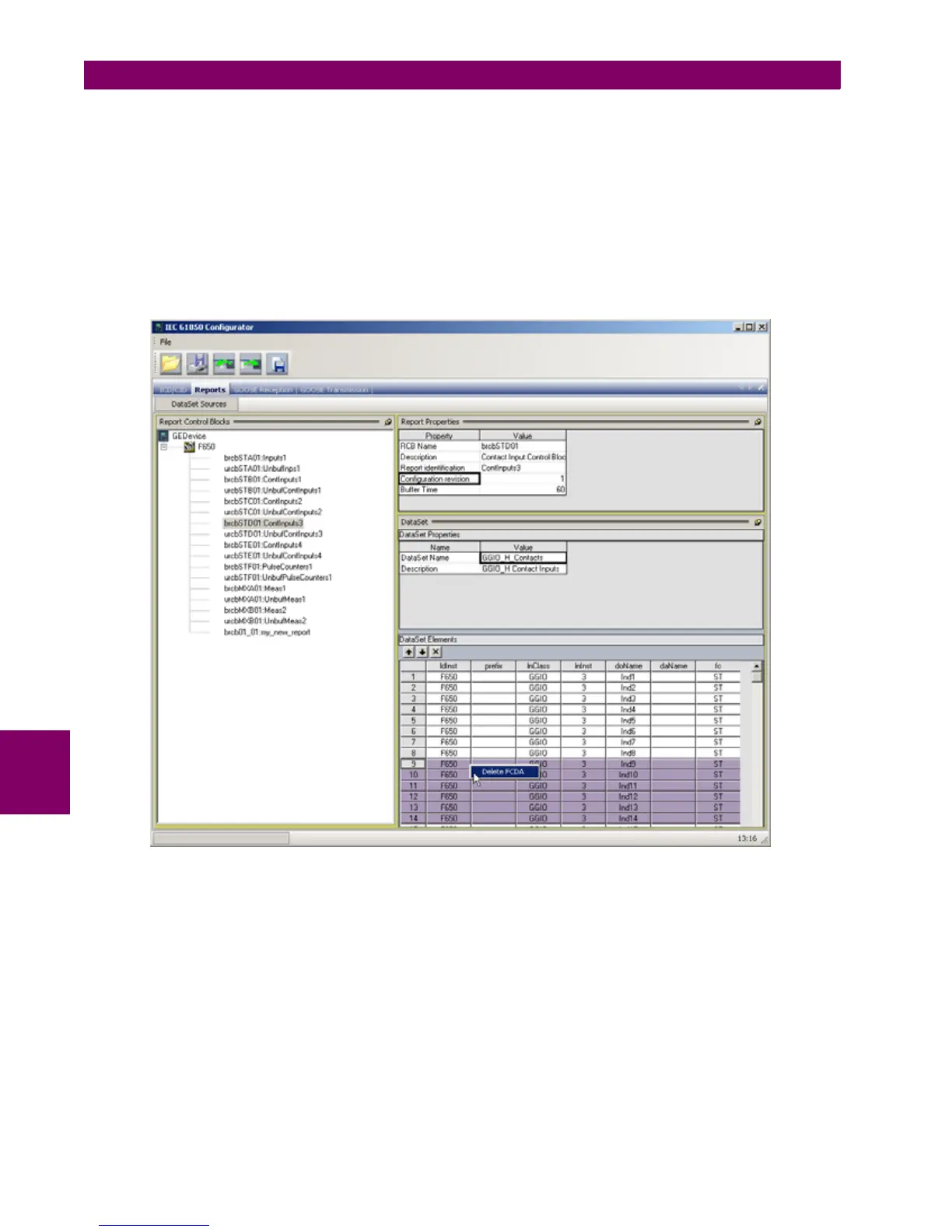
Adding elements to the Data Set is done using drag-and-drop features. In the "DataSet Sources" panel the user can
browse the complete data model of the IED and using the mouse he can drag and drop the desired element to the "Data
Set Elements" on the right. In F650 relay Data Sets for Reports can contain both Data Attributes (FCDA - Functionally
Constrained Data Attributes) and Data Objects (FCD - Functionally Constrained Data).
In order to delete elements from Data Set the user should select with the mouse the row or rows in the "DataSet Elements"
table and press "Delete" button on keyboard. It can also be done by mouse right clicking and selecting "Delete" option.
There is also some option in the DataSet to move up and down DataSet Elements inside the DataSet frame.
Figure 7–24: DATASET OPTIONS


 To Next Page