05-2806A01, Rev. J iNET Series Reference Manual 35
NOTE: Standard MDS iNET (non-iNET-II) transceivers require
special firmware to operate in redundant mode. See Upgrading
the Firmware on Page 101 for details.
2.3.3 Configuring Basic Device Parameters
Device Information
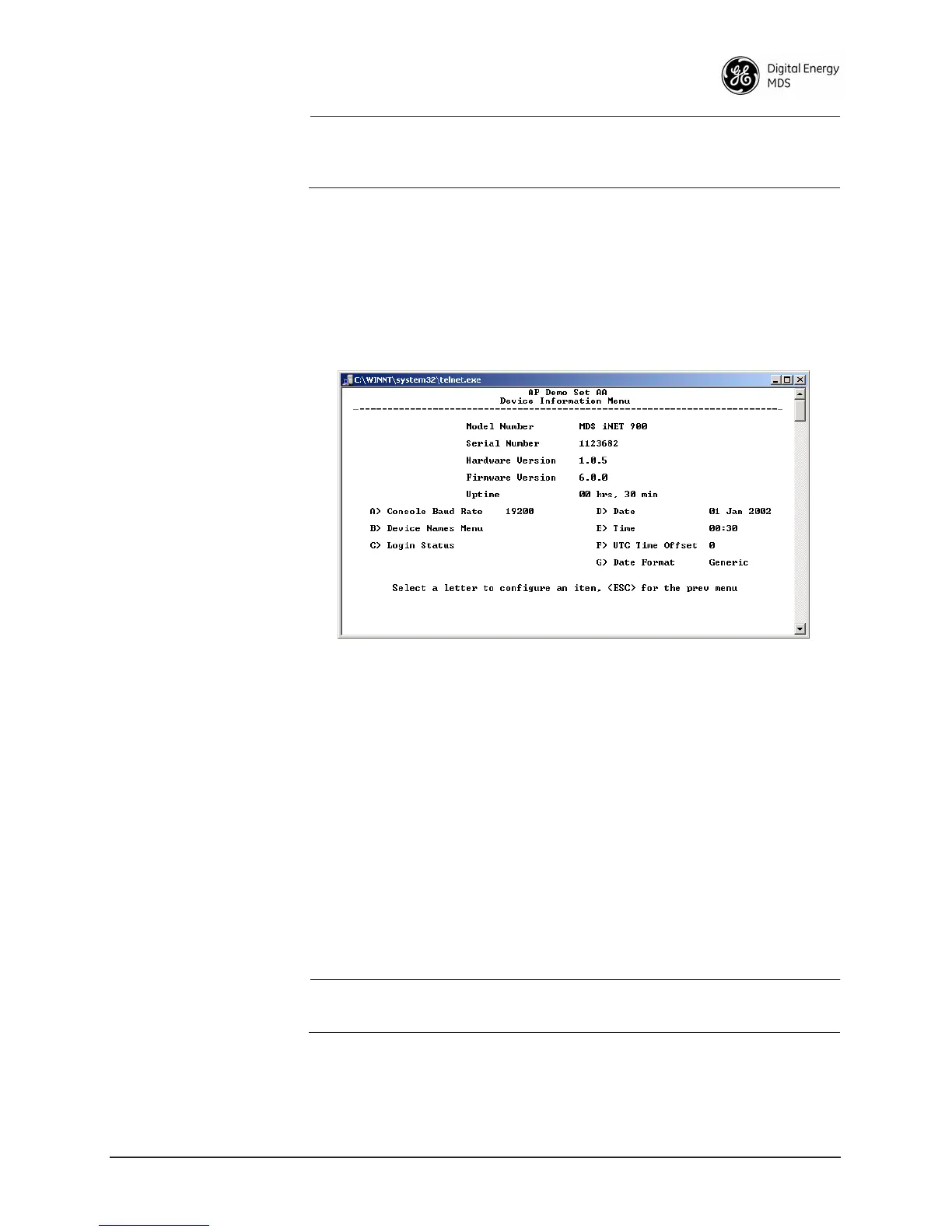
Below is the menu/screen that displays basic administrative data on the
unit to which you are connected. It also provides access to some user-
specific parameters such as device names.
Figure 2-11. Device Information Menu
• Model Number (Display only)
• Serial Number (Display only)
• Hardware Version (Display only)
• Firmware Version (Display only)—Current firmware installed and
being used by the transceiver.
•
Uptime (Display only)—Elapsed time since powering up.
• Console Baud Rate—Used to set/display data communications
rate (in bits-per-second) between a connected console terminal
and the radio. [
19200]
• Device Names Menu—Fields used at user’s discretion for general
administrative purposes. The Device Name field is used by the
transceiver as the “Realm” name for network security and in the
MS screen headings. (See Figure 2-12 on Page 36)
NOTE: Do not use a colon (:) or percent (%) symbol in the device
name.
•
Date—Current date being used for the transceiver logs. User-set-
able. (Value lost with power failure if SNTP (Simple Network
Time Protocol) server not accessible.)



 To Next Page