05-2806A01, Rev. J iNET Series Reference Manual 55
• ISM: 902–928 MHz band
• GSM: 915–928 MHz band
• SPLIT: 902-907.5 and 915-928 MHz bands
• CHANNELS: 902–928 MHz, individual channels selectable
within this range
•
Skip Zones (Only applies to iNET. Editable at AP Only.)—This selection
brings up a submenu discussed in Skip Zones Menu on Page 56.
•
Auto Data Rate Configuration—This selection brings up a submenu
as shown in Figure 2-29. For the settings in this submenu to
have any effect, the Data Rate menu item (Page 52) must be set
to
AUTO.
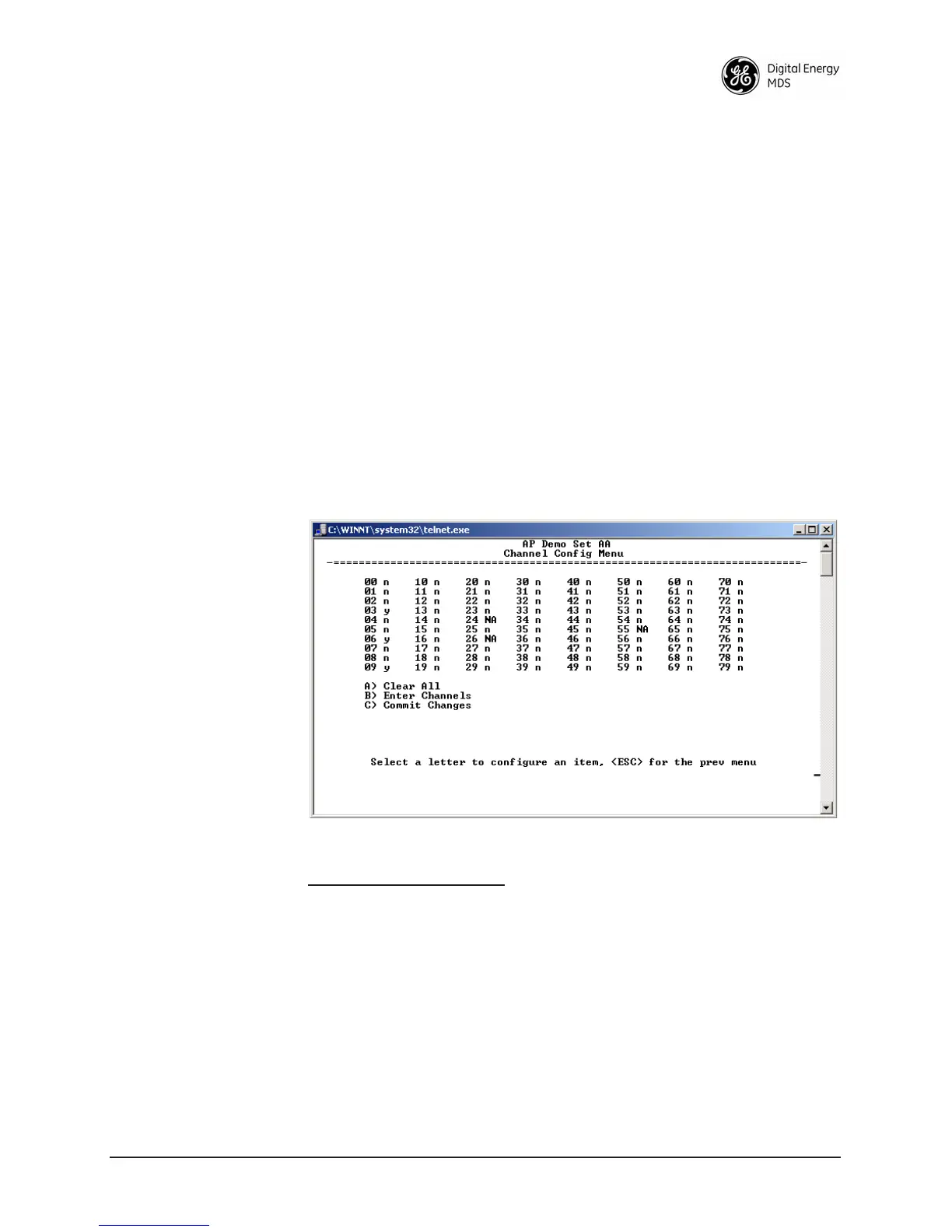
2.5.2 Channel Config Menu
The Channel Configuration menu displays the utilization of channels in
the 902–928 MHz range. This selection is available only on iNET-II or
specially provisioned iNET units. The radio hops only on the channels
selected in this menu.
Invisible place holder
Figure 2-27. Channel Config Submenu
Key to channel indicators:
n (no) = Radio channel is not used
y (yes) = Radio channel is used
NA (not available) = Radio channel is not available
•
Clear All—This command clears all entries in the Channel
Config Menu, resetting the available channels to “no usage.”
Channels that are not available for use will appear with a
notation of or
NA. These channels are not available because
of pre-existing conditions, and are not user-configurable.



 To Next Page