getbre You (;all For Service...
I,l?/11 Oven
Trouble-
shooting tips
40
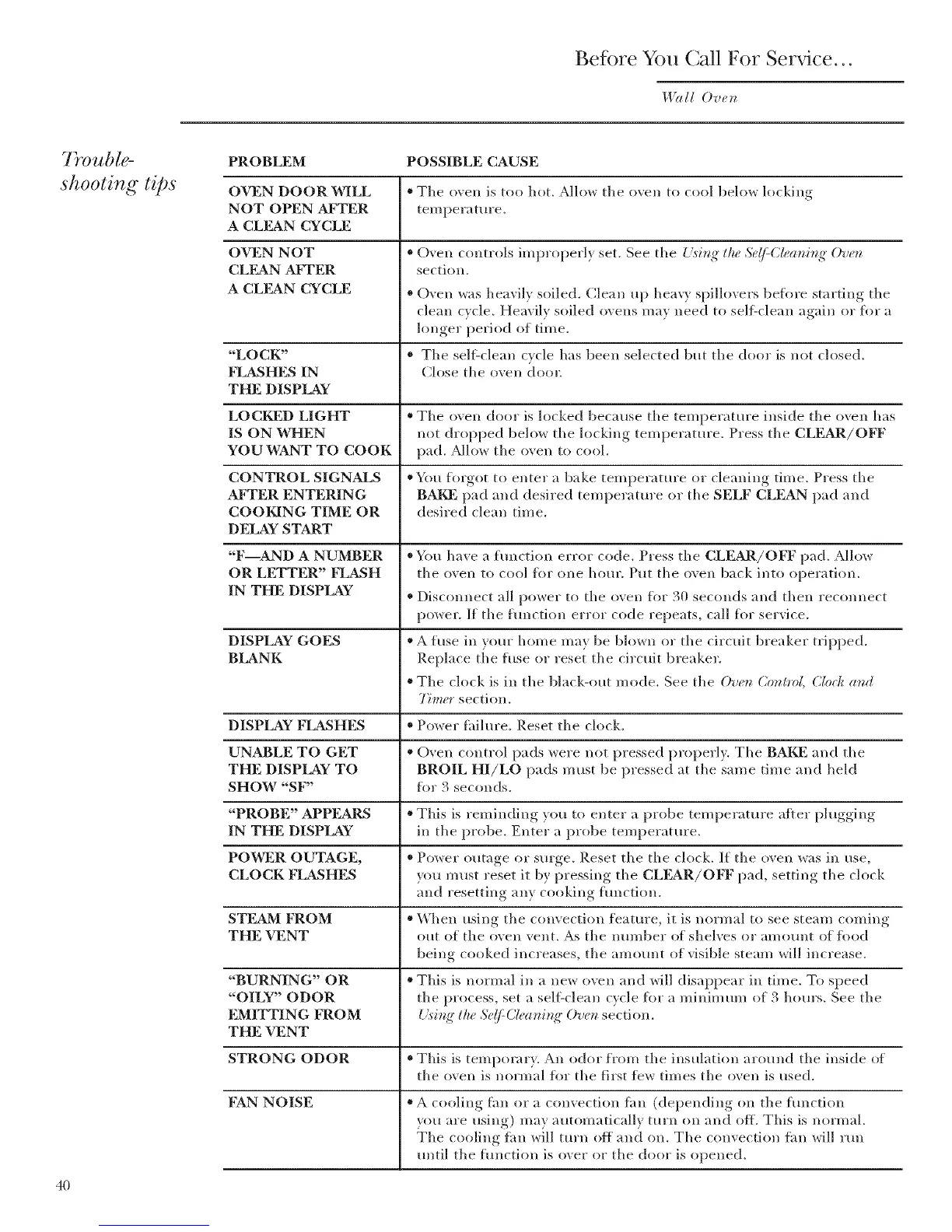
PROBLEM POSSIBLE CAUSE
• The oven is too hot. Allow the oven to cool belo,_ locking
temperature.
• Oxen controls improperl) set. See the {.'i_i_ff, tlu_ Sdf-(l_ani_ff, Ov_n
section.
OVEN DOOR WILL
NOT OPEN AFTER
A CLEAN CYCLE
OVEN NOT
CLEAN AFTER
A CLEAN CYCLE
* O_en was heavilx soiled. Clean up heav} spillovers before ,startim,_ tile
clean c_cle. Heavilx soiled oxens ma) need to sell:clean again or for a
lonoer_ period of time.
"'LOCK" " The self:dean cycle has been selected but the door is not closed.
FLASHES IN Close the oven dora:
THE DISPLAY
LOCKED LIGHT " The oven door is locked because the temperature inside the ()veil has
IS ON WHEN not dropped below the locking temperature. Press the CLEAR/OFF
YOU WANT TO COOK pad. _Mlow the oven to cool.
CONTROL SIGNALS "YIu forgot to enter a bake temperature or cleaning time. Press the
AFTER ENTERING BAKE pad and desired temperature or the SELF CLEAN pad and
COOKING TIME OR desired dean time.
DE,LAY START
"F AND A NUMBER * You have a function error code. Press the CLEAR/OFF pad. Allow
OR LETTER" FLASH the oven to cool fl)r one hour. Put the o', en back into operation.
IN THE DISPLAY * Discomlect all power to the oven flw 30 seconds and then reconnect
power. If the hmction error code repeats, call fl)r service.
DISPLAY GOES * A fuse in your home may be blown or the circuit breaker tripped.
BLANK Replace the fuse or reset the circuit breaker.
• The clock is in the black-out mode. See the O've_ (2on#'o/, (2lock and
77mer section.
DISPLAY FLASHES * Power fhilure. Reset the clock.
UNABLE TO GET " (-)yen control pads were not pressed properly. The BAKE and the
THE DISPLAY TO BROIL HI/LO pads must be pressed at the same time and held
SHOW "SF" fl)r 3 seconds.
"PROBE" APPEARS * Tiffs is reminding you to enter a probe temperature after phlgging
IN THE DISPLAY in the probe. Enter a probe temperature.
POWER OUTAGE, * Power outage or surge. Reset tile the clock. If the oven was in use,
CLOCK FLASHES you must reset it by pressing the CLFAR/OFF pad, setting the clock
and resetting any cooking function.
STEAM FROM * When using the convection feature, it is normal to see steam coming
THE VENT out of tile oven vent. As the ntln/ber of shelves or amount of fl)od
being cooked increases, the amount of visible steam will increase.
"BURNING" OR * Tiffs is normal in a new ()veil and will disappear in time. To speed
"OILY" ODOR the process, set a self:clean cycle fl)r a minimum of 3 hours. See the
EMITTING FROM { _sing"the Se(/:C/ea_fing" Ove_ section.
THE VENT
STRONG ODOR * Tiffs is temporary. An odor from the insulation around the inside of
the oven is normal fl)r the first tbw times the oven is used.
FAN NOISE * A cooling tim or a convection tim (depending on the function
vou are using) may automatically turn on and off. Tlfis is normal.
;File cooling ihn will turn off and oil. The convection ihn will run
until the hmction is over or the door is opened.



 To Next Page