– 41 –
Power Board Removal
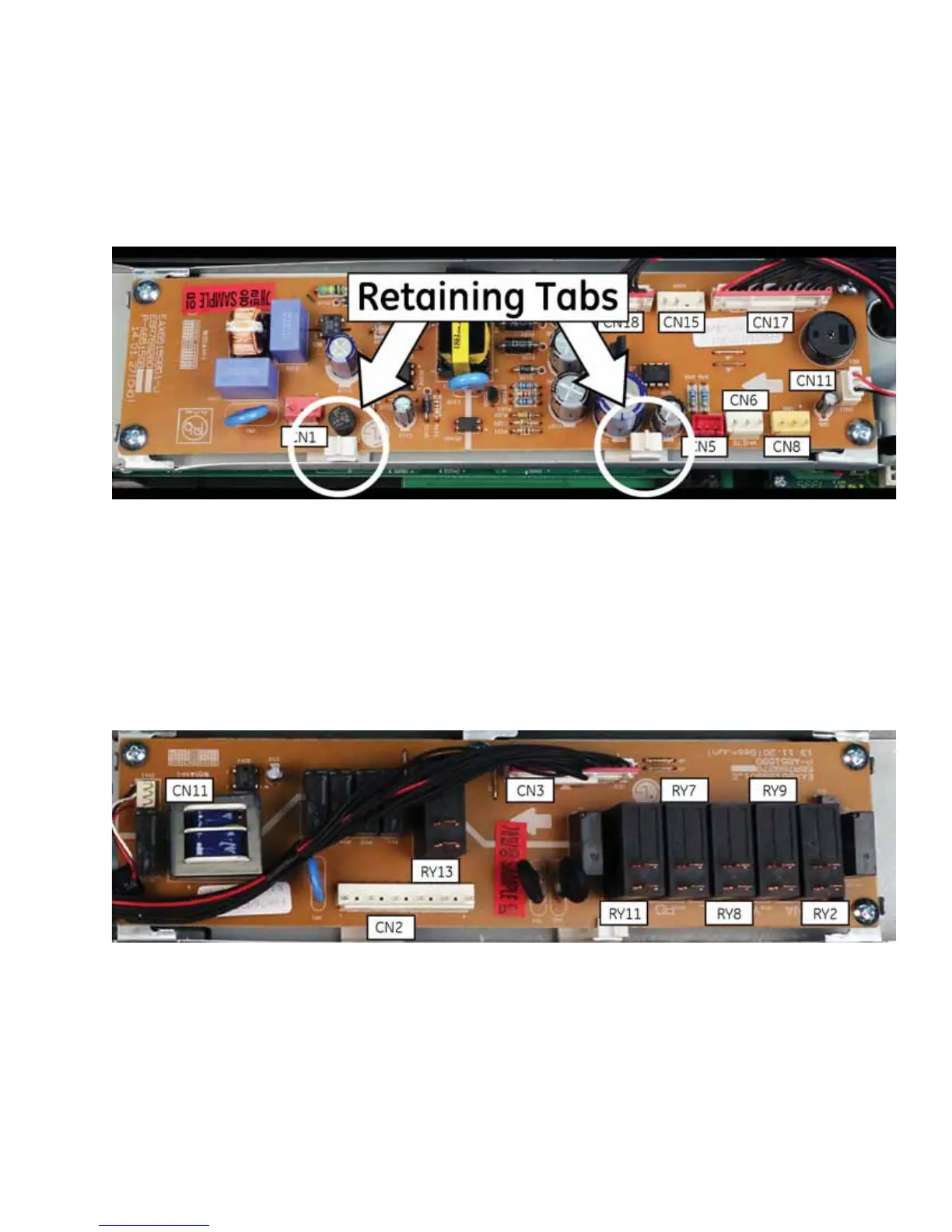
1. Remove the control panel assembly. (See the Control Panel Assembly section of this guide.)
2. Disconnect all wire harnesses from the power board at locations CN1, CN5, CN6, CN8, CN11, CN15, CN17
and CN18.
3. Remove the four Phillips head screws that attach the power board to the control panel bracket.
4. Lift the power board to clear the retaining tabs.
Relay Board Removal
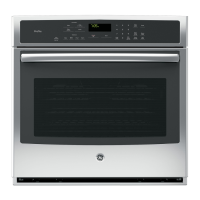
1. Remove the control panel. (See the Control Panel Assembly section of this guide.)
2. Disconnect all wire connectors from the relays.
3. 5HPRYHWKH¿YH3KLOOLSVKHDGVFUHZVWKDWDWWDFKWKHUHOD\ERDUGWRWKHFRQWUROSDQHOEUDFNHW
4. Lift the relay board to clear the retaining tabs.



 To Next Page