page | 20
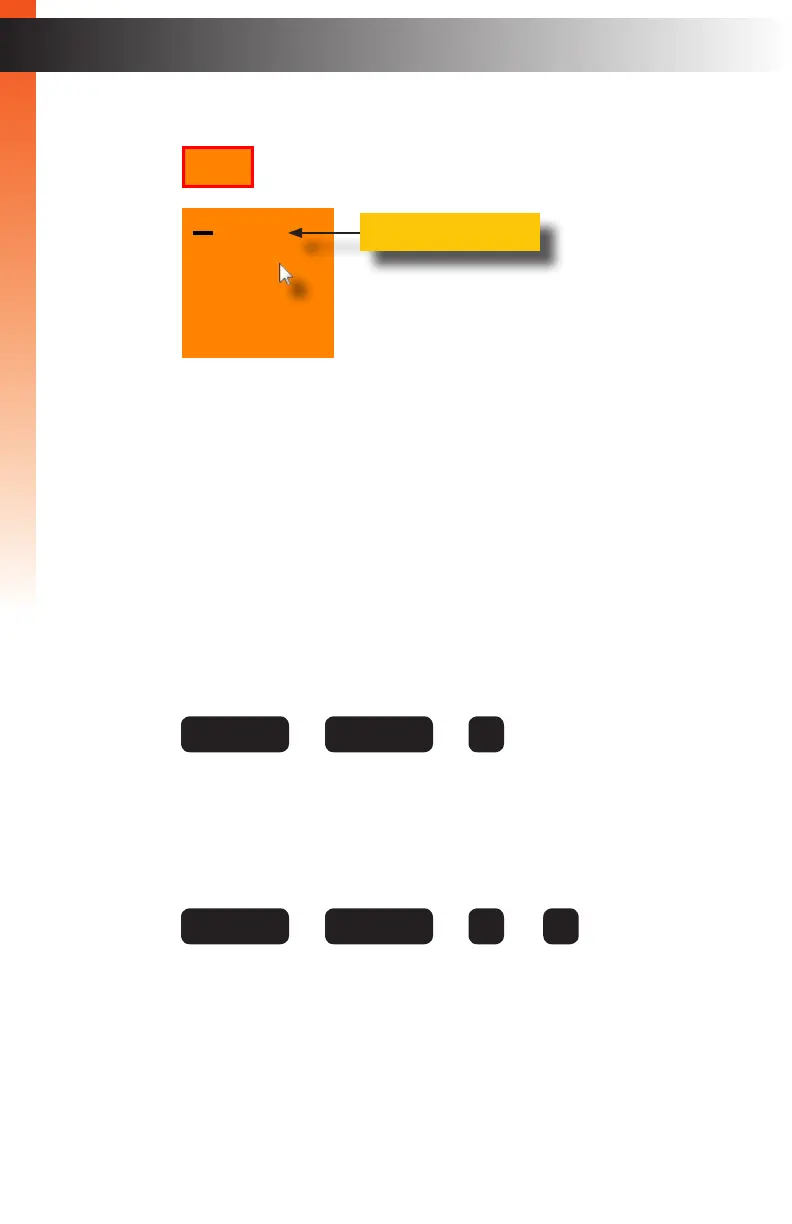
4. The currently selected source will be indicated by a “dash”, as shown:
5. Left click the desired input (1 - 4) from the drop-down menu.
6. The selected source will be shown on both Video A and Video B.
7. Click the middle mouse button / wheel to dismiss the Display Mode menu.
► Keyboard
1. Press the following keys, in sequence, on the computer keyboard.
The default hotkey is the Scroll Lock key. To reassign the hotkey refer to
Dening the Hotkey (page 40) for more information.
Where X is a number on the keyboard from 1 to 4. This number represents
the source to be displayed.
For example, to switch to Full mode and display the source connected
to Source 3, use the following keystrokes:
2. The selected source will be shown on both Video A and Video B.
01
02
03
04
Basic Operation
Switching Sources
Current source
+ + + X
hotkey hotkey F
+ + +
hotkey hotkey F 3
Basic Operation


 To Next Page